Introduction
Course Introduction
This course explains the theory, implementation and operation of the Internal Controls module and how they relate to other modules within eramba.
Primarly this course requires you to undertand "Theory". Eramba "Use Cases" require this module to be implemented, for that reason these guides make constant regerence to this course "Theory" and "Videos" Guides. Advanced Configurations explain you how to implement this module with more sophisticaeted configurations.
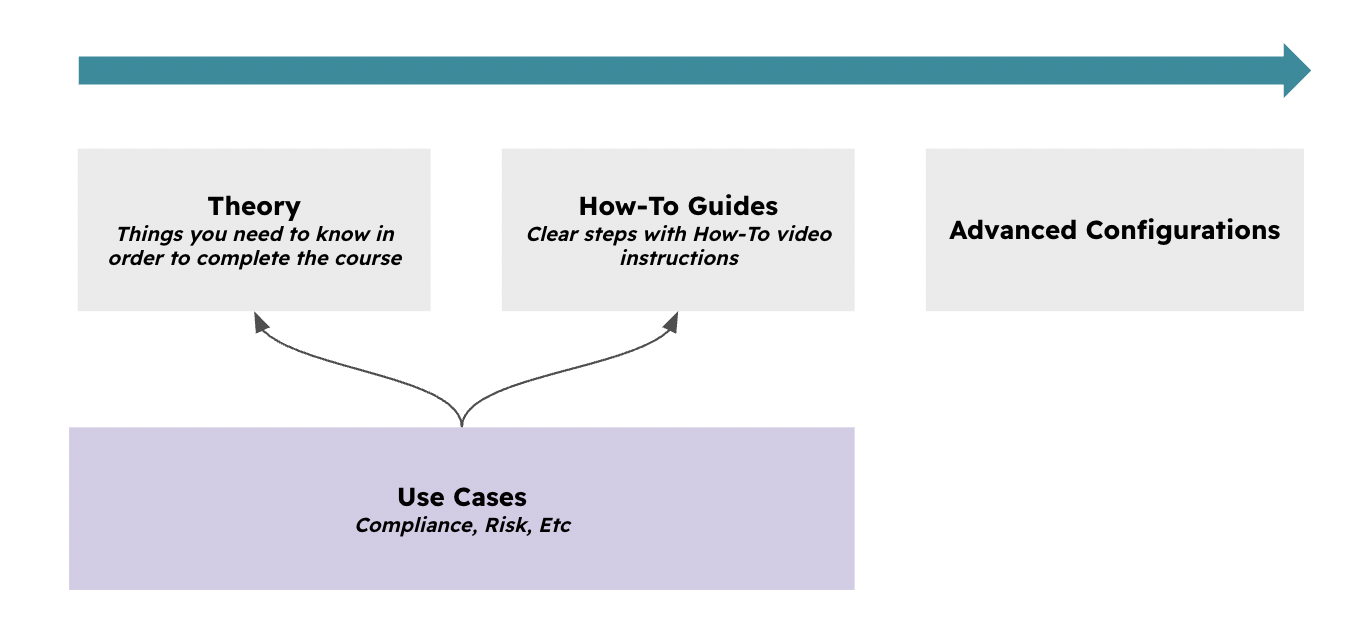
Typical Scenarios
This chapter explains ways in which Internal Controls are used in eramba:
- Ensure internal control owners take accountability
- Testing of internal controls, manually or automatically
- Have an overview of which controls missed, passed, or failed testing.
- Follow up on maintenance tasks for your internal controls.
Supported Versions
This feature runs on Community and Enteprise versions.
Templates
We are working on an integrated list of Internal Control templates; please review our Product Roadmap for details and updates. These templates will not work automatically in your organization because, as explained, controls are never exactly the same. However, they will serve as a valuable source of inspiration.
Theory
Definition
Internal Controls are best described as "Activities" your organisation performs, typical examples in the world of Cybersecurity, Finance and Quality are listed in the table below:
| CyberSecurity | Finance | Quality |
| Access Control Reviews | Segregation of Duties (SoD) | Document Version Control |
| End-Point Encryption | Bank Reconciliations | Calibration Logs |
| Multi-Factor Authentication (MFA) | Expense Approval Limits | Non-Conformance Reporting (NCR) |
We provide examples from different industries because eramba is used in all sorts of industries, not just cyber. The key qualities of Internal Controls are:
- They follow a process (written or not) all the time—step one, two, three, etc. You encrypt laptops the same way every time, right?
- They have an owner—a person or a team that performs the activity. Even if the process is done by a Robot, machine or software, that is also owned by someone.
- They are not a project; they are something done today—whether good, bad, or "so-so," it is done today.
- They cost money and are therefore only implemented to deal with one or more specific problem(s). Statistically in the eramba community, we call this leverage.
- If they stop working, the problem they mitigate becomes a reality and—kapum!
- For that reason, Internal Controls are regularly tested to ensure the owner has followed the process and to provide evidence that the problem is under control.
- While they seem very common to all organizations, every company performs them in a different way. No two organizations run the same controls exactly the same way; there is no such thing as a "standard template" for a control.
Understanding the bullet points above is absolutely critical to a correct Eramba implementation. Here are a few more points specifically in the context of Cyber:
- Policies are not Controls. An "Access Management Policy" or a "Security Policy" is not an Internal Control in Eramba. That is just a piece of paper (or a document).
- ISO 27001, SOC2, etc., are not Internal Controls because they do not satisfy the conditions explained above. They are requirements common to the entire planet; every organization deals with them in the manner that fits them best.
- There is no such thing as Internal Control templates because no one knows how you perform activities in the organisation.
Problems & Solutions
Internal Controls on their own don't do almost anything in the context of eramba. No-one buys or uses eramba just to keep track of Internal Controls.
Looking at the diagram below, you can think of the gray boxes (and the pinkish one) as modules in Eramba, which are roughly grouped into two categories: Solutions and Problems. The reason most GRC professionals have a job is because there are problems in the organization where they work; in Eramba, those are primarily Risks, Compliance Requirements, and Data moving around.
Solutions is the term we use in eramba to document what is actually being done in the organization today to mitigate problems. Here is where Internal Controls play a very important role.
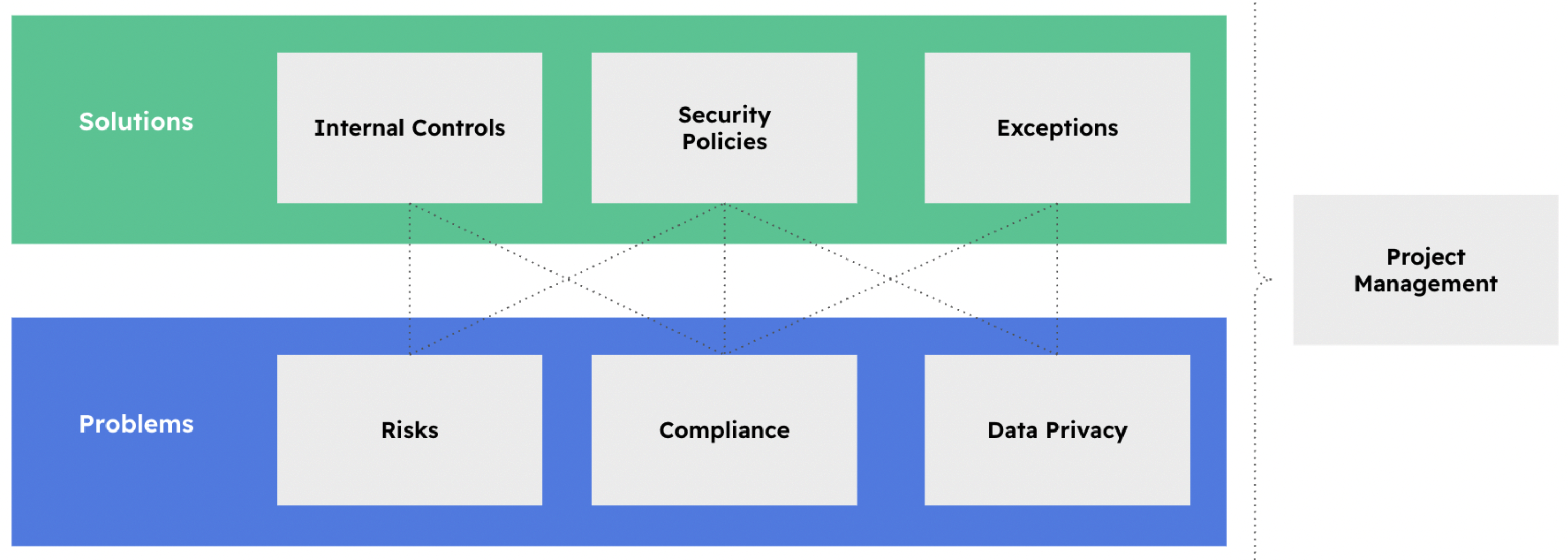
Imagine the Internal Control: "Quarterly Certified Hard Drive Shredding." This "Solution" which happens to fit the requirements of an "Internal Control" (process, owned, etc) can help deal with the following problems:
- Risk: Unauthorized access to data on decommissioned hardware.
- Compliance Requirement: ISO 27001 Annex A 8.10 (Information Deletion).
- Data: Disposal of End-Point Devices.
Internal Controls have leverage, meaning that typically one of them will deal with multiple problems. The average community leverage is 5–15; this means if you have 1,000 problems (nothing extraordinary nowadays), you do not need 1,000 Internal Controls—you might only need 100. This applies regardless of the organization's size, type, or industry.
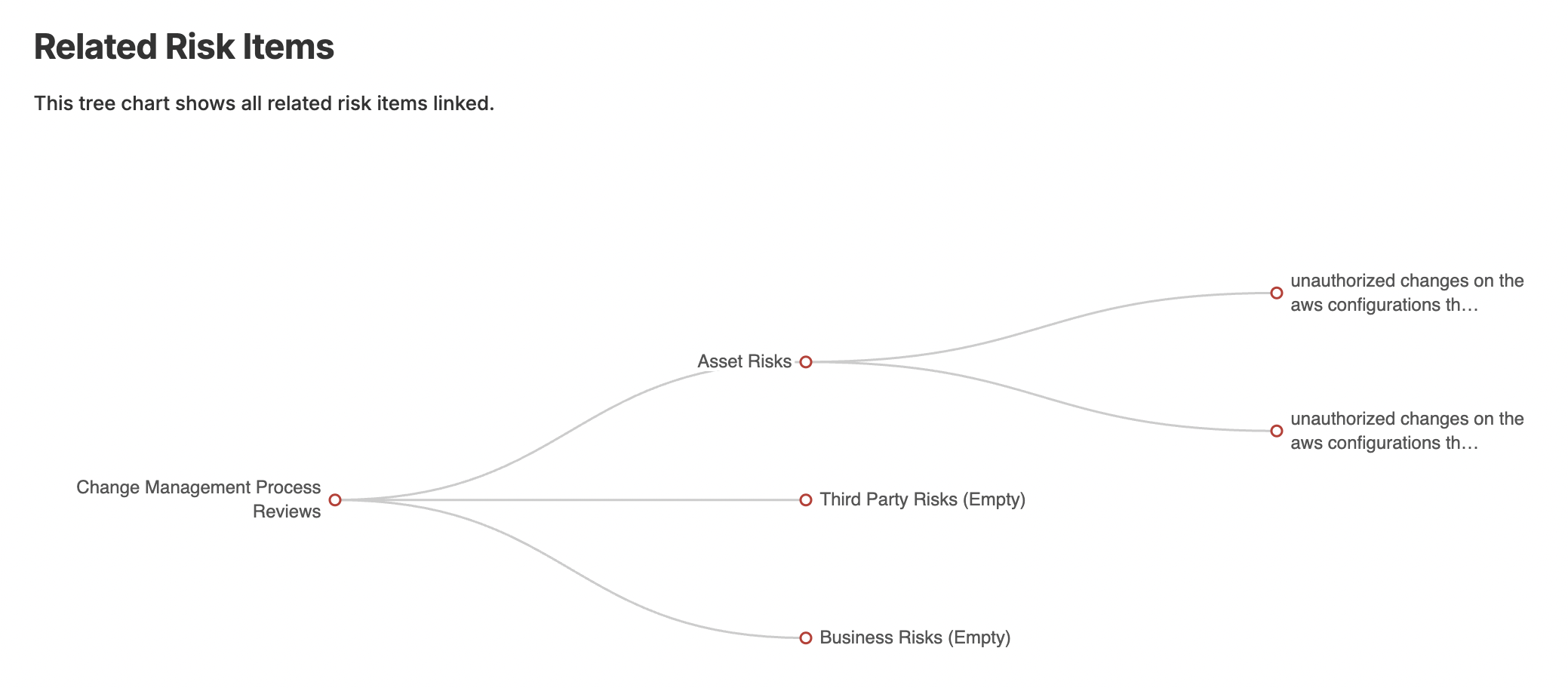
The screenshot below is from a basic Internal Control report in eramba that shows how the Internal Control "Change Management Process Review" ties to two Risks.
And then to many compliance requirments (too many to show in a single screenshot)
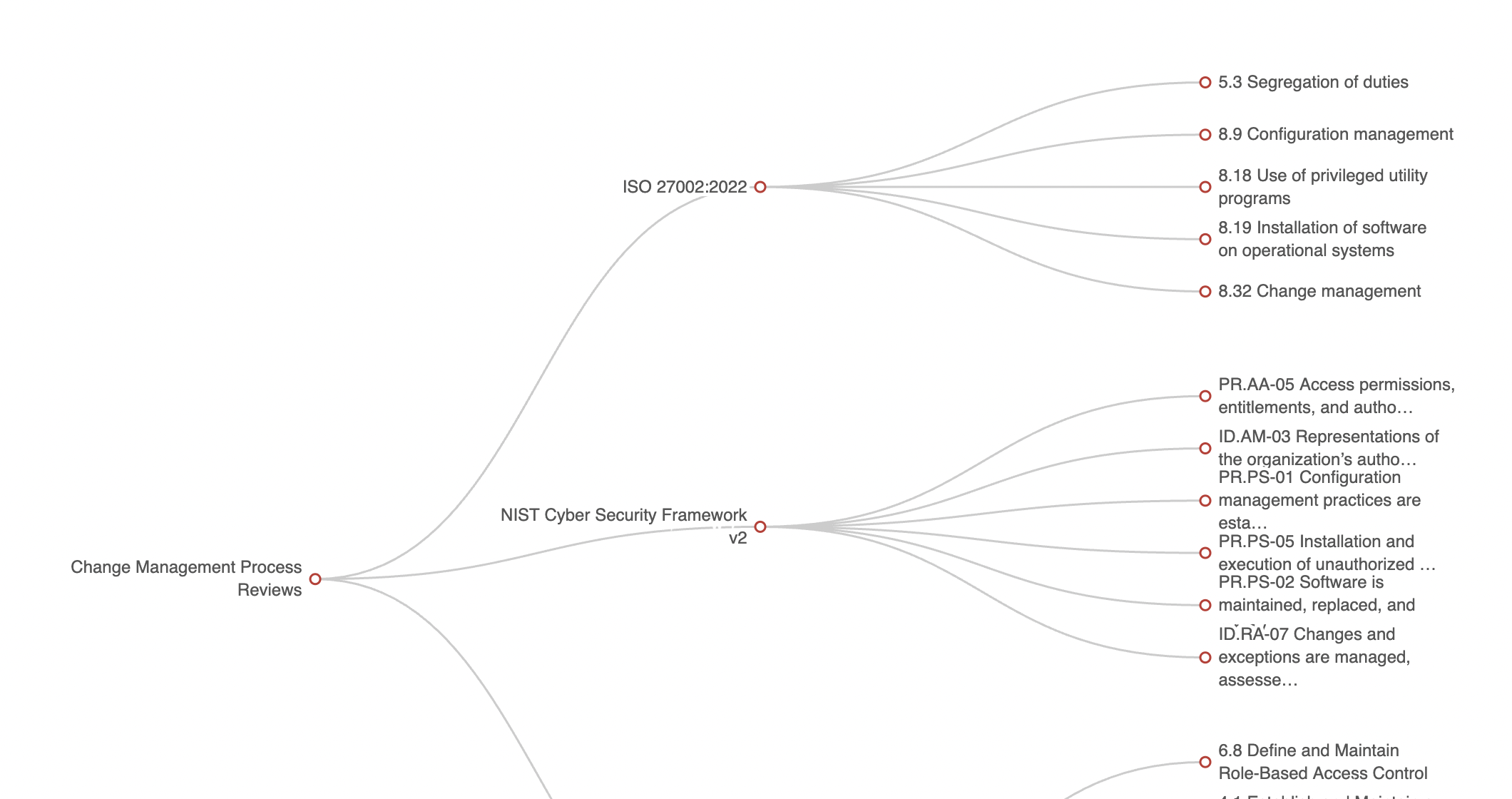
Internal Controls being activities or process, they often times (not mandatory in eramba) tie to one or more documents in the Policy module (the one on the right) that explain how these controls are supposed to work.

Broad Vs. Specific
One problem can need several Internal Controls when the activities that address it have different owners, scopes, processes, or testing requirements. A broad Change Control Reviews control might cover Linux, network, and database teams. Separate controls may be clearer when those teams follow different procedures or need different evidence, test methods, success criteria, or review schedules.
Specific controls also make test results easier to interpret. If Linux passes but network changes fail, one combined pass/fail result can hide which scope is working. Separate controls make ownership and follow-up clearer. Split when one test cannot fairly assess every team or when a combined result would be misleading.
There is no fixed ratio of broad to specific controls. Keep one control when the activity, owner, scope, and test approach are consistent. Add controls when meaningful differences need separate accountability or assurance. More controls also mean more records to maintain and audits to perform, so use the smallest number that still produces clear, trustworthy results. See Audits, Issues and Maintenances for the cost and design of testing: Click here
A framework name alone does not determine the split. A broad control may support a high-level ISO review, while PCI DSS may require evidence scoped to particular systems or teams. Decide from the actual requirement, scope, evidence, and test criteria. A control may still support several problems; see Problems & Solutions: Click here
Basic Control Attributes
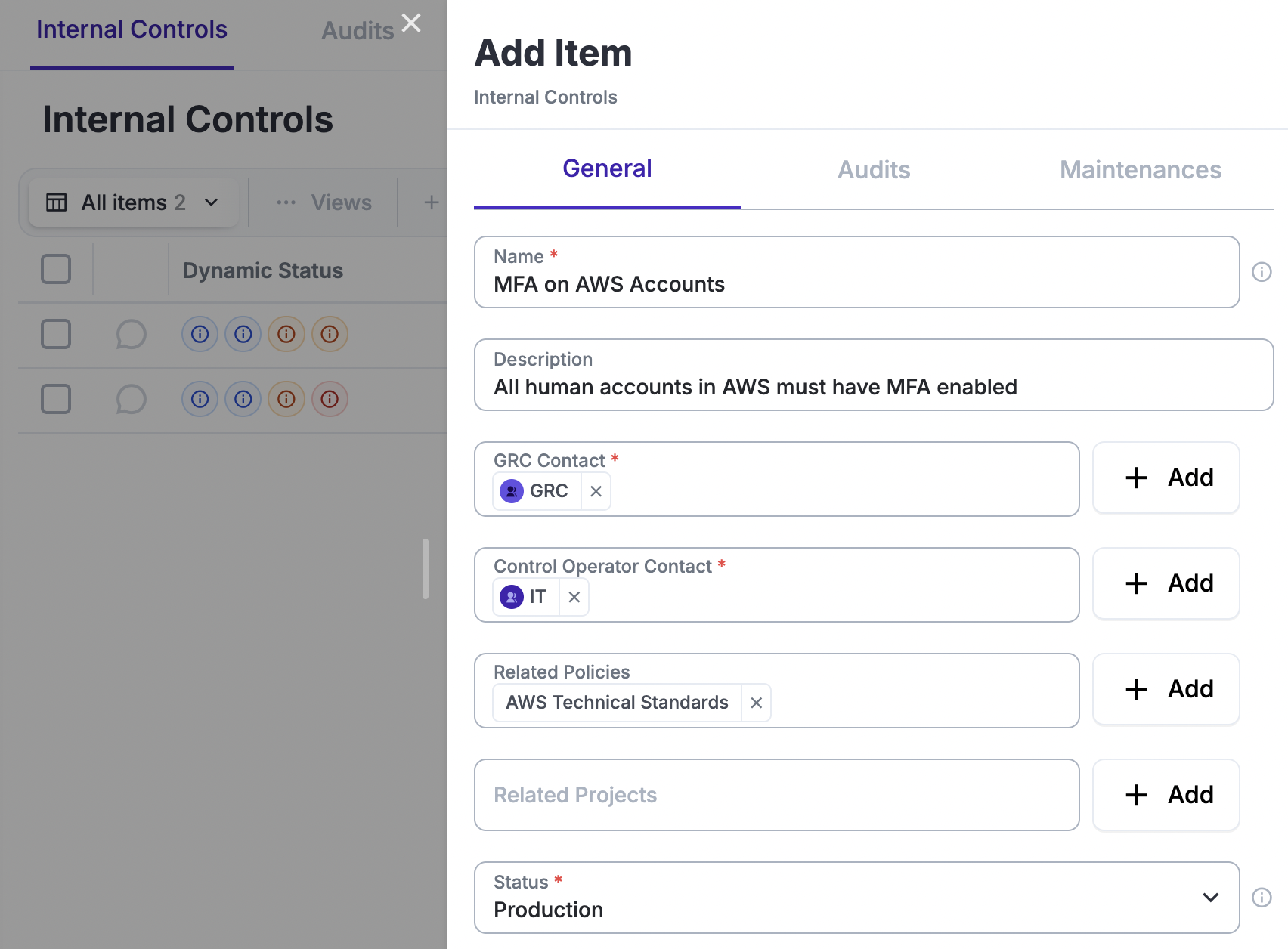
Follow the VideoVideo 1:59 on how to create a basic control
As already discussed, in its most basic form, an Internal Control requires very basic fields:
- Title, for example: End-Point Encryption, Employee Checkout, Background Checks, Etc
- Description is optional
- GRC Contact is the group where you work since you have an interest in documenting this control
- Control Operator Contact is who actually performs the activity, for "End-Point Encryption" that will be "IT" for example
- Related Policies is optional and can link to an item on the Policy module that describes how the control works in detail
Do not bother with Audits and Maintenances if you are only creating a basic control.
Audits, Issues and Maintenances
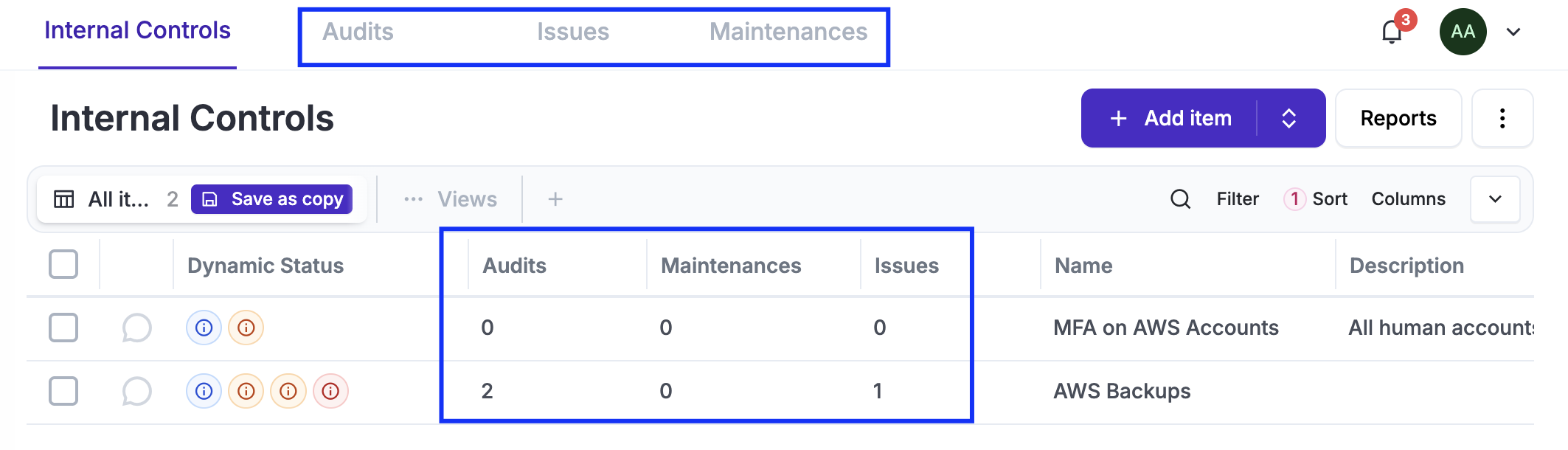
Internal Controls are solutions that require Audits to prove whether they work or not (like an exam: you either pass or fail) and Maintenances to keep them working (like changing the oil in an gasoline engine). Sometimes they simply do not work, and you will want to record that failure in a record called Issues.
An Internal Control can have one or more of these (Audits, Maintenances, Issues) records associated with it. You can see these records by clicking on the top tabs, or, if you wish to see the specific items directly, simply use the shortcuts for each control.
Audits
Follow our Videos to know how to manage Audits
Audits are the only way you can prove to customers, regulators, etc., that your solutions work and, therefore, that your risks are mitigated and your compliance requirements are met.
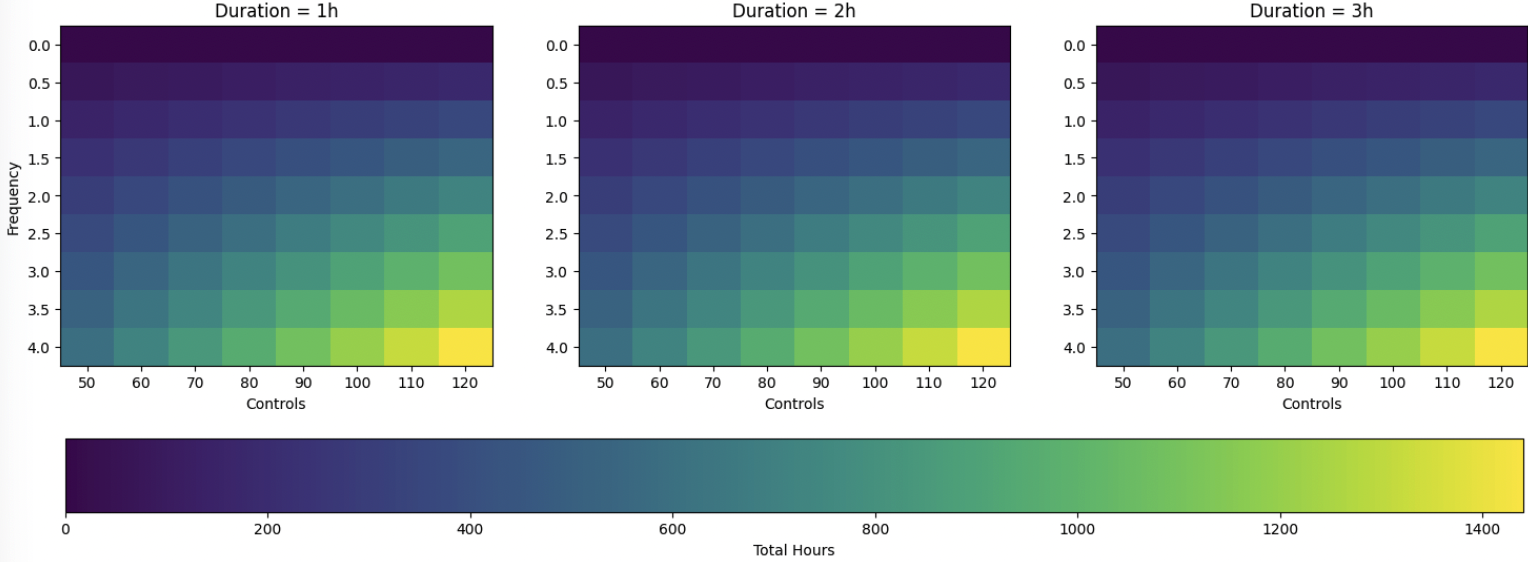
Unfortunately in one way or another, audits cost money, and this is often greatly ignored. The math to calculate how much auditing costs per year is simple: multiply the number of Internal Controls by the average yearly testing frequency and the average testing duration.
For example, 70 Internal Controls, of which 50 will be tested an average of 2.5 times per year, with each test taking 4 hours, require 500 hours of work per year. The charts below show three models for average testing durations of 1, 2, and 3 hours.
If your boss wants to know whether everything is fine, there is a price to pay for that answer. The more reliability required, the more testing is required. A balance needs to be found.
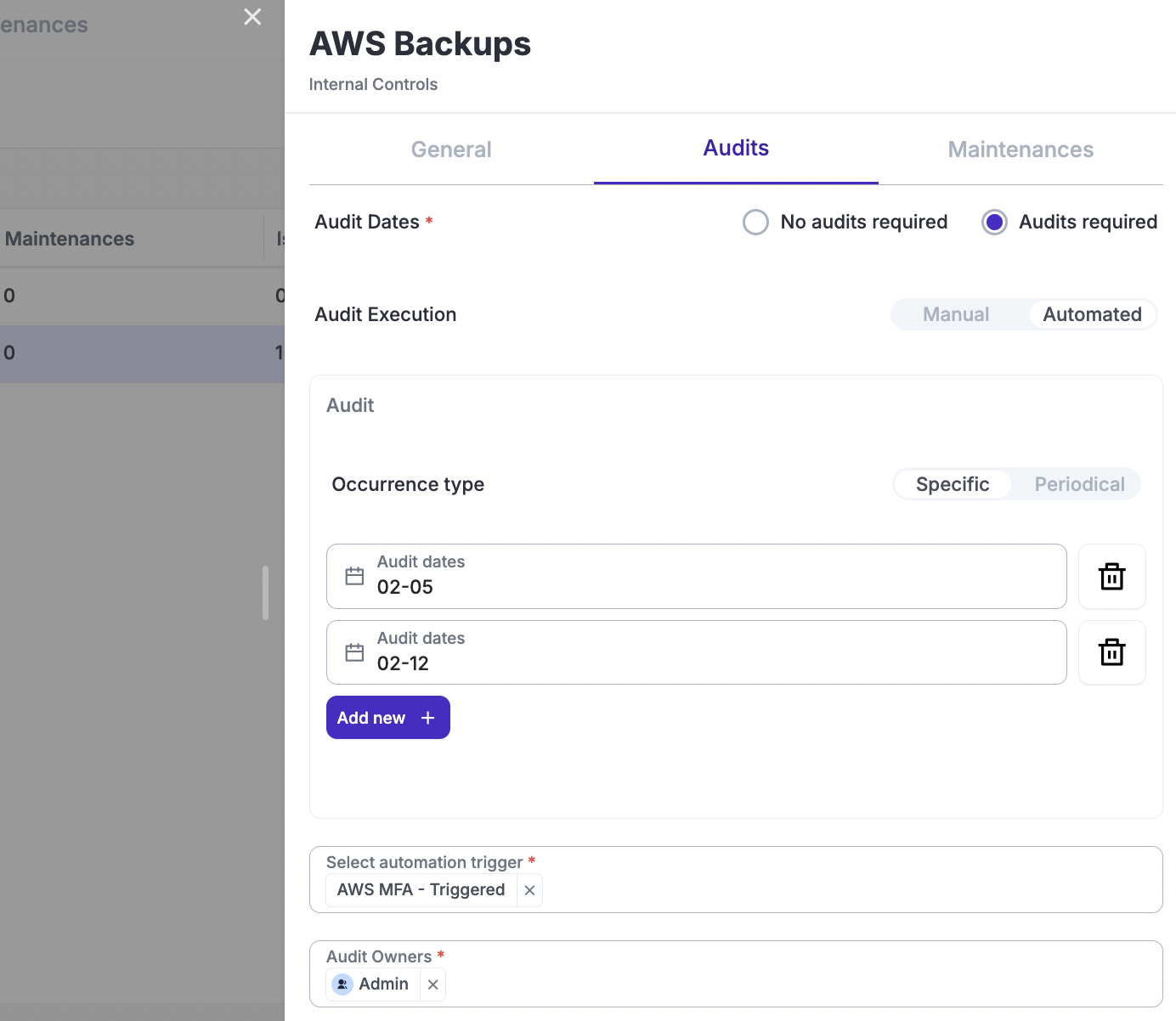
If you wish to Audit controls, on the "Audit" tab of the control you will need to define:
- Audit Execution: Defines who will perform the audit. Manual audits rely on humans reviewing and analysing evidence and storing it in the audit record. Automated audits use automations to complete the entire process.
- If you selected automation, you will need to choose from an already-created automation.
- If you selected manual, you will need to define the “Methodology” (what evidence you need) and “Success Criteria” (how you will determine whether it is a pass or fail).
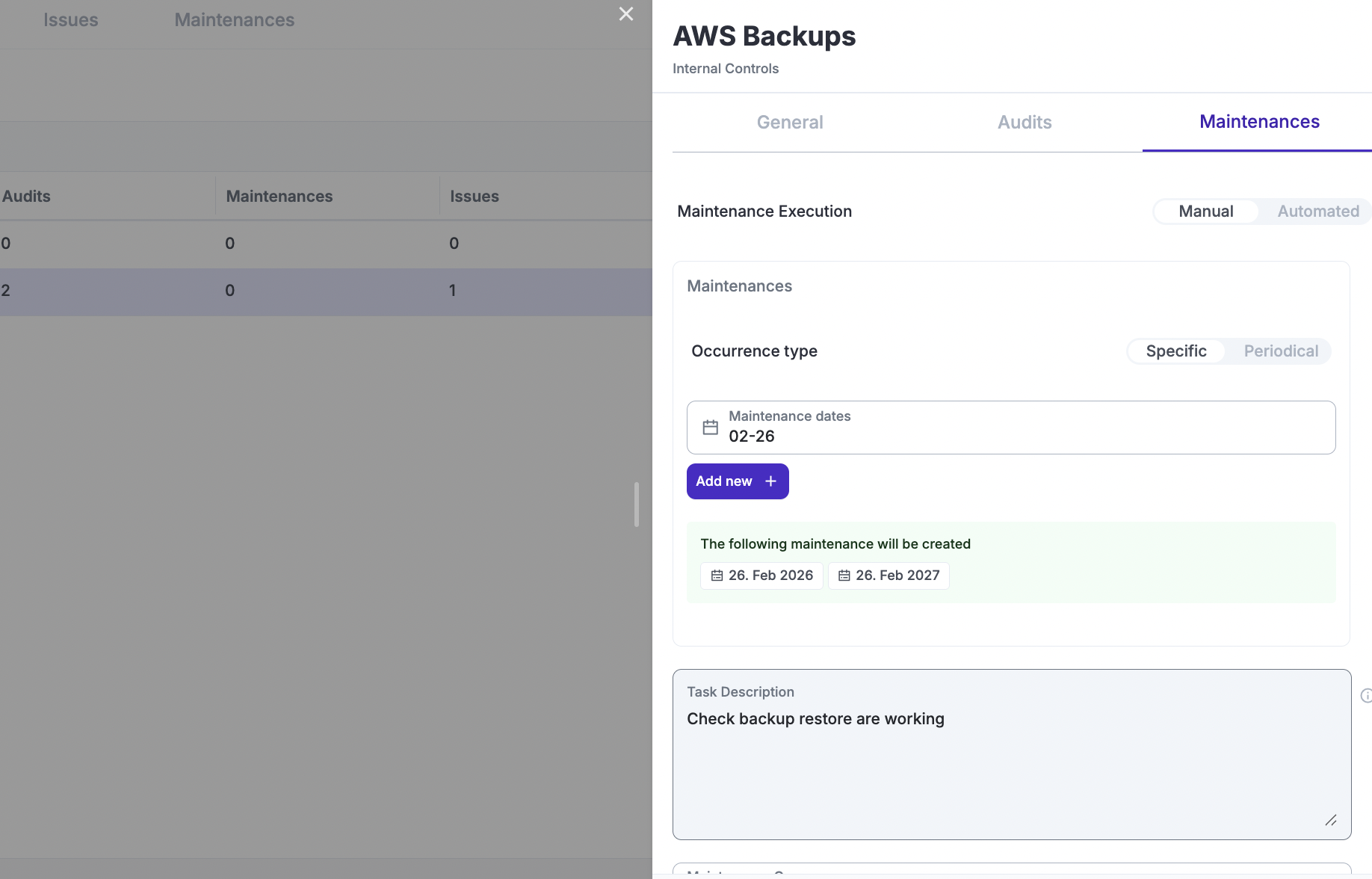
- Occurrence Type: You can define the schedule for your audits in two ways. In both cases, this setting defines what audit records will be created for this and the next calendar year. These dates can be adjusted at any time, and audit records will be adjusted accordingly: created, deleted, etc.
- Specifying dates that repeat every year
- Periodically, where the dates are calculated for you based on a set frequency, such as quarterly.
- Audit Owner: This is typically you, or the group that wants to perform the audit.
- Audit Evidence Owner: This is the person or group providing you with the evidence. This is only applicable if you are manually testing.
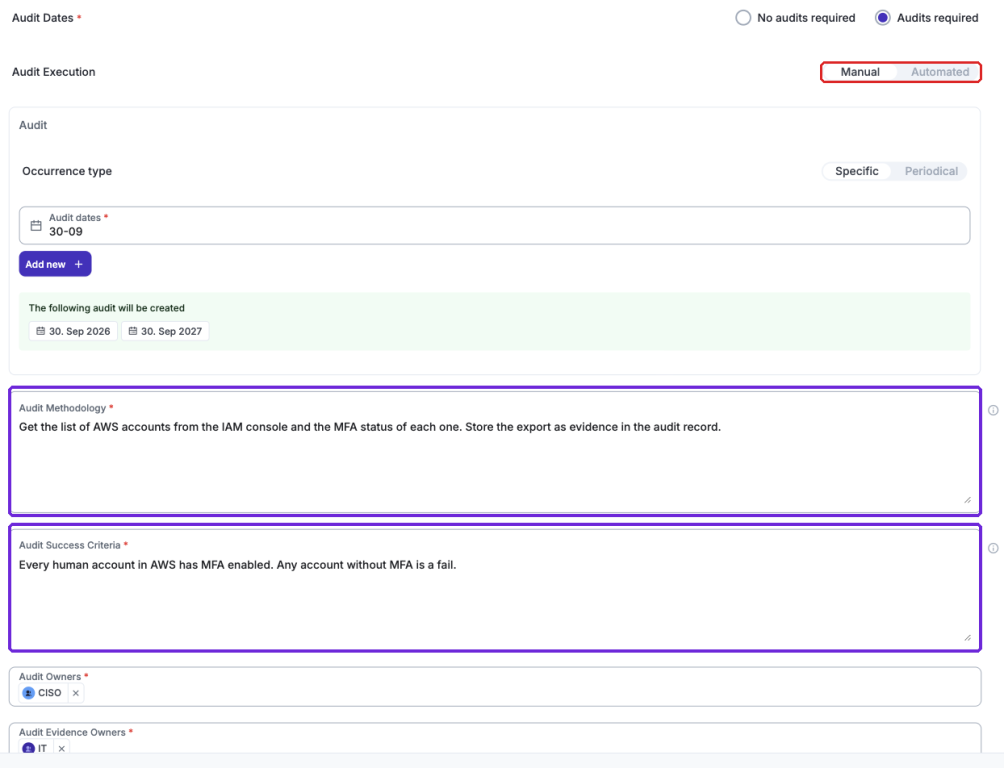
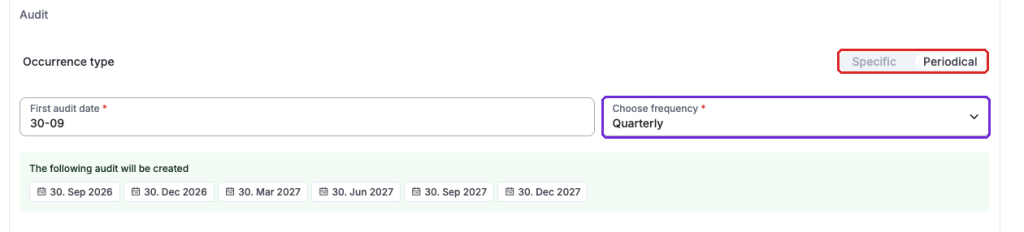
After saving your audit settings, eramba will automatically create audit records for the current and next calendar year (January–December). For example, if you define testing on May 5th and December 12th, and the day you click "Save" is June 5th, eramba will:
- Create one record for the current calendar year: This will be for December 12th. It will not create an audit record for May because that date has already passed.
- Create two records for the next calendar year: These will be for May 5th and December 12th.
If you change your mind and edit the Internal Control, you can change any field, and Eramba will adjust the audit records accordingly. If you remove specific audit dates (e.g., May 5th or May 12th), Eramba will delete the records that match those dates—provided they are still marked as incomplete. It will then create any new records based on the scheduling logic mentioned above.
Whatever change is done, eramba will notify you what will happen before you save.
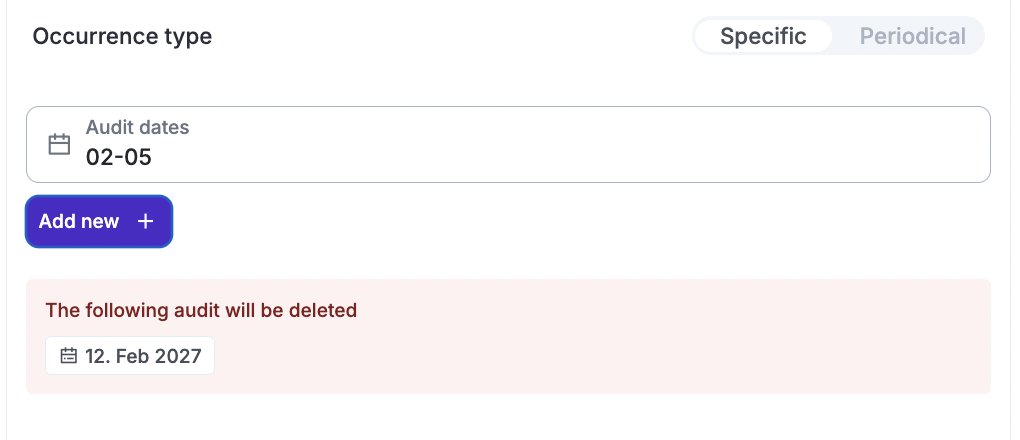
Audit records will be displayed on the Audit tab, you can access the audits of any control by clicking on the shortcut or directly over the Audit tab (in this case you will be listed all audit records for all controls).
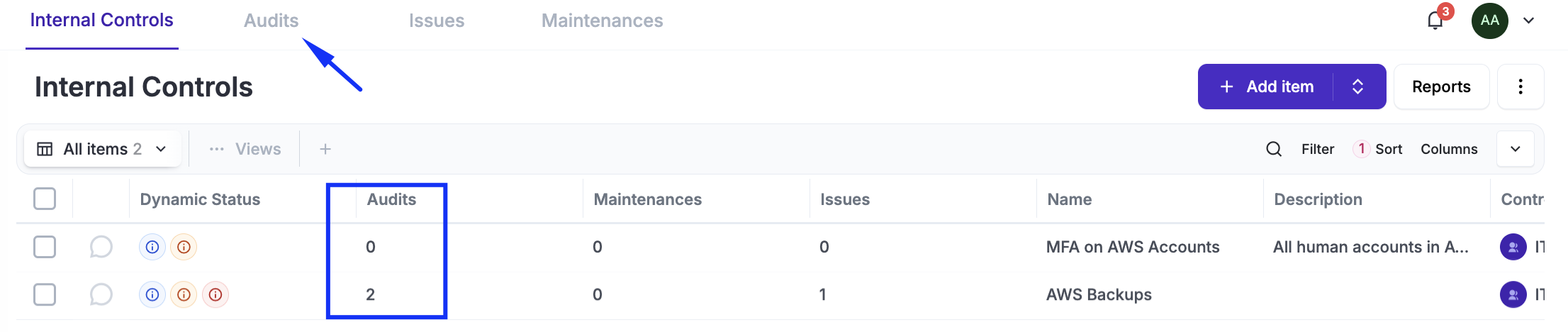
Audit records have the following key attributes:
- Audit Methodology: This is inherited from what was defined in the Internal Control.
- Planned Date: This is the date when the audit is supposed to be conducted.
- Automation Script: This depends on the type of audit (if automated).
- Start, End Date, and Conclusion: When the audit actually started, when it ended, and what the summary of findings was.
- Result: This is the final status—either Pass or Fail.
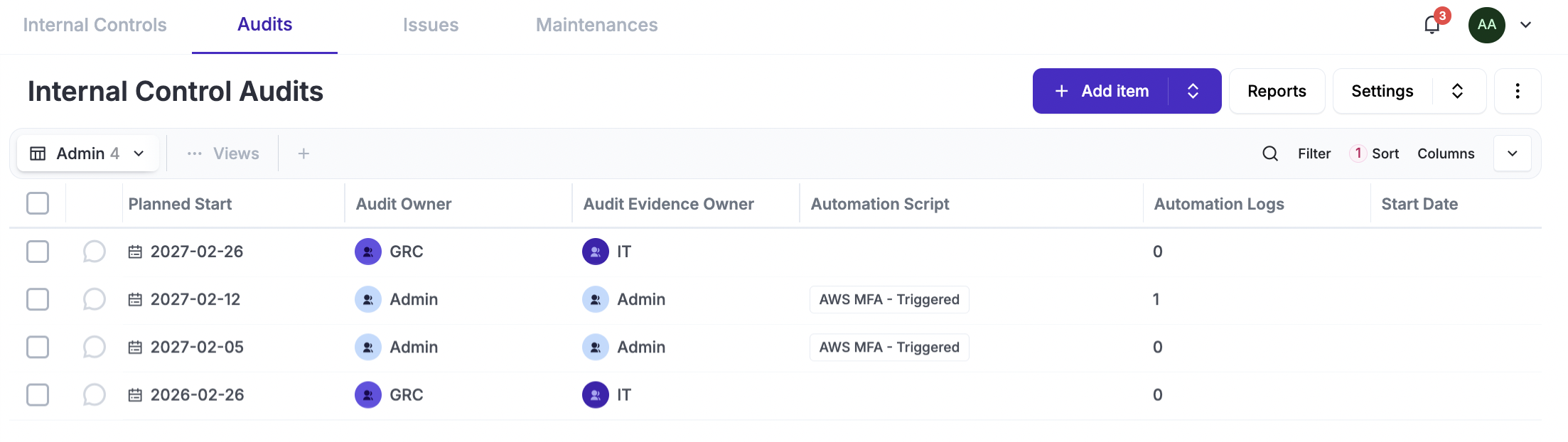
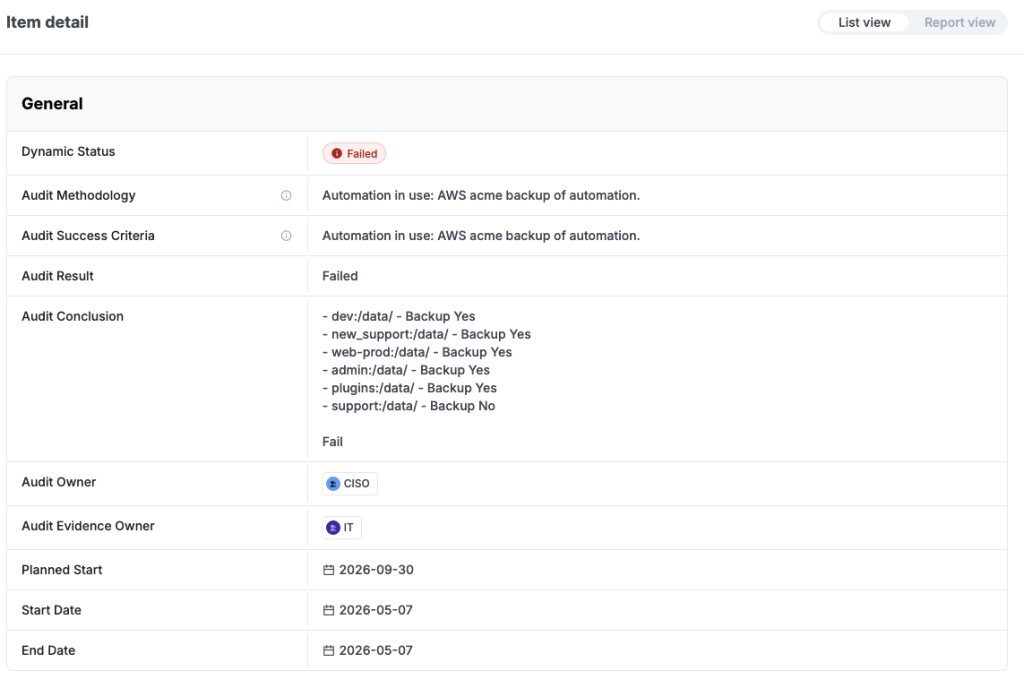
If you are using automation, the script will automatically execute at midnight on the day of the planned audit, or you can run it manually at any time by clicking "Run Automation."

Maintenances
Maintenances work exactly the same way as Audits. The only difference is in the records stored: instead of an audit methodology and success criteria, you need to provide a description of the maintenance task.
Issues
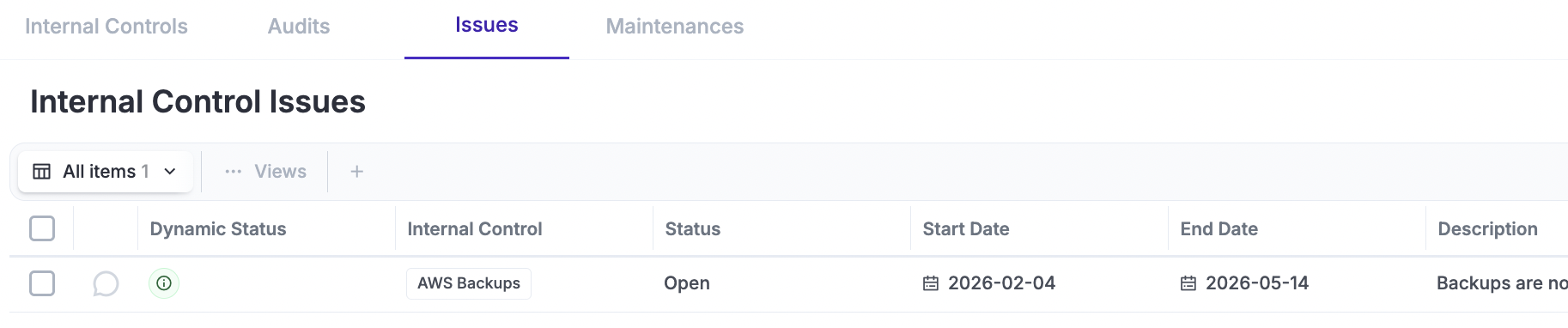
An Internal Control can have one or more Issues associated with it, which will be displayed on the "Issues" tab. An Issue is a simple record where the Status (Open/Closed) indicates if it is still applicable, and the Start/End dates help you understand for how long the issue was active.
Videos
Creating a Basic Control
Defining Manual Audits
Defining Automated Audits
Creating an Ad-Hoc Audit
Videos being recorded during the first week of June 2026
Completing an Audit Record
Advanced Implementations
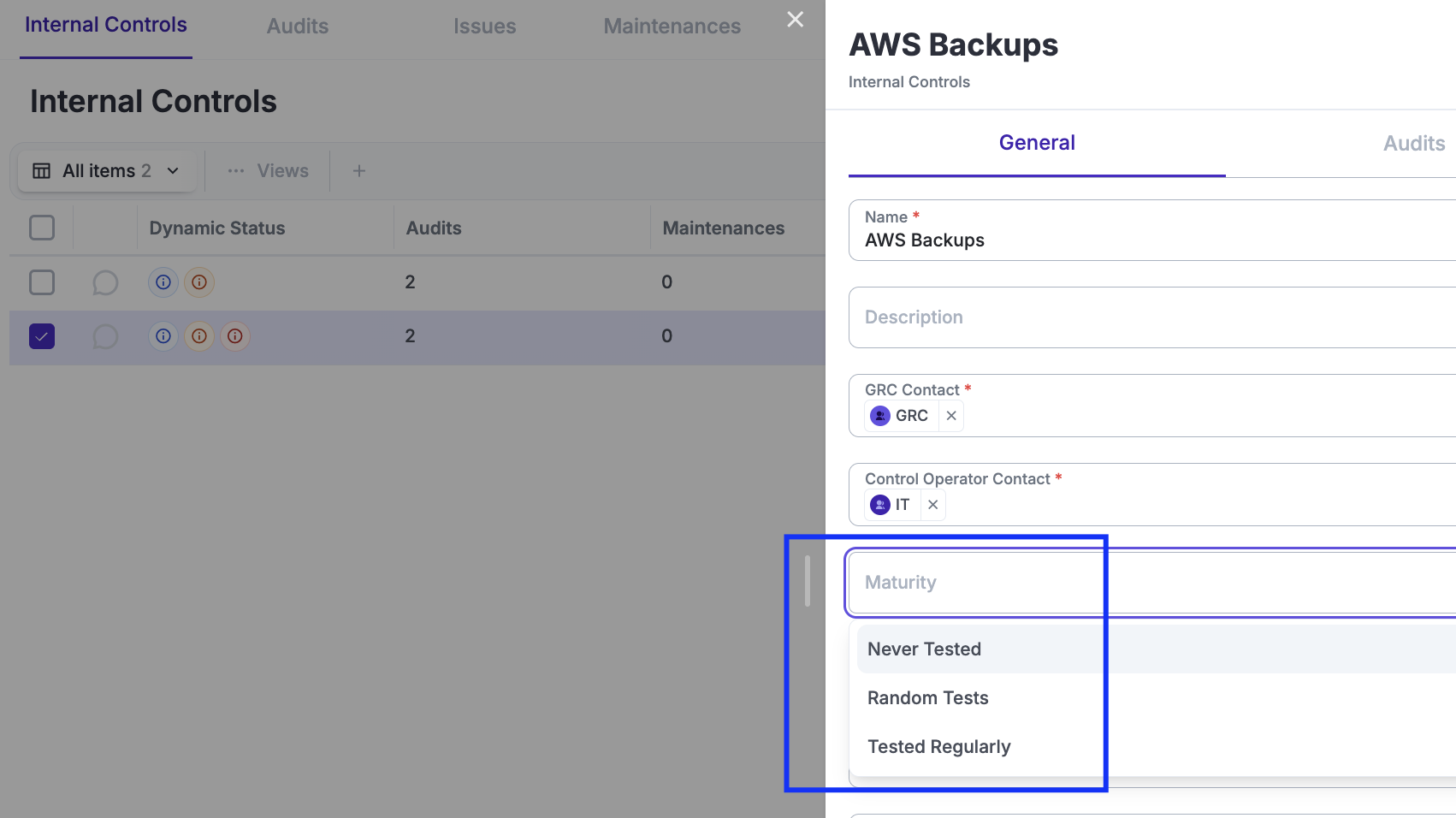
Customisation
There are many possibilities when it comes to customisations. It essential to understand the customisation common feature before making configuration decisions.
The most common examples for the Internal Control modules are listed below:
- Control Catalogue / Internal Controls: Maturity (Implemented, Tested, Etc)
- Control Catalogue / Internal Controls/Audits: Audit Duration (Short, Long, Etc), Evidence Quality, Etc
- Control Catalogue / Internal Controls/Maintenance: Maintenance Duration
Dynamic Status
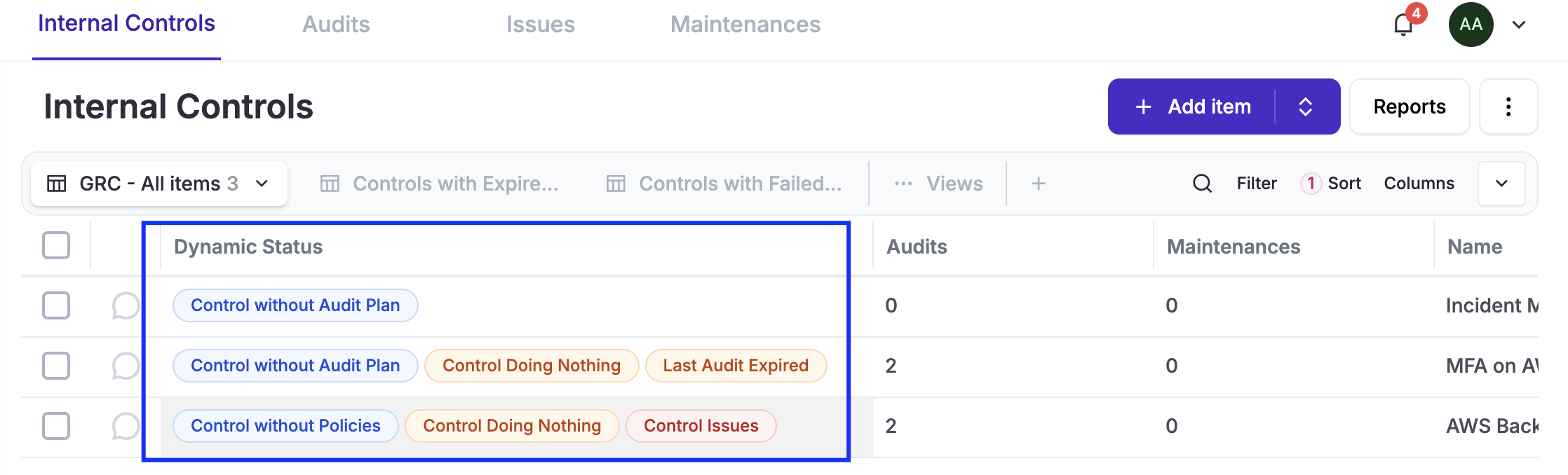
There are many possibilities when it comes to Dynamic Stauses, in particular using them in combination with Custom Fields, Notifications, Reports and Automations. It essential to understand the Dynamic Status common feature before making configuration decisions.
The most common examples for the Internal Control module are listed below:
- Control Catalogue / Internal Controls: Maturity (Implemented, Tested, Etc), Automated vs Manual Testing, Internal Controls without Policies, Internal Controls without Audit Plans, Etc
- Control Catalogue / Internal Controls / Audits: Audit Duration (Short, Long, Etc), Evidence Quality, Etc
- Control Catalogue / Internal Controls / Maintenances: Maintenance Duration
Views
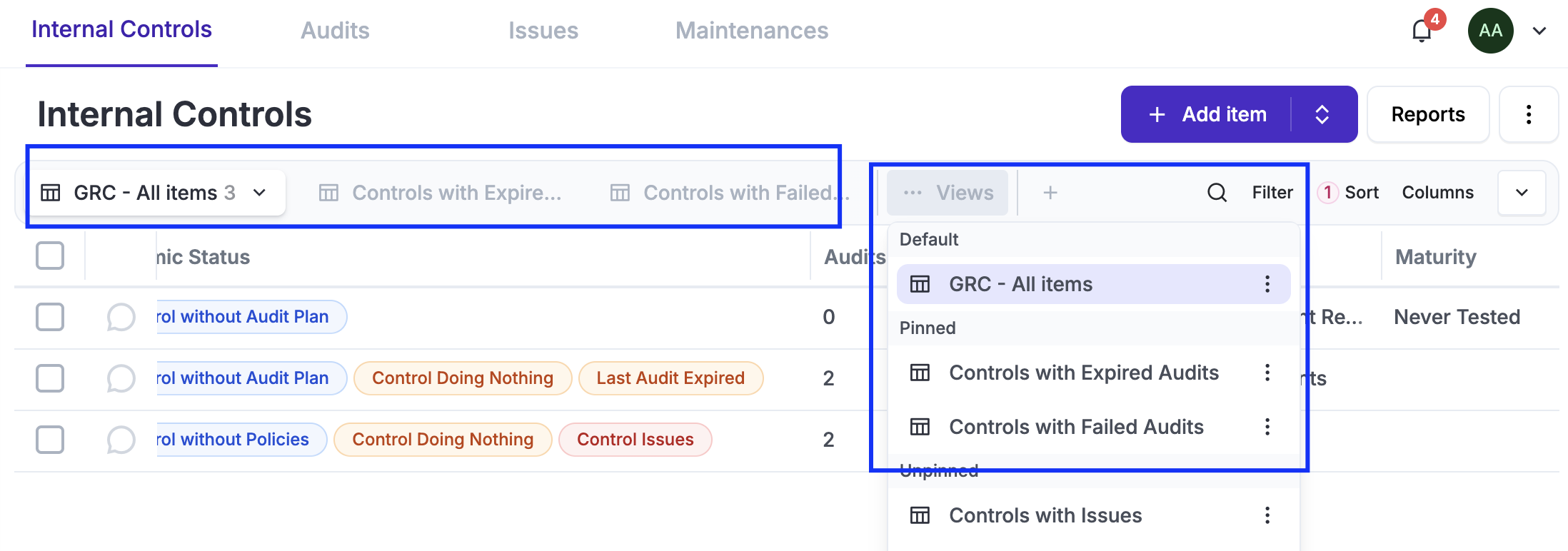
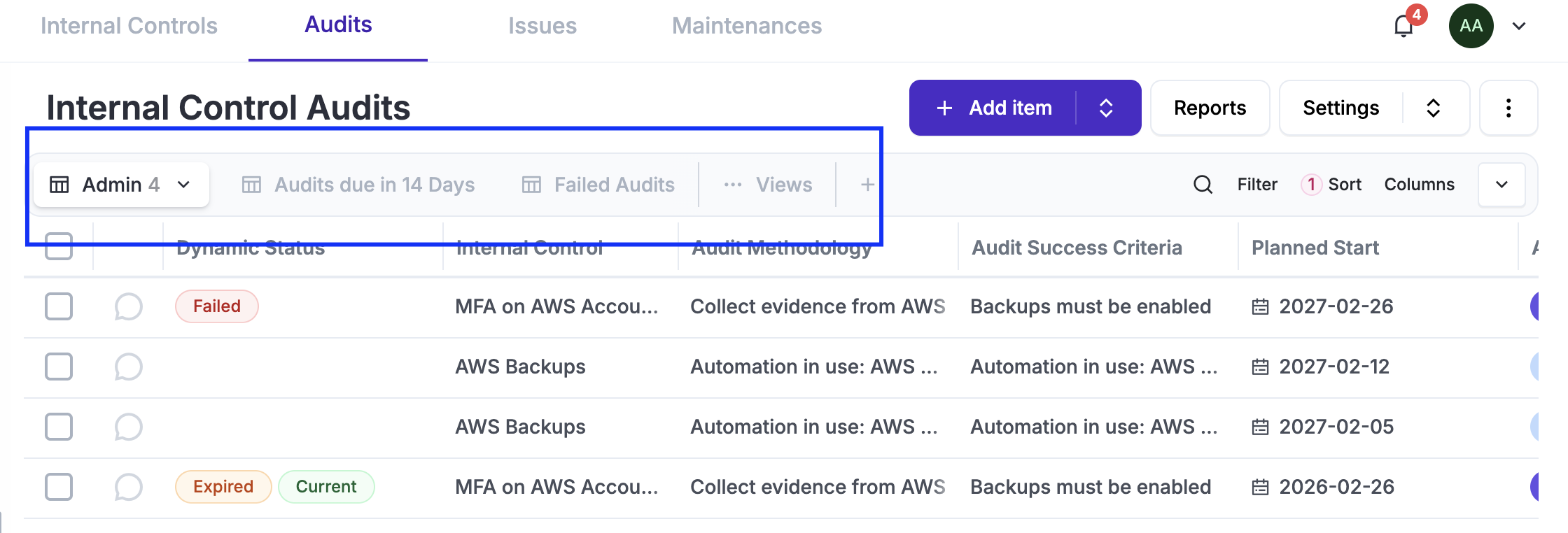
Views are essential as is the main interface with data in eramba, you will most likely adjust them to suit your needs. It essential to understand the User Interface guide before making configuration decisions.
You will create default views for yourself on most modules, typically grouping data using filters, often based on custom fields. Eramba ships with multiple default views on each tab (Audits, Maintenances, Etc) which are not pinned by default.
Notifications
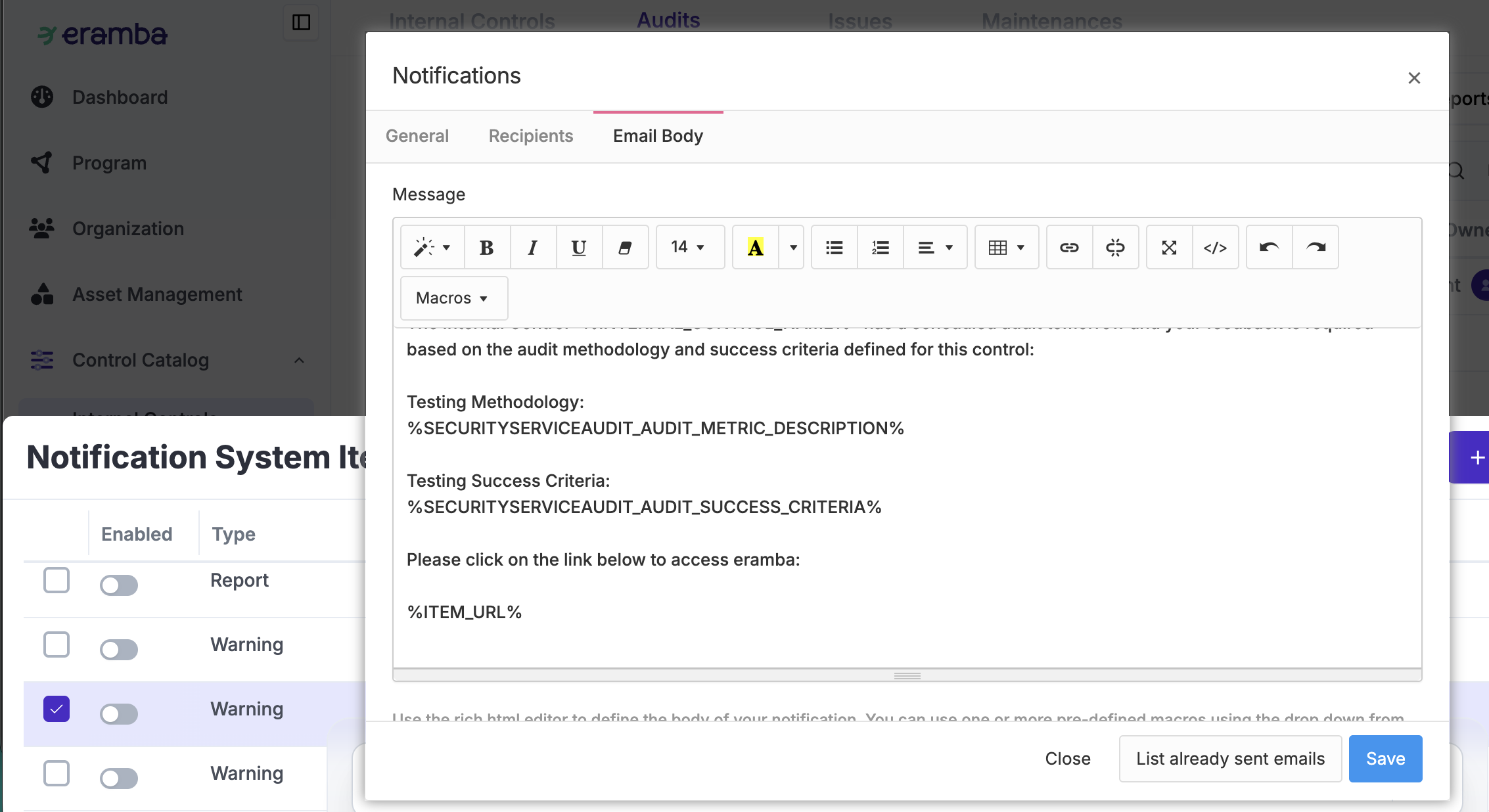
There are many possibilities when it comes to notifications. It essential to understand the notification common feature before making configuration decisions.
It is very common to set up notifications on all these modules because most items have some form of deadline (Audits, Maintenances, and Issues). Additionally, most items have some form of result (Pass, Failed, Completed, Not Completed). Most common notifications are already defined, you just need to adjust (body, subject, recipients) and enable them.
Of course, you will also want to send scheduled reports, such as a "List of controls to be tested next week" or a "List of controls used in NIST which failed the last audit.
Typical Warning notifications:
- Control Catalogue / Internal Controls / Audits: Audit Deadline in 1, 10, etc Days, Audit Pass/Failed, Audit Expired, Etc.
- Control Catalogue / Internal Controls / Maintenances: Maintenance Expired, Maintenance Completed, Etc.
Typical Report Notifications:
- Control Catalogue / Internal Controls: Controls with Expired/Failed Audits, Controls with Expired Maintenances
- Control Catalogue / Internal Controls / Audits: List of Audits to test Next Week, List of Failed Audits, List of Expired Audits, Etc
- Control Catalogue / Internal Controls / Maintenances: List of Maintenances to complete Next Week, List of Expired Maintenances, Etc
REST APIs
There are many possibilities when it comes to incoming REST Calls. It essential to understand the REST API common feature before making configuration decisions.
REST APIs are enabled by default on the Internal Control and Internal Control / Audit modules, allowing you to receive REST calls from other systems. While this is typically used to update or create Audit records, the possibilities are endless.
Automations
We are working on this part of the documentation
Reporting
Still have questions?
Write to support@eramba.org or ask the community on the forum.