Business Units, Assets and Third Parties

Define and review assets primarily used in Risk and Data Protection programs

  • Documentation
  • Duration6m 57s
  • LanguagesEN

Course Introduction

This course explains the theory behind Business Units (and their Processes), Assets, Third Parties and Liabilities and how they relate to other modules within Eramba.

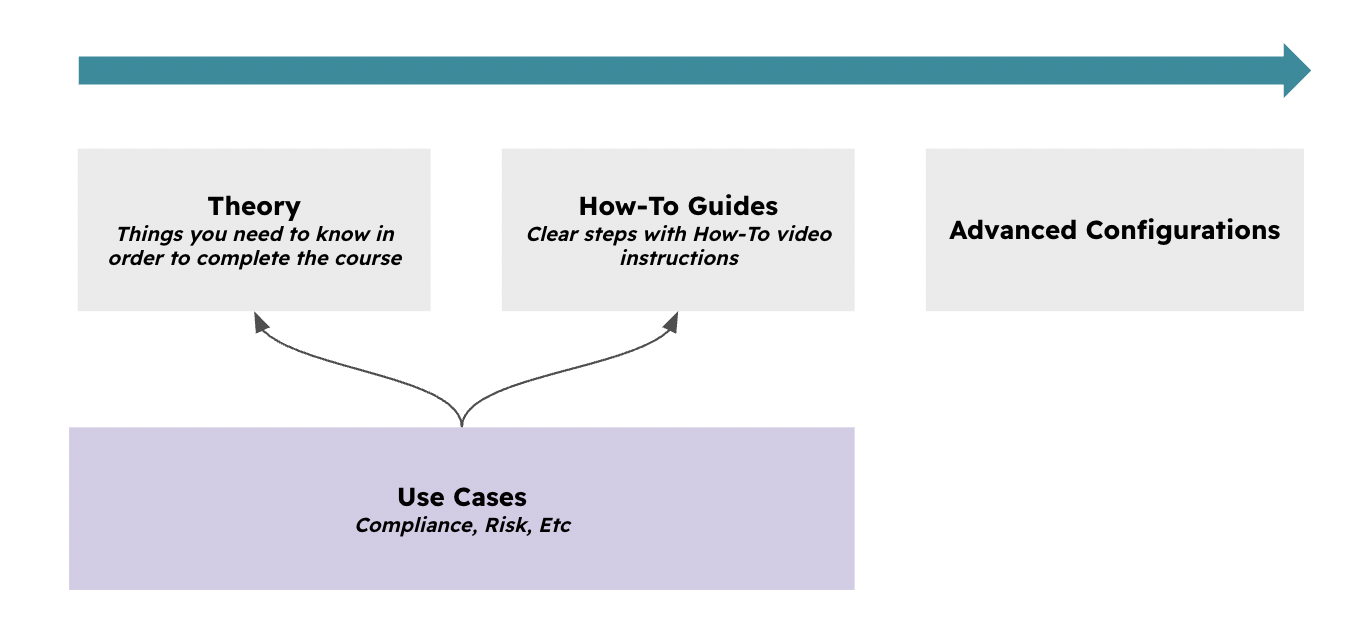
As a combinatino of support module, they are not intended for standalone use; rather, they exists to support the delivery of our key GRC use cases (Compliance, Risk, Etc). This course covers how the module is utilized, with a specific focus on Control Testing (both manual and automated).

Additionally, we will explore how to leverage Common Features—such as notifications, automation, reporting, and custom fields—to increase the module's power and efficiency.

LLMs

Statistically, most people don’t "read" — and certainly don’t fully "understand" — documentation. If you’re planning to take this course be asured you wil get in trouble.

You can use LLMs to clarify doubts from what you "read" to make sure you "understand", you simply need to copy the URL and paste it into your preferred LLM (OpenAI, Gemini, etc.) together with the prompt below:

I’m trying to understand how Assets and Third Party works and how it’s implemented in Eramba. This is their documentation. If you’re able to review it, can you answer any quick questions I may have? This is the URL: (paste url here)

If you are somewhat dilligent and careful on your questions you wil get a lot of support from your LLM.

Typical Scenarios

This chapter explains ways in which these modules are used in eramba:

  • BU, Process, Assets, Liabilities, Third Parties are used in Risk Management
  • Third Parties are used in Online Assessmnets to perform Supplier Assessments
  • Assets are used for Data Privacy and optionally for Account Reviews

Supported Versions

These modules run on both on-premise and cloud deployments and are available in Enterprise and Community editions. Community limitations relate to common functionalities (notifications, automation, etc).

Scope

Before diving into the technical details of how these modules function in eramba, it is important to define what they are intended to store:

  • Business Units: These are the departments within your organization (e.g., IT, Sales, HR). Processes are optional sub-elements that describe the specific activities these departments perform. A single Business Unit (BU) can oversee one or more Processes.

  • Assets: these are the physical and digital items the organization owns, such as Laptops or Data. Crucially, every Asset must relate to at least one Business Unit (for example, the "IT" BU would relate to the "Laptop" Asset).

It is vital to remember that eramba is not a CMDB or a granular inventory tool. You do not document every individual laptop or every specific employee; instead, you document Asset Classes, such as "Laptops" or "Employees."

  • Third Parties: For most organizations, these represent Suppliers. While they can technically include customers or partners, the primary focus is typically on vendor management.

  • Liabilities: These are the contractual or legal agreements your organization has entered into. They represent the obligations that affect your Assets, Business Units, and Third Parties.

Risk Management

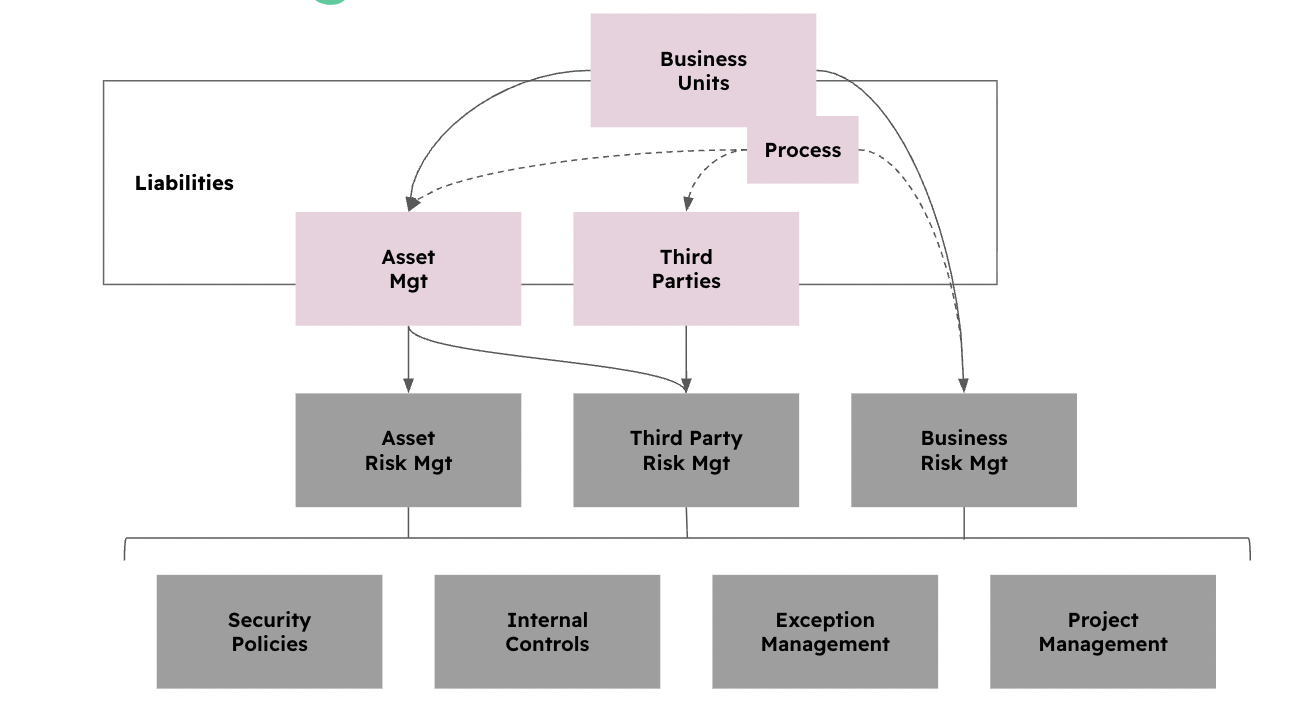
While this is explained in more detail in the Risk Management Use Case guide, the brief explanation is that these modules provide the necessary context for your Risks.

You cannot use any of the three Risk modules without first utilizing these supporting modules. As you can see in the diagram below, Business Units, Assets, Third Parties, and Liabilities act as the foundational data that feeds directly into your Risk assessments.
Online Assessments

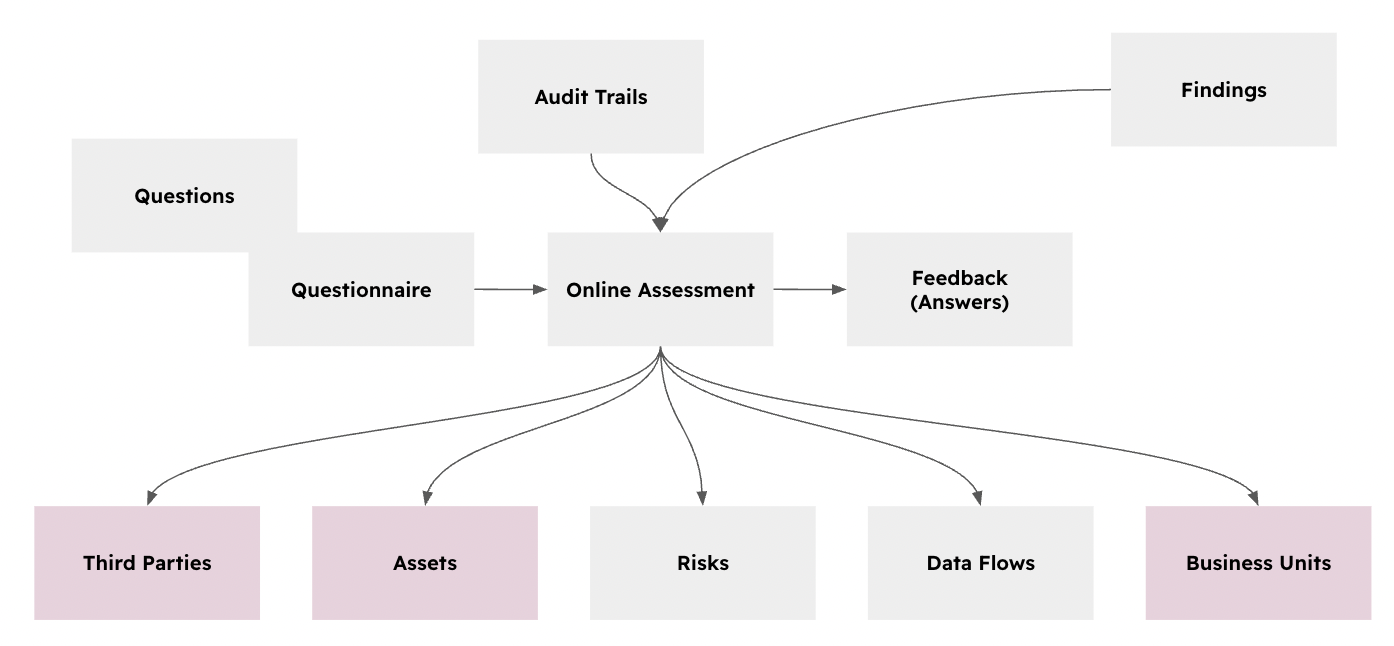
When working with the Online Assessment Use Case, you will see that assessments can take different inputs depending on the questions you ask and their specific purpose. While these associations are not mandatory for an Online Assessment (OA), they are often highly desirable for data integrity.
Data Privacy

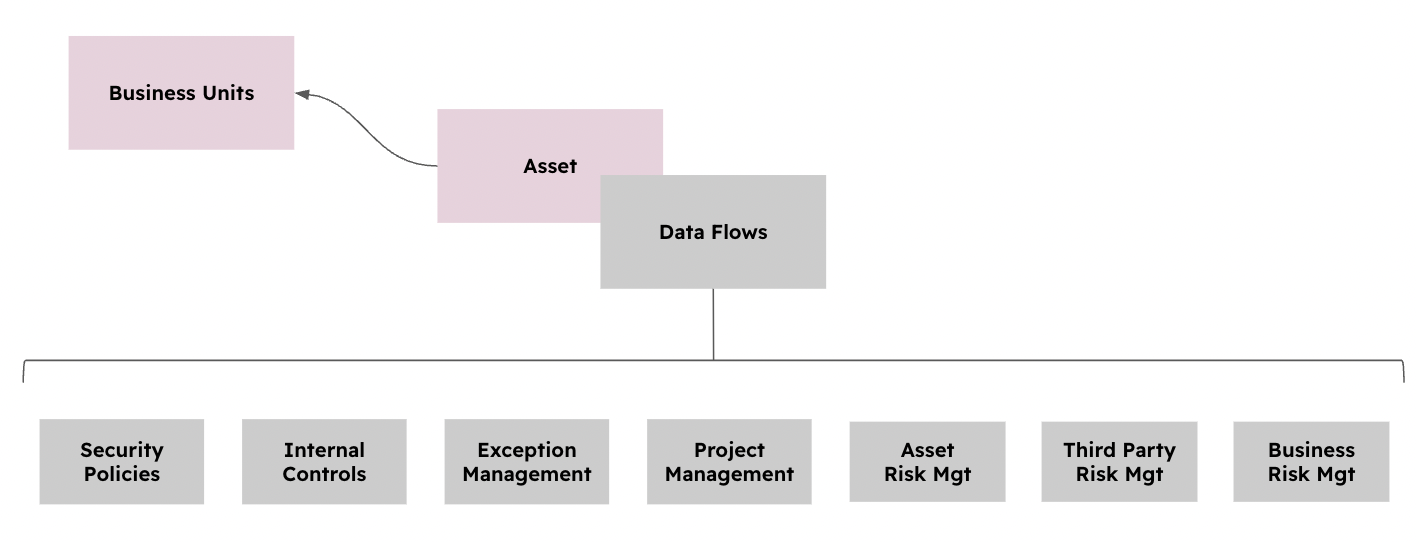
To create a Data Flow (something essential for Data Privacy), you must have at least one Asset defined. And, as we now know, every Asset requires at least one Business Unit to be associated with it.
Templates

We are working on an integrated list of Assets, Third Party and BU templates; please review our Product Roadmap for details and updates. 

Core Concepts

There are no overly complex concepts to detail here. In general, keep these key takeaways in mind:

  • These modules, on their own, don't really do anything. They function as the connective tissue for the rest of the system.

  • They must be used within their associated use cases. To implement eramba correctly, you should follow the guides for Risk, Compliance, or Data Privacy rather than focusing solely on this guide. Those specific manuals will point you back here when appropriate.

  • Assets are not detailed inventory items. Do not treat eramba as a tool to track individual serial numbers or hardware specs.

  • It is very wise to keep these modules simple. Populating them with an excessive amount of data complicates the implementation of Risk exponentially. The more granular your assets and business units are, the more complex your risk assessments become.

Management

Notifications

All these modules support Notifications, as that is a standard common feature across eramba. While the core functionality remains the same, the specific use cases vary slightly between modules, with some offering more triggers than others.

It is very important to review the Notification common functionality in detail before making these adjustments. There are many possibilities available, and it is best to have them clear in your mind before continuing.

Here are common examples of Warning notifications for these modules. Keep in mind that while some of these are built-in, others are custom triggers you will need to configure using the Dynamic Status and Notification engines.

  • Assets: Asset has no risk associated, Asset Review is Expire, Asset Review is about to expire

  • Third Parties: First OA Assigned, New OA Finding, Expired OA Finding, OA Passed/Failed

These are "scheduled" summaries (Report Notifications), typically sent weekly or monthly, based on your filtered Views.

  • Assets: List of assets with no risks (The "Clean-up" report), List of assets with expired reviews, List of assets with reviews due next week.

  • Third Parties: List of third parties without Online Assessments, List of third parties without associated Risks, List of third parties with Failed Online Assessments.

Customisation

There are many ways in which you can customize these modules; most of the time, this revolves around creating custom fields for:

  • BU/Process: continuity aspects of the process, revenue of the BU, Etc

  • Assets: location of the asset, criticality, etc

  • Third Parties: supplier email/website, supplier criticality, Etc

It is very important that you understand how the Customizations common functionality works before you attempt using it in eramba. We also strongly recommend setting these adjustments BEFORE you start putting data into the module.

Views

In each of the modules, you will most likely define your own Views to simplify access to commonly used information. The "Report" notifications mentioned earlier in the Notification section of this guide rely on these typical views to determine which data is sent to your inbox.

Create/Import/APIs/Edit/Delete

There are no special remarks in this area; of course, it is fundamental that you understand how the User Interface and APIs common functionality work across the entire system to move around the software without friction.

Note that some of these modules do not include APIs. Review the API documentation to understand how you can validate whether a specific module has APIs enabled.

Reporting

See Reporting documentatio

Implementation

These modules should not be implemented on its own; they are a Supporting Module, not a standalone Use Case. You should only use this module as part of the implementation of the core Use Cases: Risk Management, Online Assessments, or Data Privacy.

To ensure a smooth rollout, we recommend the following sequence for any of these modules:

  1. The "Sandbox" Control: Create one dummy item (Asset, Bu, Etc) until you are fully familiar with the User Interface and the form fields.

  2. Customize Fields: Add any custom field needed for your specific reporting.

  3. Enable Notifications: Enable template notifications or create new ones.

  4. Adjust Views: Set up your filters so you can see exactly what needs your attention at a glance.