Introduction
Summary
The Data Protection module helps you documenting how data flows across your organization (how is collected, transmitted, etc) and what security controls, risks and third parties are involved.
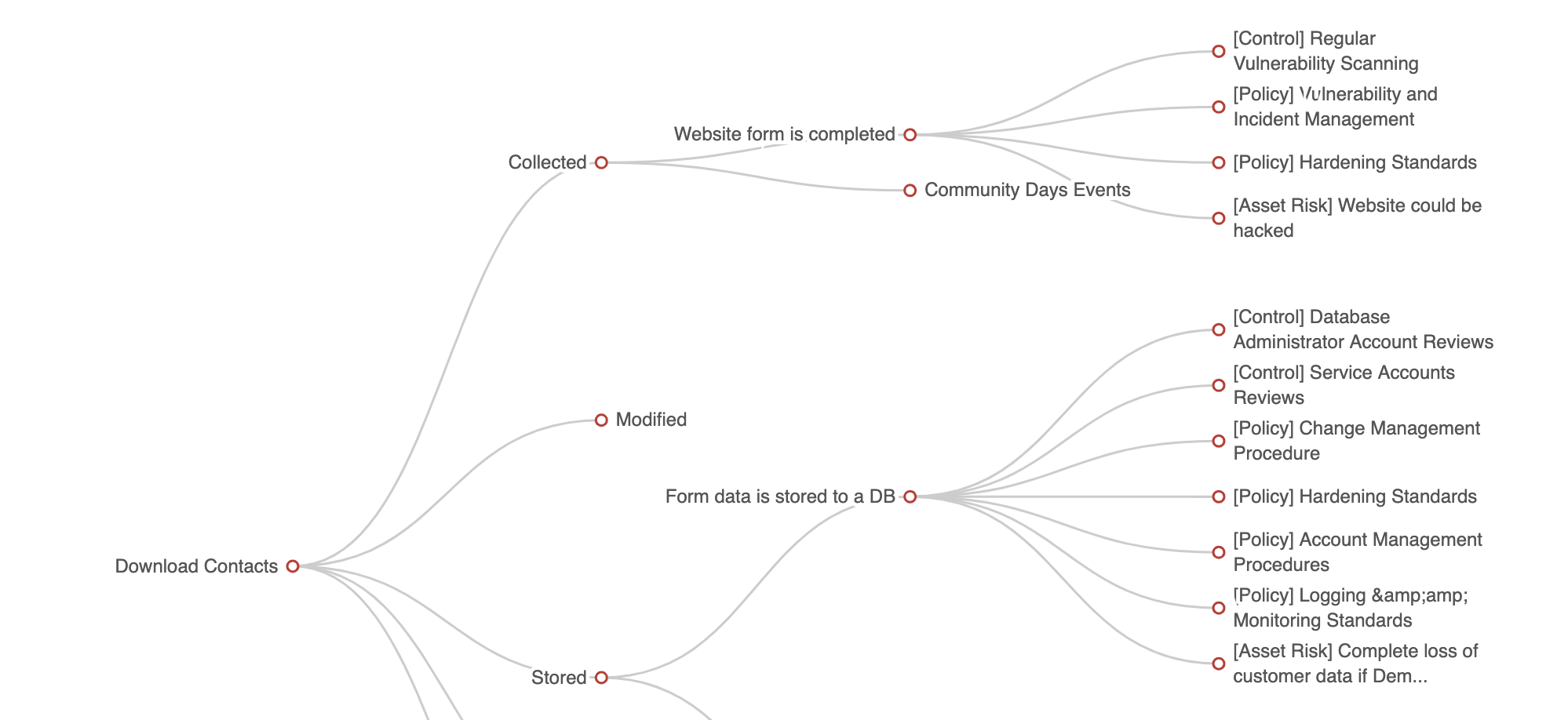
A big reason on why organization do GRC is to protect data and its associated value and reputation. So it does make sense to cut to the chase and answer the simple question of "How do you protect data?" in a simple and structured way.
The module will help you build these relationships, for each flow what you have in terms of protection. You will end up with a little bit of a matrix.
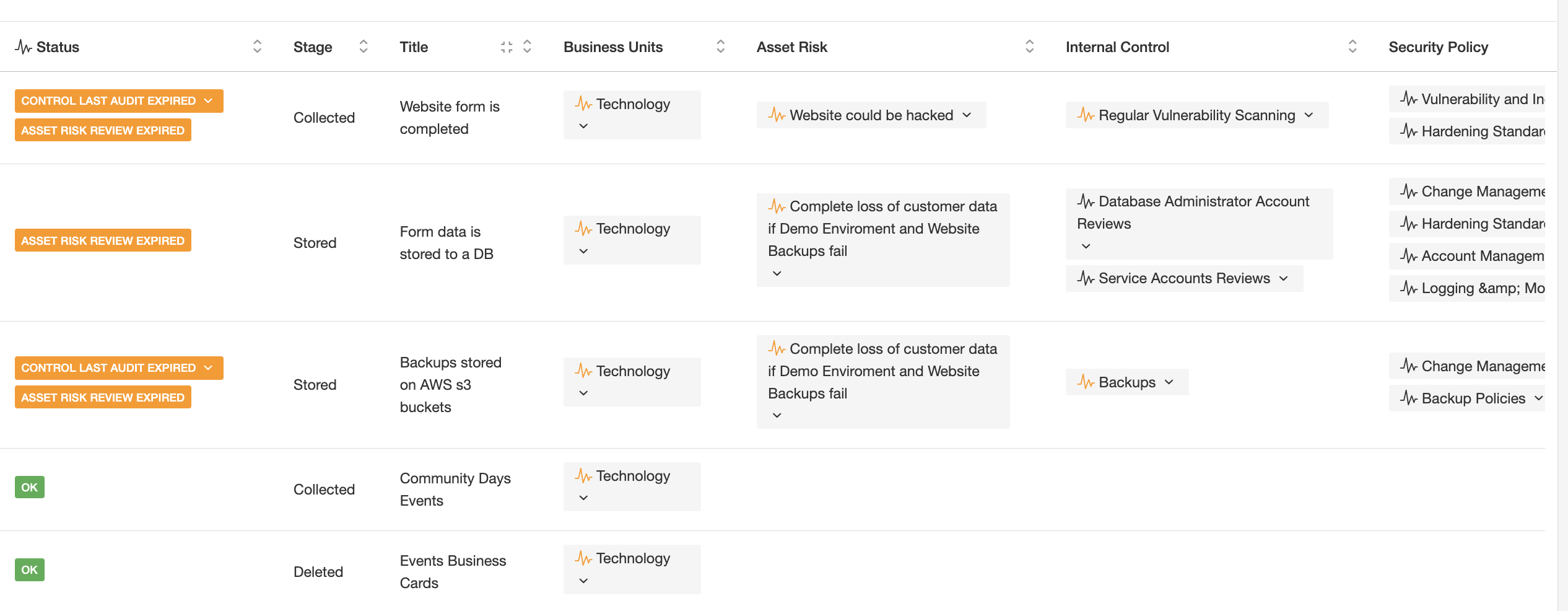
As you document data and how it flows and how is protected, you can also document GDPR specific attributes for each flow. We have laid out the regulation requirements on each field to make your life a little easier.
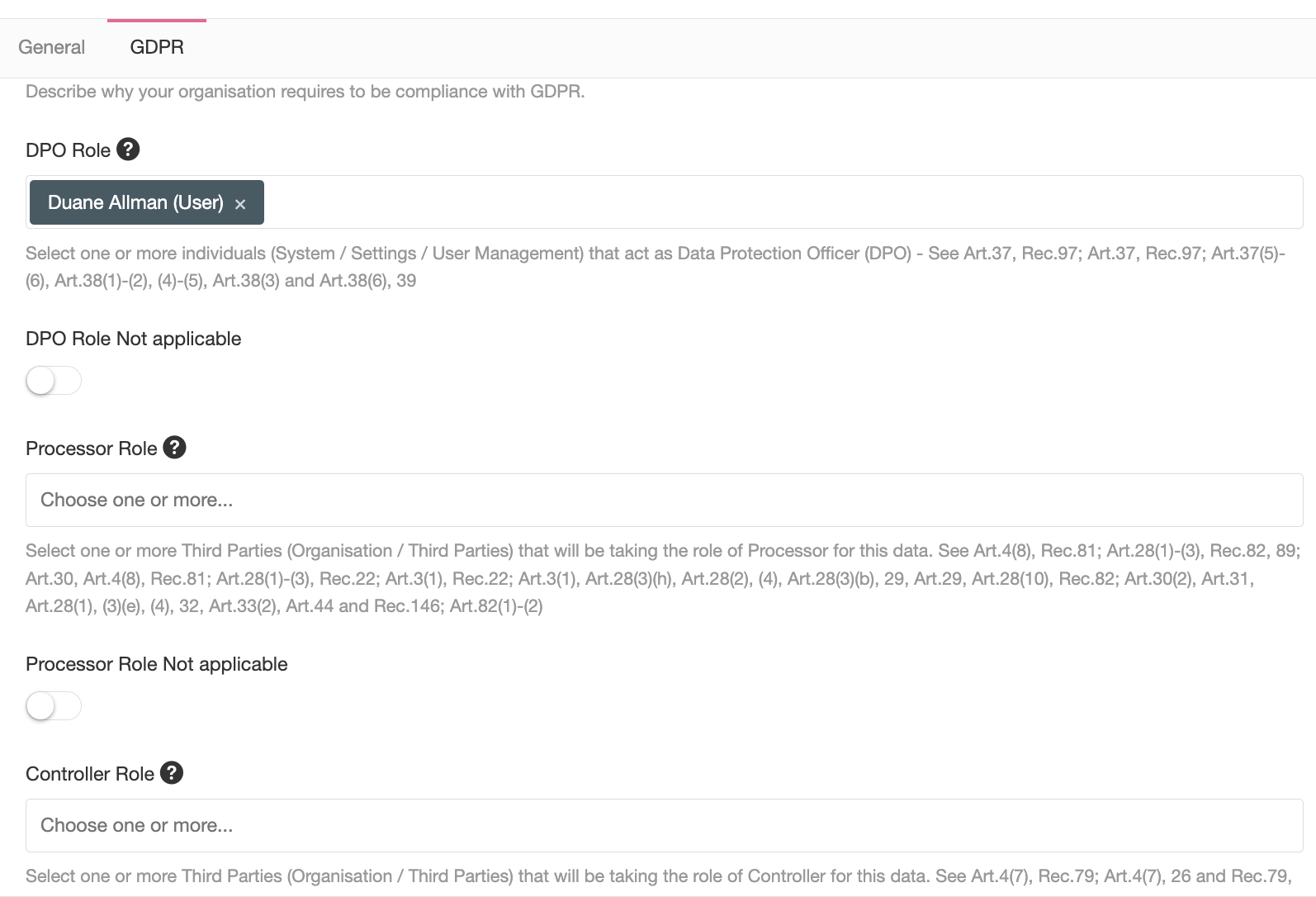
The module will leverage filters, reports, notifications and dynamic status to help you understand how your data protection evolves as your GRC operates.
Course Introduction
In this course, you will learn:
- What the Data Protection module can do for you.
- What modules interact with the Data Protection module and how each one of them work.
- How to implement the Data Protection module.
The Data Protection module is linked to other modules in eramba, and those links can be grouped in two:
- Some modules provide context to your Data Flows: Assets, Liabilities, Risks, Etc
- Some modules provide treatment to your Data Flows: Internal Controls, Policies, Compliance Exceptions, and Projects
Because these modules work with each other, you will need to understand them all if you want to use the Data Protection module. This course will explain how they work, and how they are implemented together.
Eramba uses a unified user interface on all modules, so learning how one module works will make all the others very easy to understand. Also, understanding the Internal Controls, Security Policy, Projects, and Exceptions modules will come in handy, as they are also used as “Treatments” on the Risk Management and Compliance Management modules.
As part of this course, you will also learn how to use common features that affect all modules in eramba:
- Notifications
- Filters
- Reports
- Custom Fields
- Dynamic Statuses
These features provide many ways in which you can make operational GRC much easier, less time consuming, and seamlessly extract important metrics.
Course structure:
- Introduce you to the Problem vs. Solution Principles
- Introduce you to the basic features of the Data Protection module
- Understand how “Treatment” modules work: Controls, Policies, Projects, and Exceptions
- Understand how “Context” modules work: Assets, Liabilities and Risks
- Implement the Data Protection module from scratch
Theory
Problem vs. Solution Principle
GRC is a management practice like Sales or Marketing, we all do it and we all do it in slightly different ways to accommodate our organization's circumstances: budget, resources, maturity, localization aspects, Etc.
eramba does GRC in a certain way and is important you understand what that method is so you can compare it with your methods and decide if this is a good fit or not.
eramba organizes its core modules in two: Problems and Solutions.
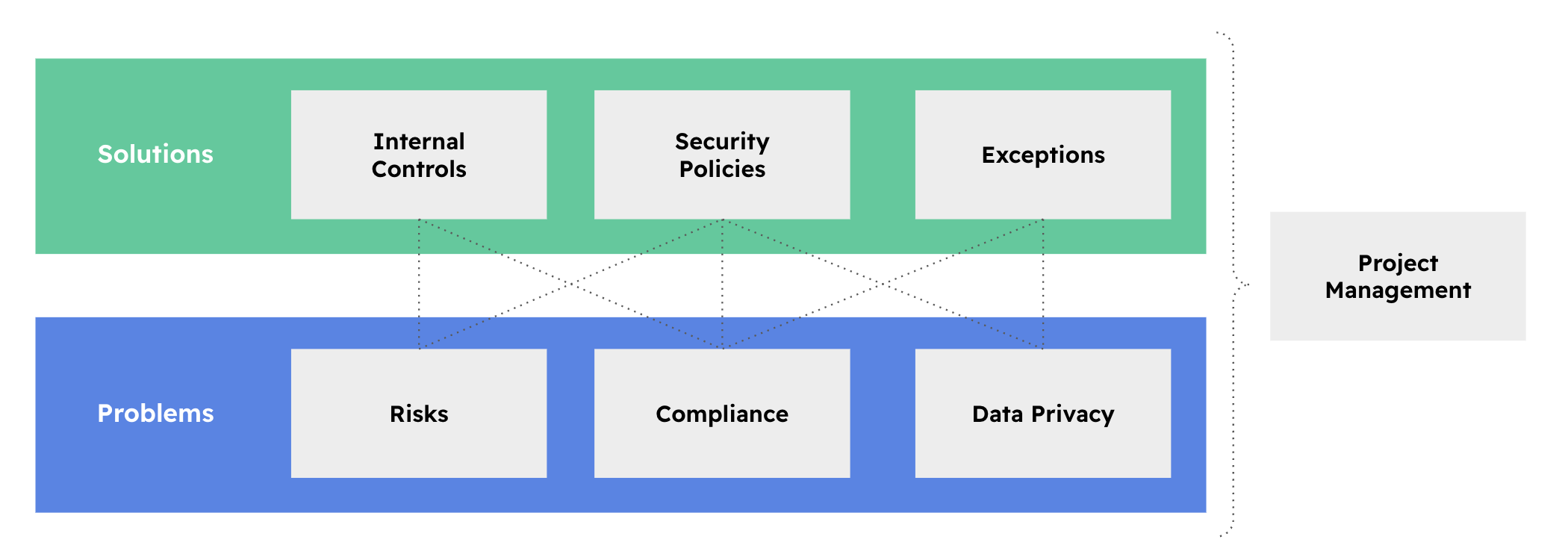
Problems (Blue) are:
- Things we need to be compliant with, for example, ISO 27001, SOX, SOC2, PCI-DSS, Etc
- Organization Risks
- Answering the question: How do we protect Data?
Solutions (in Green) are:
- Policies such as a Network Diagram, Encryption Standards, Security Procedures etc.
- Internal controls are activities such as Firewall Reviews, Laptop Encryption, Access rights audits etc.
When a problem has no available solution there are two options:
- Exceptions: if the organization decides it does not want to deal with the problem for the time being.
- Projects: are used when the solution is not available now but will be in the future.
The important thing to understand at this point is that you implement eramba by doing two very important things:
- First tell what problems your organisation has.
- Then for each one of these problems, ask yourself what solutions (Internal Controls and Policies) exist in your organisation. If there are no solutions what do you want to do next (Projects & Exceptions)
Reflecting Reality
When looking at the solutions and problems (compliance is the exception) is important to remark that we are talking about the actual solutions and problems that exist in your organisation. There are no templates for this.
For example:
- Everyone has an Internal Control called "End Point Encryption" because everyone is encrypting endpoints, but we all use different technologies, procedures, teams to implement them, Etc.
- Everyone has a procedure to provision and de-provision accounts to a system, but again while they will all look similar they will all be different.
- Everyone is subject to theft, but circumstances will be different again for everyone. The impact and likelihood will also be different.
In eramba we want you to reflect the reality of your organisation and there is no template for that. The only thing all organisations have are compliance requirements, things like ISO, PCI, Etc. The rest needs to come from you.
First Principle
The first principle in eramba is the one that states that for every problem there will be a solution.
- If an auditor asks you how you meet PCI requirement 1.1.1 (does that even exist?) you can simply follow the arrows "upward" to whatever solution it has associated.
- If someone challenges you as to why you need a Policy or an Internal Control, you can follow the arrows downward to whatever problem is driving the need for that solution.
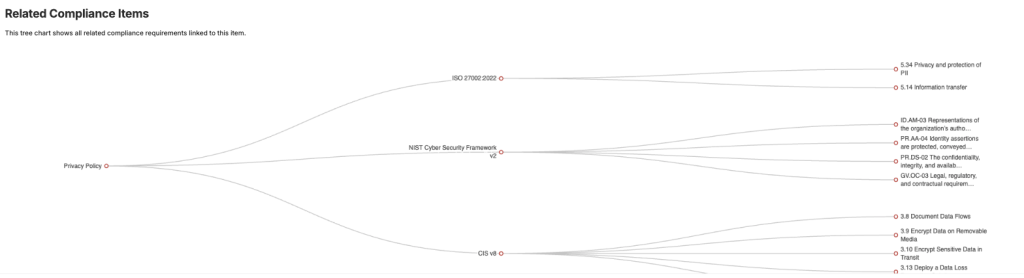
The chart below shows the typical chart eramba uses to depict these relationships. The Privacy Policy (in the policy module) is used to meet three compliance requirements from two different packages. The same report can be obtained for Risks, Controls, Projects, Etc.
Let’s review further examples:
| Problem | Solution |
| A risk scenario that describes the issue of laptops being stolen or lost. | An Internal Control that describes how end-point systems are encrypted and have access controls using strong authentication. A policy about Endpoint encryption and a procedure on how the job is carried out on each laptop. |
| The data flow describes how customer data is downloaded to laptops to make a report. | The solutions above could be reused in this scenario. |
| Compliance requirement 3.4.1 from PCI-DSS. | The same control mentioned above can be reused for this problem. We could upload an encryption standards policy onto the system too and link it to the control and compliance requirements. |
| Compliance requirement 5.1.1 from ISO 27001. | Information Security Policy uploaded on the system. |
Leverage
Is not that complicated for any organization today to have 500 or more problems. PCI has 260 requirements, and ISO some 150. Add to that 100 risks and 100 data flows you could easily be in the 500 problems range.
If you have 500 problems you do not need 500 solutions because solutions will be re-used across your problems multiple times. The agreed leverage in the community says that for every solution you will address anywhere in between 5 and 15 problems. An example of this situation is demonstrated in the table above.
Second Principle
As shown in the diagrams below (yes, you will see this diagram pretty often in eramba), we think of GRC as an ecosystem.
Whatever happens to your solutions, your problems should be affected. If a solution is not really implemented, is not working, is partially working, etc. that should reflect in your problems because perhaps that is not even a real solution.
Say you have a problem, a risk, that your "Website could be hacked". You created the Risk and then you document that the solution to that problem is an Internal Control called "Vulnerability Scans" where a scan runs every checking for potential issues. So far you have completed the first principle (problem and solution).
Now imagine, that someone forgot to perform audits on that Internal Control and your website gets hacked. People will think you are not aware of what is happening (to put it politely) in the organisation and this is of course very unprofessional. If you claim there are solutions, then they should be there. If they do not work you should also know.
To avoid this situation we have the Second Principle which is all about the "Status" of everything, in particular your solutions.
- Projects, Exceptions and Policies have mandatory deadlines for review. If you don't do them on time they will get a "Yellow" status.
- You can (optionally) describe a testing methodology and calendar for your Internal Controls. If you don't test on time they will get a Yellow status. If the testing fails, they will get a Red status.
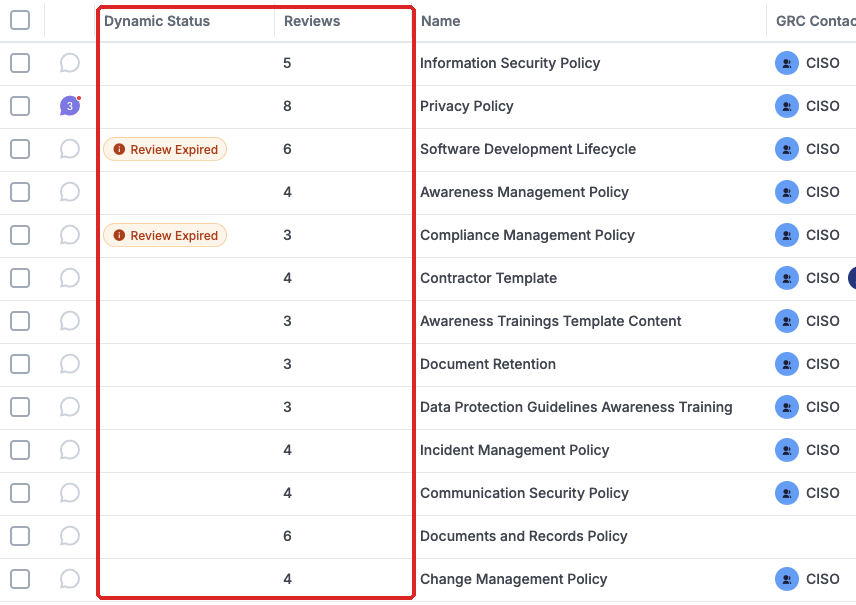
The screenshot above shows clearly policies with their reviews and the labels that tell us which ones are okay and which ones are not. The same applies to any module in eramba.
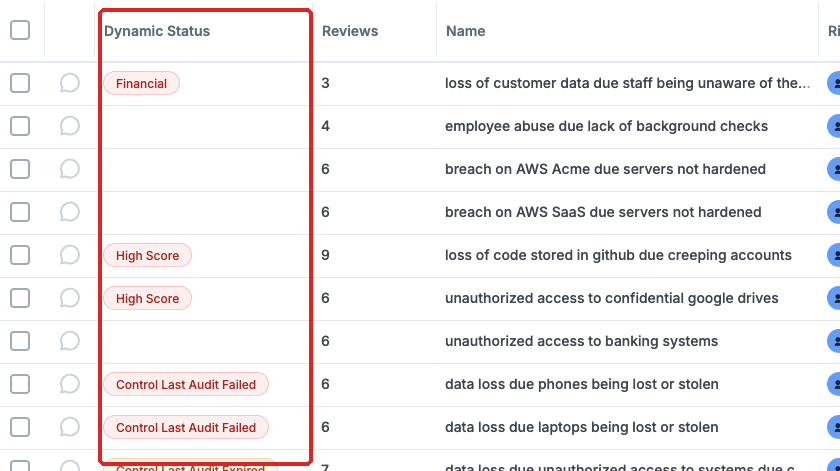
Is only when all is reviewed on time and passed that labels are green. If any "Solution" gets a "Yellow" status, whatever problem will inherit that status as well. The Risks shown in the screenshot below clearly show those labels.
Using the Second Principle is very easy to tell:
- Am I compliant with PCI?
- Are these Risks mitigated?
Remember everyone can tell there are solutions, but most can not diligently prove it.
Data Protection Module Tabs
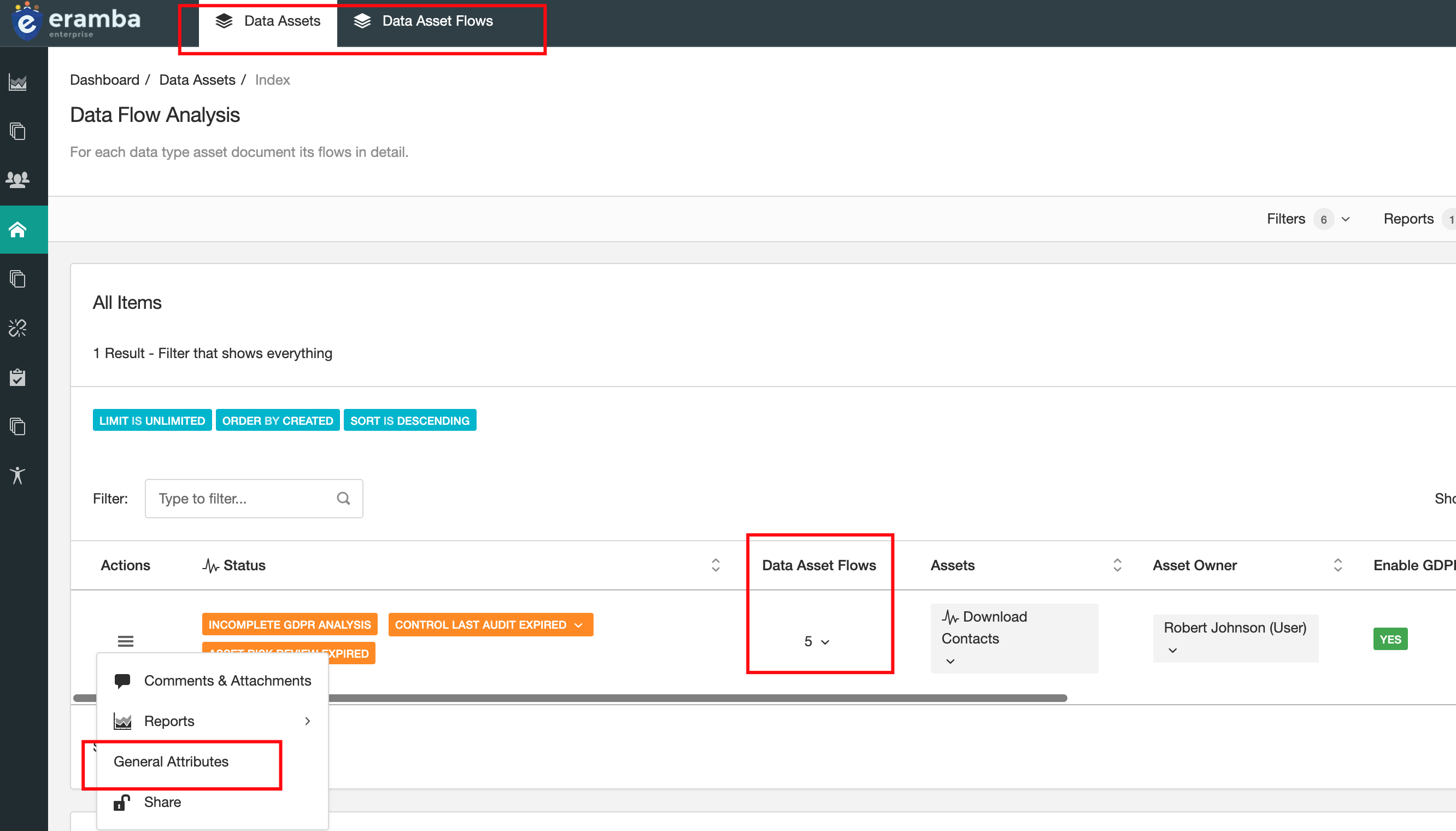
The Data Protection module has two tabs, “Data Assets” and “Data Assets Flows.
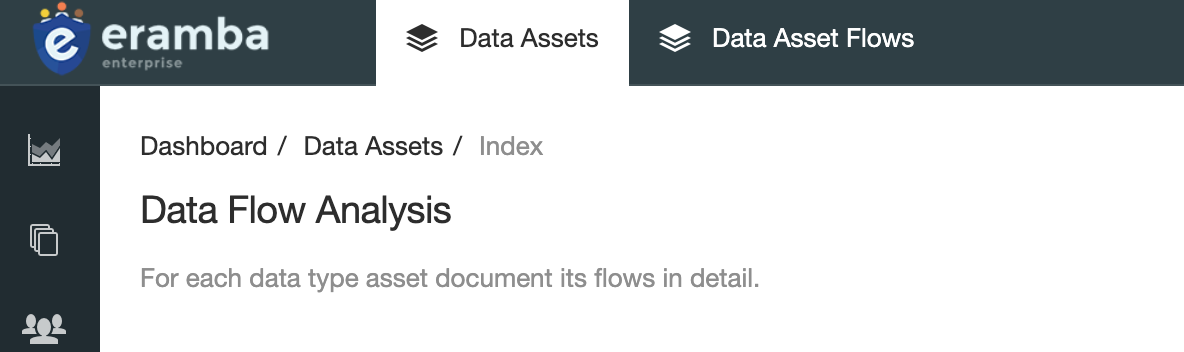
The “Data Assets” tab is the parent tab and place where your assets (those typeed as "Data Assets") will automatically show. This is meant to be assets that hold data, such as: Invoices, Personal Records, Credit Card data, Etc.
Each Data Asset has one or more flows, these flows are stored under the child tab "Data Assets Flows". A flow is a description of what happens with that data when is collected, transmited, stored, discarded, Etc. Typically a data asset will require many flows in order to acuratelly describe its lifecycle.
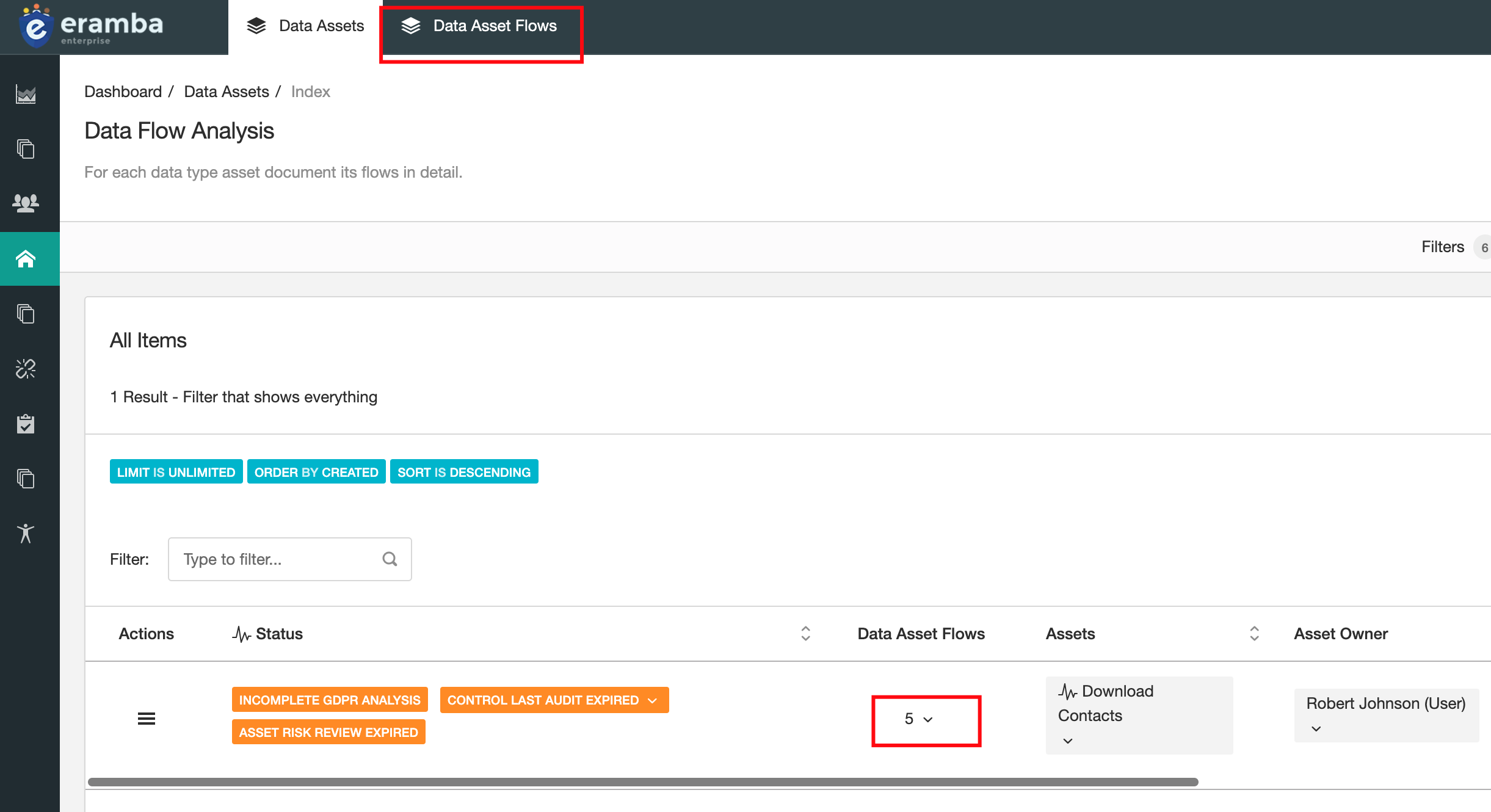
Each data asset has a shortcut to its “flow” records; you can see the number of flows next to the title of the document.
Clicking on the number will provide a direct link to the “Data Asset Flow” tab with a filter that shows all flows linked to that particular data asset.
Assets, GDPR and Flows
Before continuing, review the Business Units, Assets and Third Parties documentation.
Data Protection is made of two components:
- Assets: this is the data that moves around your organization, in the context of Data Protection they come from the Asset Management module.
- Data Flows: for every asset you will have one or more data flows, they describe how data moves around the organization.
We will describe how these two modules work together as their relation is required in order to use the Data Protection module.
Asset Management
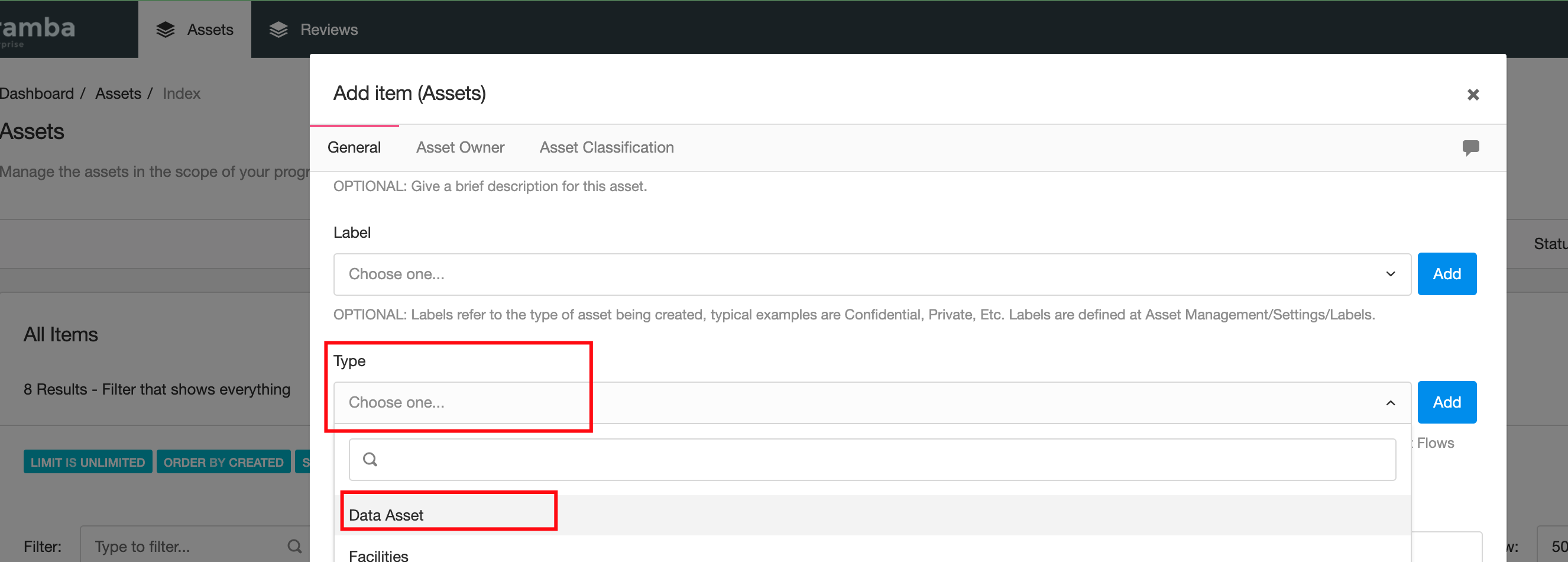
When you create an asset at the "Asset Management" > "Asset Identification" module you can specify the type of asset. If you want to use an asset in the "Asset Management" > "Data Protection" module then you need to set the type of asset to "Data Asset".
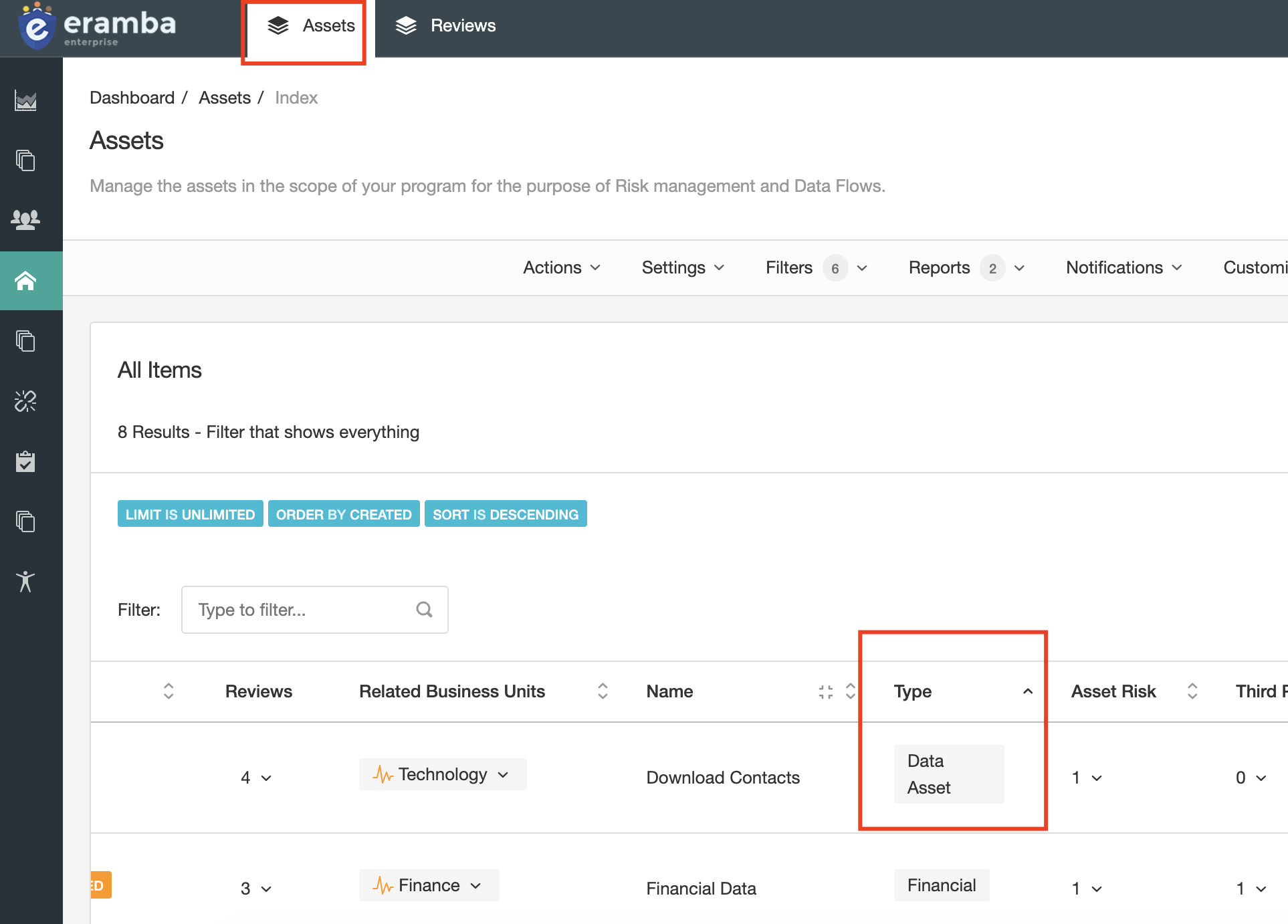
Only assets of that type will show under the "Data Protection" module. Once the assets show in this module you can start describing the attributes of the asset in the context of "Data Protection".
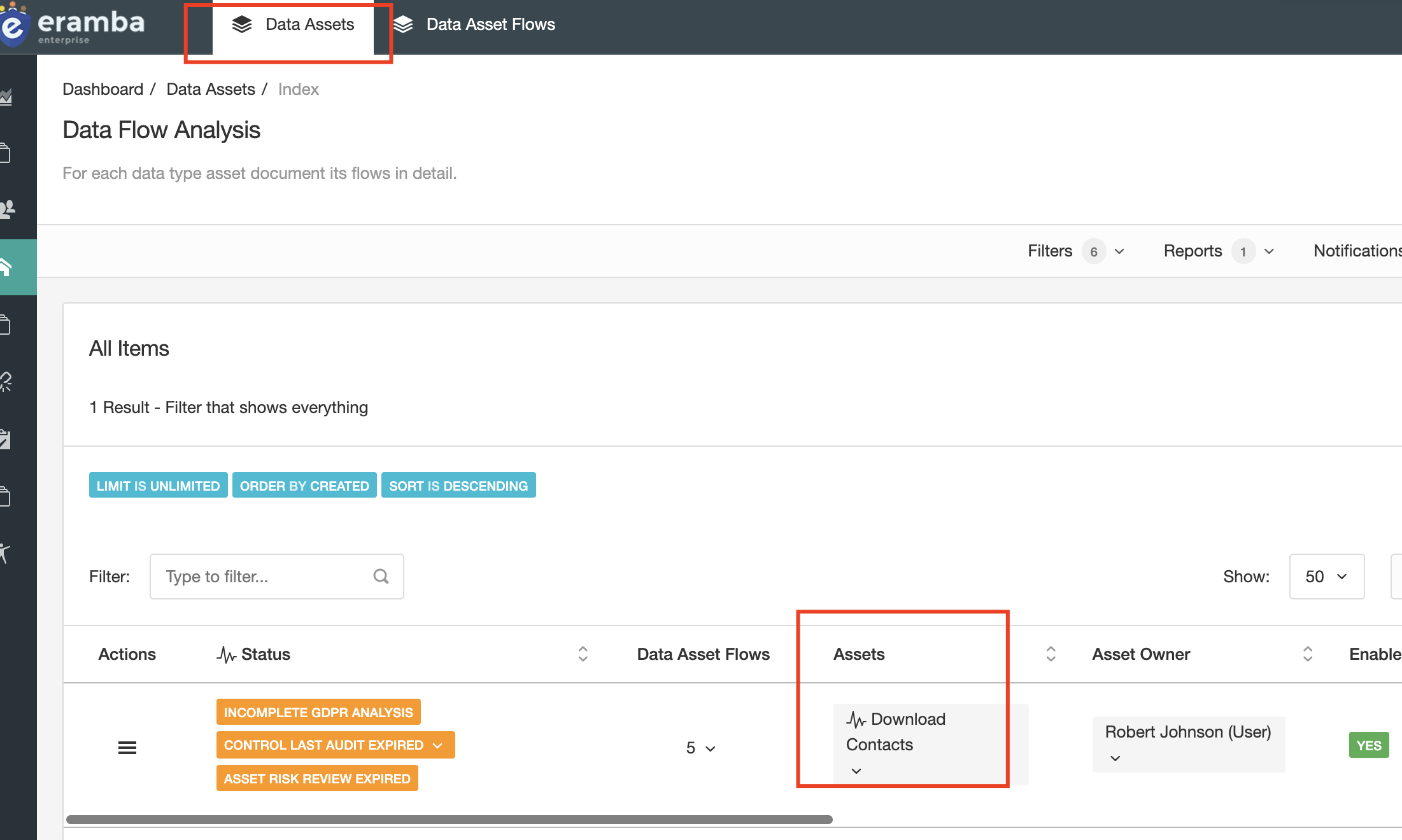
General Attributes and GDPR
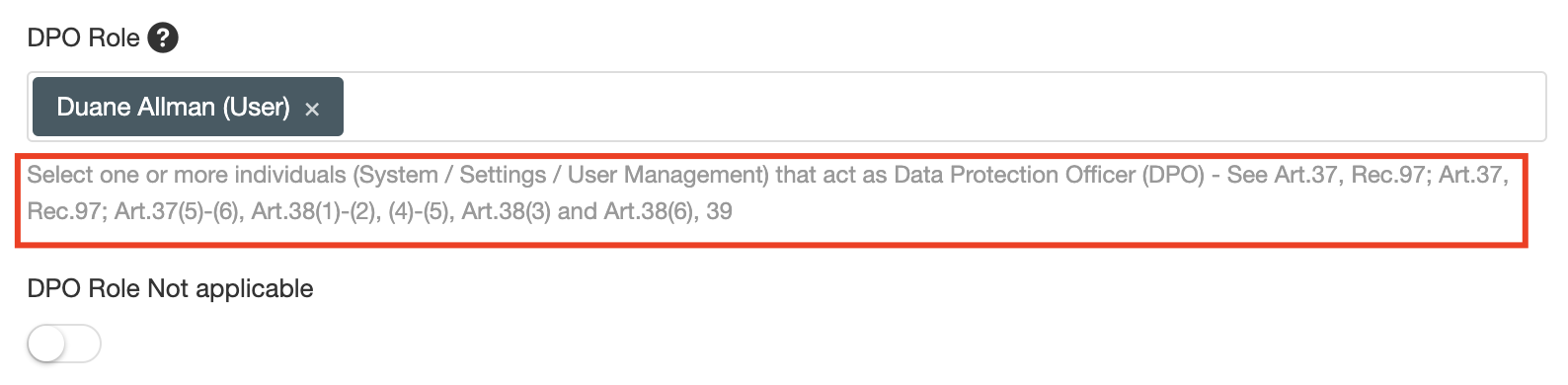
Under the "Data Protection" module you can click on "General Attributes" and provide further context on this asset, in particular in relation to GDPR.
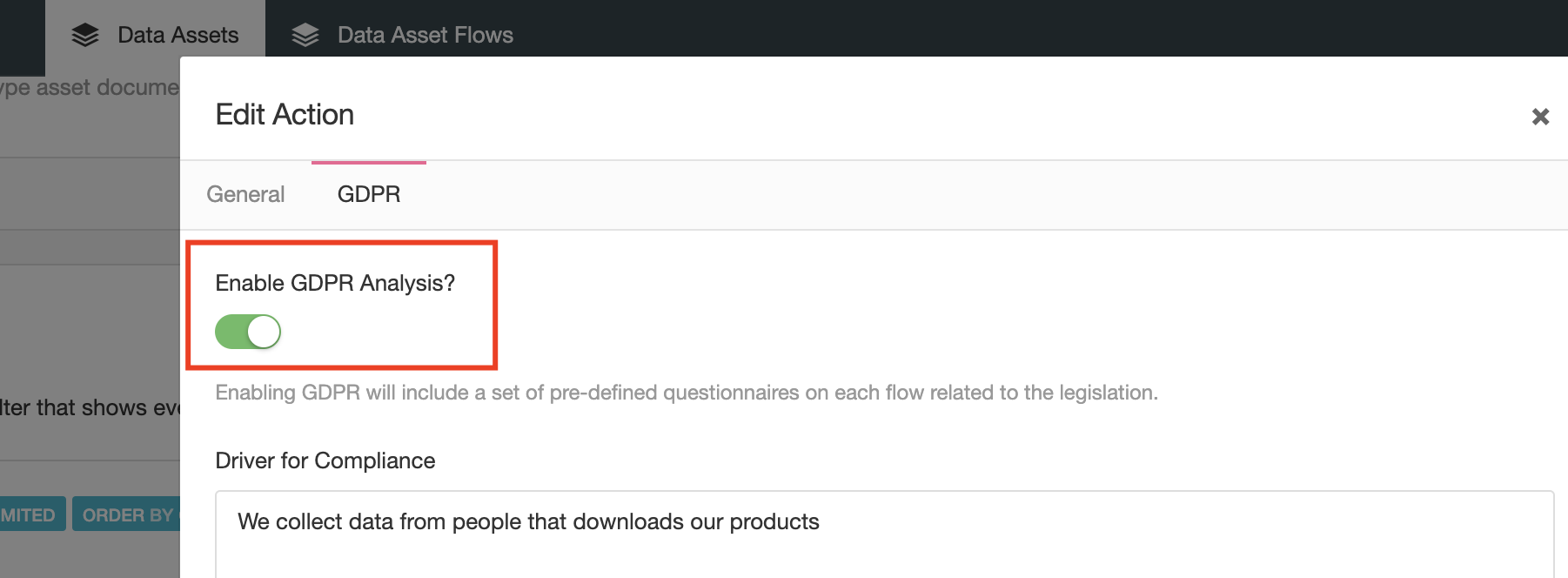
The form will ask you different mandatory (based on the regulation) attributes you must understand and document if you want to be compliant with the legislation. There are helper texts with extracts of the legislation that will make it easier for you to understand what is expected from you.
Data Flows
Each Asset will have one or more data flows - data flows describe how data moves across the organization, there are types of flows:
- Collect: how data is collected, using online form, paper format, Etc.
- Modified: how data is modified, by whom, Etc.
- Stored: where and for how long data is stored.
- Transit: how data moves around, over courier, networks, Etc.
- Deleted: how data is discarded.
Is perfectly normal to collect the same data in three different ways (For example: digital, paper and verbal) so dont be surprised if you find yourself in the situation where multiple flows of the same type exist.
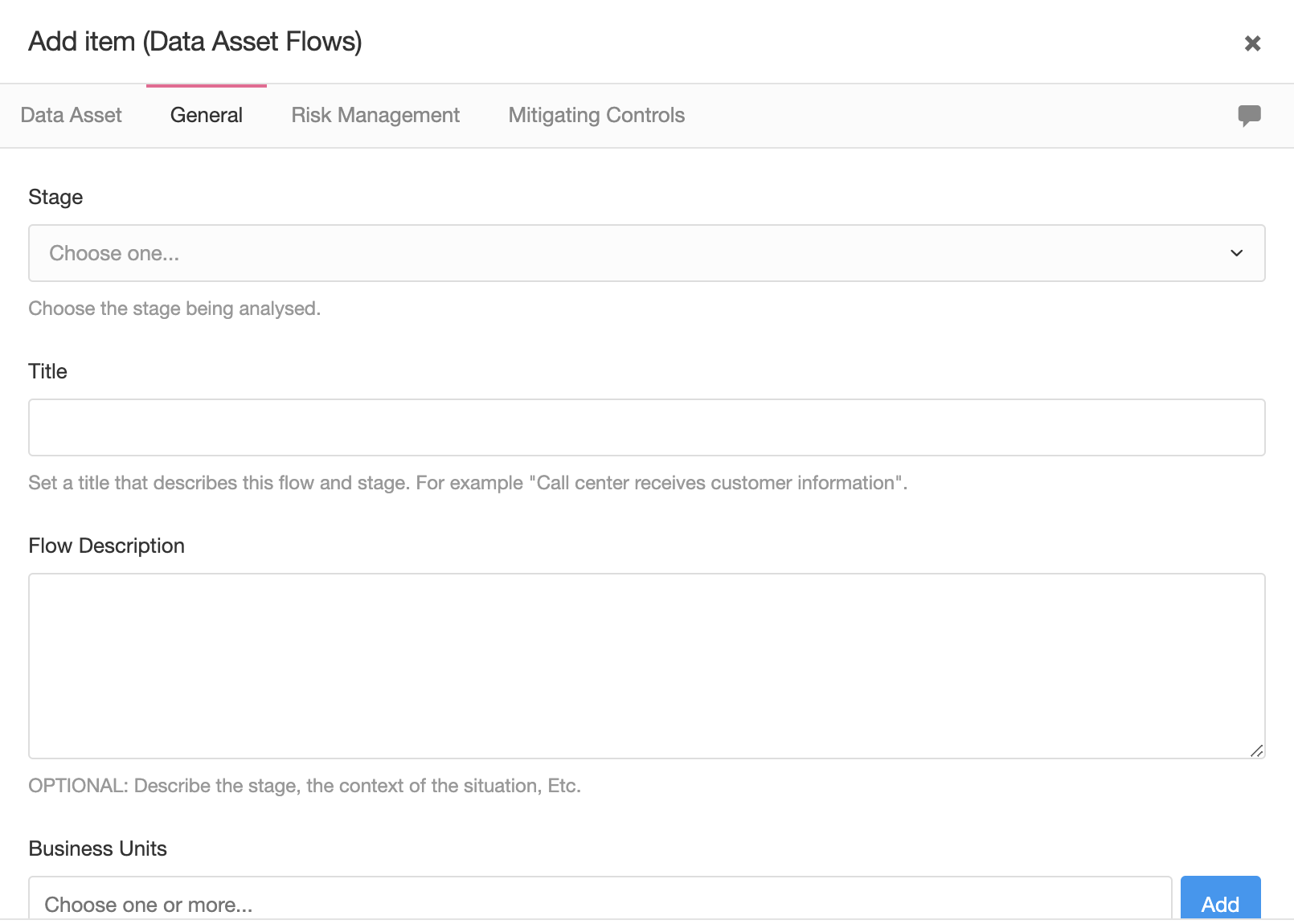
For every flow you will also describe:
- Which Business Unit is involved
- Which Third Party
- What Risks exist
- What Control are used to mitigate
- What Projects, Policies, Etc
If you have enabled GDPR under the "General Attribute" tab, then for every flow you will also have GDPR related attributes to complete.
Implementation
Prerequisites
Before implementing eramba you need to understand how it works. Sounds logical right?
Unfortunately, we see many people going cowboy style trying to figure out eramba by clicking things without understanding much of the end game. This, without exception, leads nowhere.
In this episode, we explain in which order you need to use the documentation and a few implementation tips to ensure you successfully implement eramba.
Learning Tips
We recommend that you stick to the following advice:
- Always read the entire documentation and make sure you understand it before implementing eramba
- If you do not understand something (is very very common and totally ok!) - ASK support@eramba.org if you are an enterprise customer or the forum if you are a community user.
- Is a great idea to "play" as you read the documentation: create a dummy control, policy, review, etc but do not consider that as part of your implementation.
- Do not skip episodes.
General Prerequisites
Before you start with the Risk, Compliance or Data Flow modules you need to complete the following courses in the order described below. This will take around 5 hours of your time.
Once you complete all these modules come back here and continue with this episode.
- User Interface
- Filters
- CSV Imports
- Customization (enterprise customers only)
- Reporting (enterprise customers only)
- Notifications (enterprise customers only)
- Dynamic Status (enterprise customers only)
- Access Management
With the exception of Access Management, do not attempt to implement any of those modules. For now, all you need to do is understand more or less how they work.
In regards to access management, we suggest that you, at last, do the following:
- Create an account for yourself with admin rights
- Setup your prefered authentication method
- Setup groups for every department in your organisation
Use Case Prerequisites
Once you go through the "General Prerequisites" you need to complete courses based on your use cases. Once you complete all these modules come back here and continue with the next episode.
Compliance Management:
Risk Management:
Data Flows (GDPR) Management:
Data Protection Related Modules
Before continuing, review the Business Units, Assets and Third Parties, Policy Management, Internal Controls and Project Management documentation.
As mentioned in the previous episodes, the Data Protection module requires "solutions" and therefore is mandatory you understand how this other modules work. You can now take a pause in this course and begin instead learning how this related modules work before you continue.
Related Modules
You need to ensure you complete the following courses before continuing:
- Asset Management (mandatory)
- Policy Management
- Internal Controls
- Project Management
and optionally
- Risk Management (which will also require the courses mentioned above)
The first three will also be helpful for Risk and Compliance Management modules, so all this knowledge will be leverages still in other main courses in this platform.
Implementation Steps
Before continuing, review the Access Management documentation.
The Data Protection module requires multiple modules in order to be used: BU, Assets, Controls, Risks, Policies, Etc. For that reason alone preparation is key. We recommend you go trough the training in detail and also complete all related courses, these course are also used on the Risk and Compliance module so the investment will later be leveraged.
Once you have completed all courses you can begin the implementation. If you have already implemented the Asset Risk Module your assets, controls, Etc will most likely be already on the system and the implementation will be easier. If you have not implemented yet the Risk modules do not worry and simply go ahead by:
- Ensure your Access Management implementation is completed (see course)
- Identify Business Units and their associated owners or representatives
- Trough interviews, document the assets they use and how they move around the organization. You can already create the assets and data flows (only the stage and title fields) at this stage.
- For every stage you create, identify any Third Party involved (and create it in eramba), Controls, Projects and Policies used to protect the flow. You can go ahead and create them. If your organization is not used to Control Testing we recommend you leave the "Audit" tab for later.
- Flows can be linked to Risks, we do not recommend you do that unless you have already implemented your Risk module.
Optionally, at the stage when the assets are being identified you could (and should) review GDPR aspects around them. You will use that information when flows are created.
Adding Assets to the Data Flow Module
Before continuing, review the Business Units, Assets and Third Parties documentation.
We will now explain how to add assets to the "Data Protection" module and how you can optionally configure these assets "General Attributes", these attributes are related to GDPR in the sense you can define GDPR related attributes to them.
Adding Assets
In order to use this module you will need to add assets to the "Asset Management" > "Data Flow" module, you can do that by first creating an asset in the "Asset Management" > "Asset Identification" module (review the Asset Course on how this is done) - important! make sure these assets are of "Type: Data Asset". Only assets of type "Data Asset" will be shown on the "Data Flow" module.
General Attributes
Once the asset is created it will be displayed on the Data Flow Module, bear in mind this module has two tabs one where the assets are stored and one for the assets flows. On every asset you can click on the item menu and access its "General Attributes" where two main things can be documented:
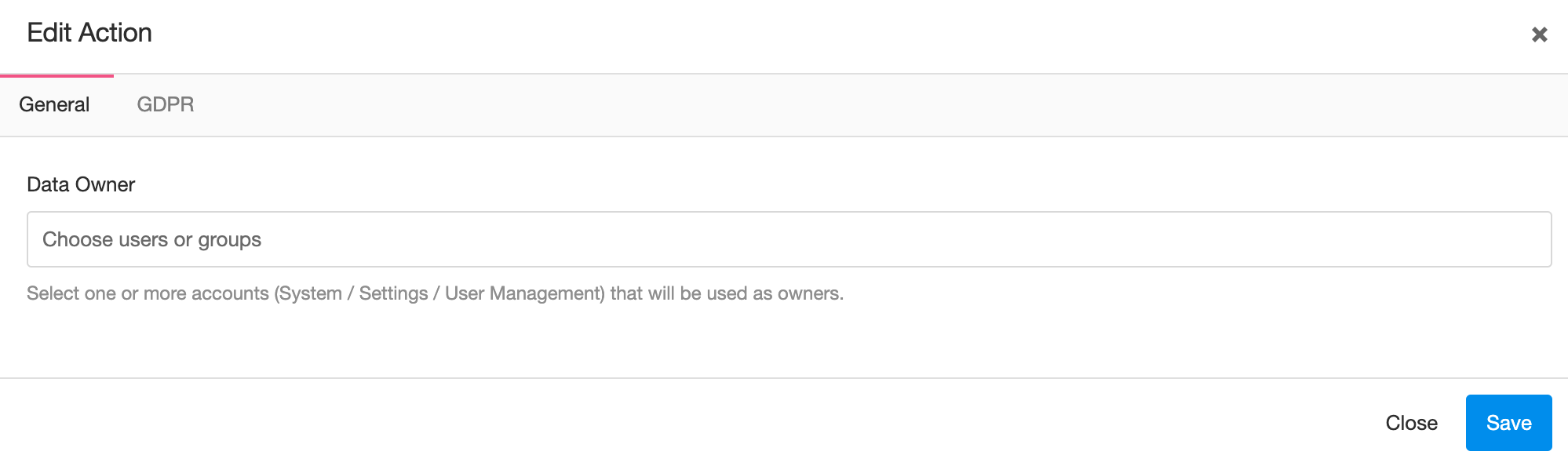
- The asset owner (which is helpful for notifications)
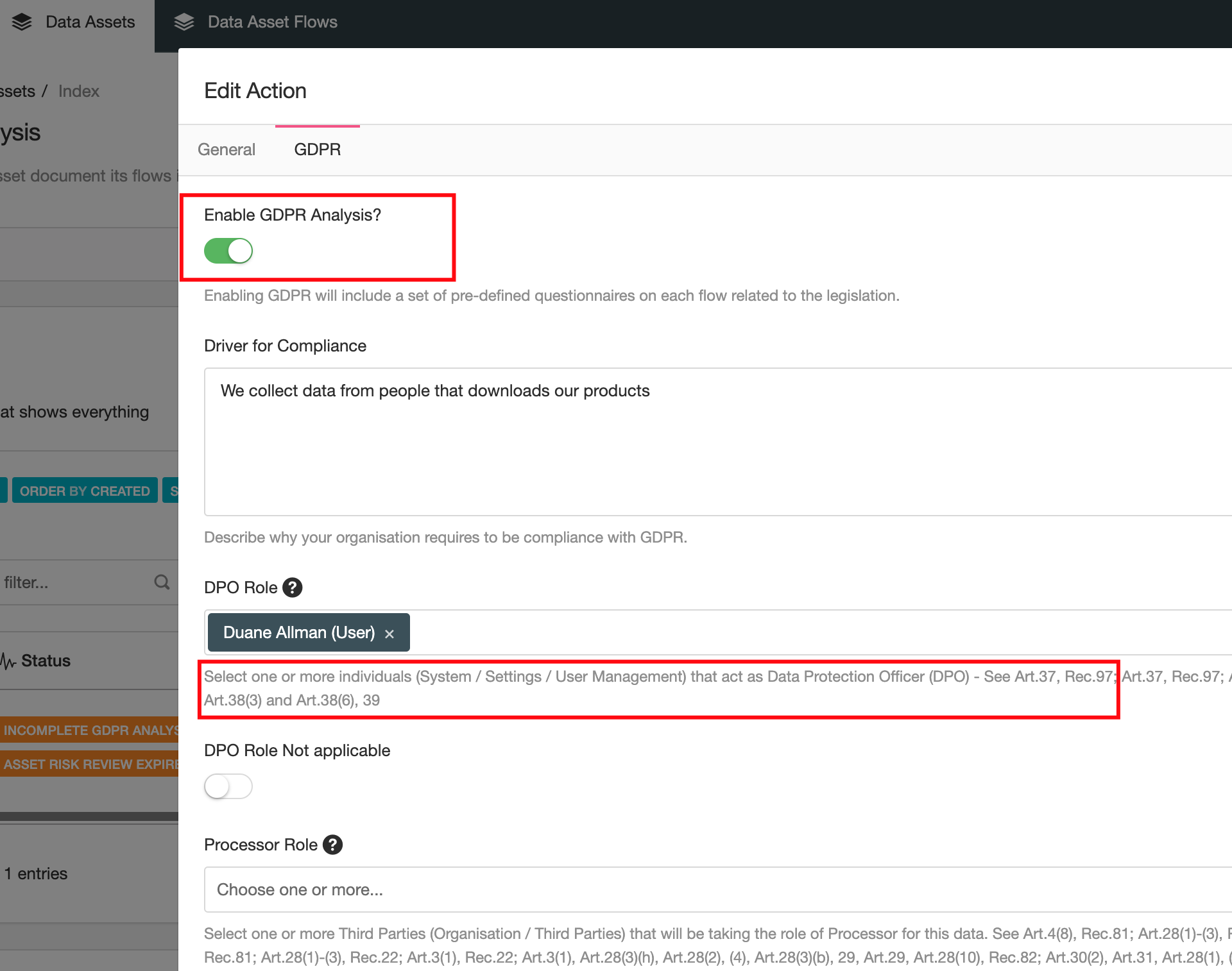
- Enable or Disable (by default is disabled) GDPR attributes for this asset
We recommend you assign users or/and groups to the Data Owner as you will most likely end up emailing this role when flows are added, modified or their status changes.
From a GDPR perspective you can also enable (by default is disabled) the GDPR menu which will let you configure different GDPR related attributes for this asset such as DPO, Processor Role, Etc. Enabling this field will also enable additional GDPR related attributes on each of the flows you will later create for this asset. We have included references to the legislation for each field in order to help you understand why the field is required from a legislative perspective.
Once you have defined your assets and the general attributes you can move on into creating flows that describe how this assets moves around the organization.
Creating Data Flows
Before continuing, review the User Interface documentation.
To create a data flow go to the "Data Asset Flow" tab, click on "Actions" and then "Add". This will open a window where the new data flow can be described in more detail.

You will first have to choose the "data asset" were you want to associate the new flow. Once you selected an asset the modal will change and show you four additional tabs:
- General
- Risk Management
- Mitigation Controls
- GDPR (optional)
The fourth tab, GDPR will only show if the asset "General Attributes" has the GDPR toggle enabled.

While most fields are pretty self-descriptive, we'll provide some guidance on some of them:
- Stage: you will have to select from a dropdown the stage for this flow, your options are: Collect, Modify, Store, Transfer or Delete. You need to select which part of the data asset lifecycle you are documenting.
- Title: you need to provide a descriptive title for this flow, something that explains what the flow is all about.
- Business Units: you should have created Business Units before using the module. The reason for them to be linked is to explain who in your organization is related to this particular flow.
- GDPR Tab: it will be mandatory to complete all fields on the GDPR tab if you toggled the option under "General Attributes"
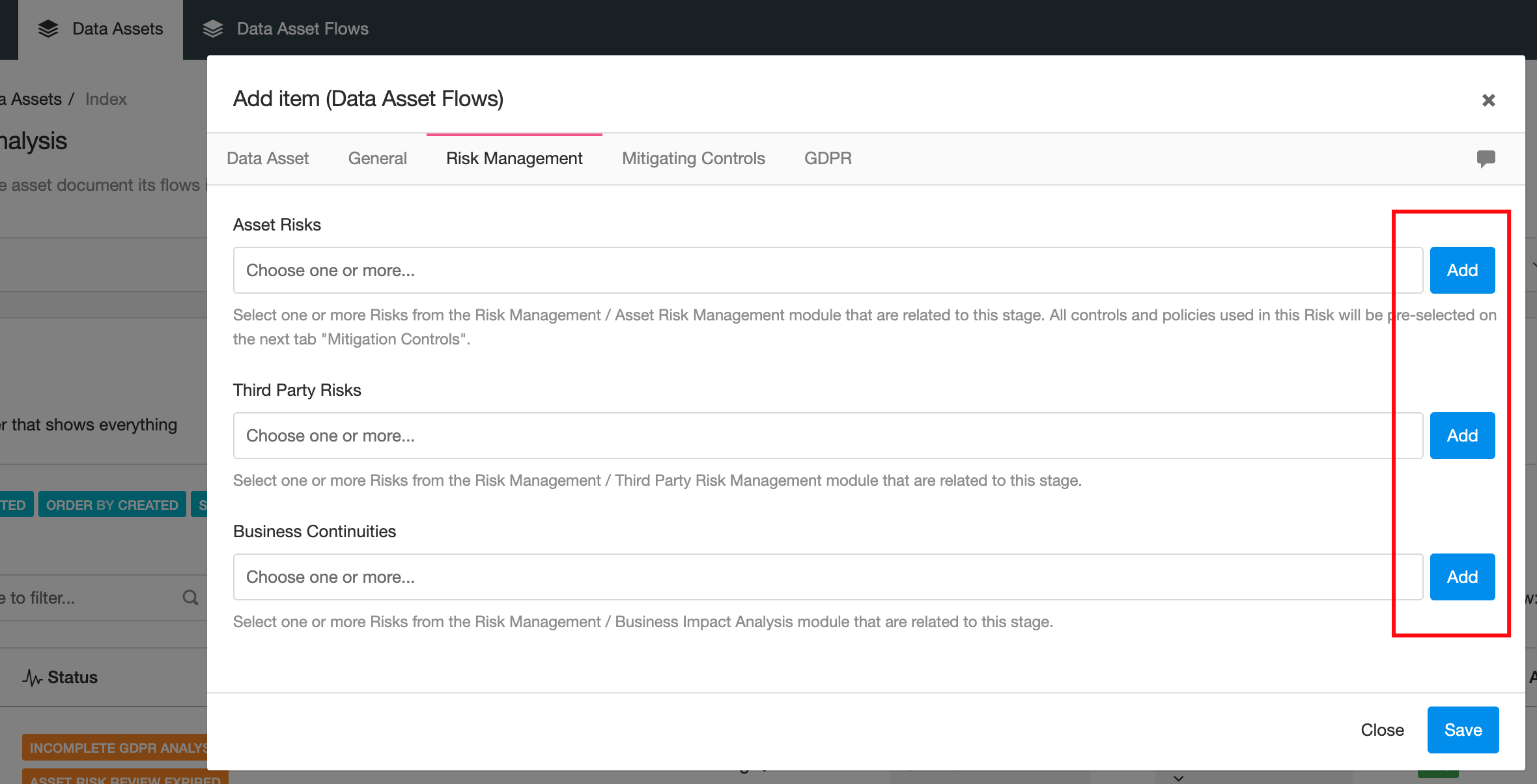
Optionally under the Risks and Mitigation Tab you will describe what Risks and controls exist around it. As you can see you will need other modules to provide context to your flows and for that reason you need to understand how other modules works in eramba.
As you create flows you can use the "Quick Add" shortcuts, these buttons next to the fields will allow you to create Risks, Controls, Policies, Etc.
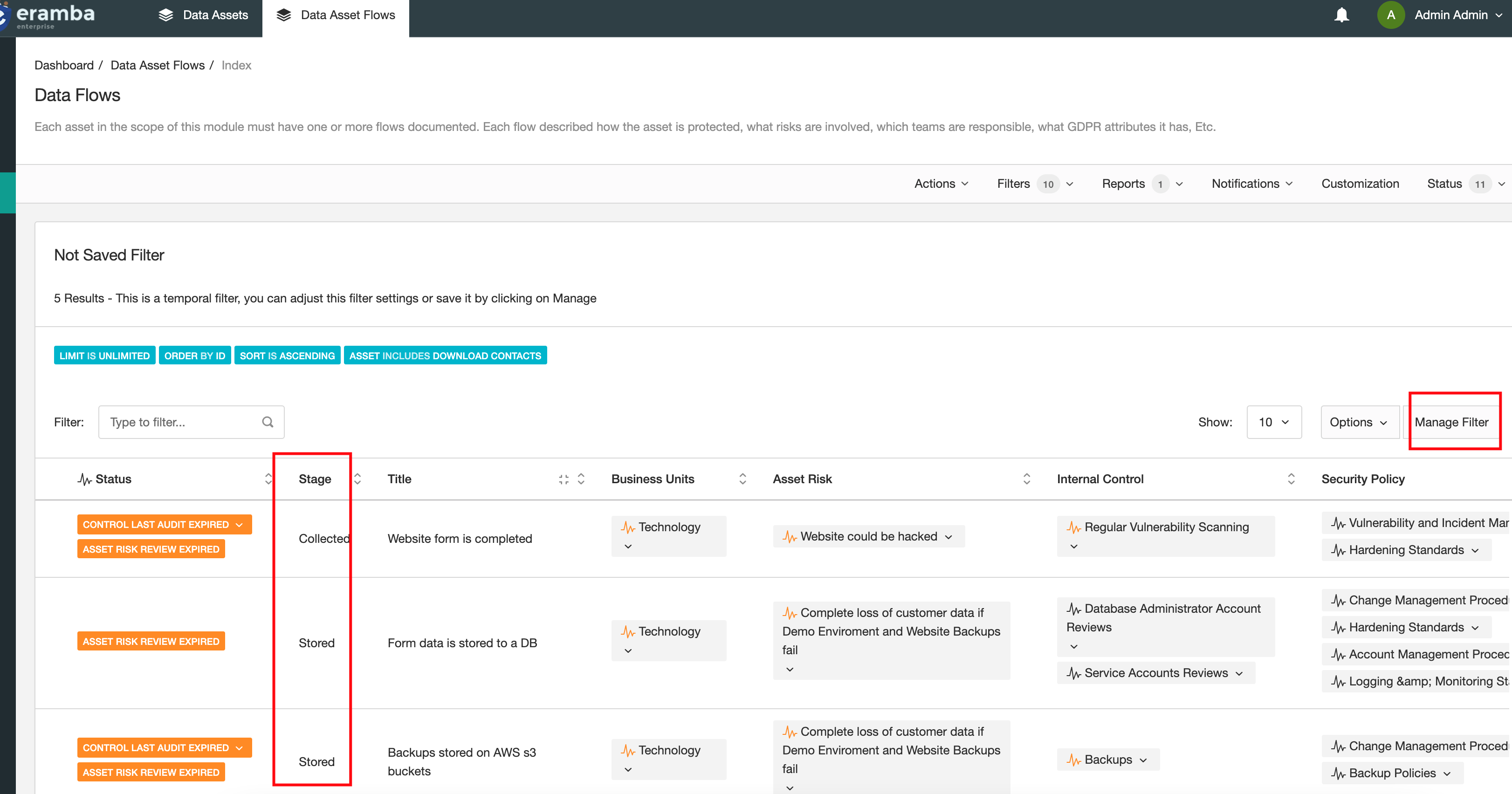
As flows are created you will describe in more detail the Data Asset lifecycle, do not forget to adjust the columns you are displaying (using Manage Filter) to tailor the view to your needs.
Typical Filters
Before continuing, review the User Interface and Report Notifications documentation.
Filters allow us to query data in eramba and show it as a table. Please review the Filter course for in-depth training on how to create your own filters. Remember filters apply to all tabs in this module: Assets and Asset Flows.
Default Filters
While eramba comes with some default filters already defined for you (All Items, Etc) you can also make your own filters (review the Filter documentation).
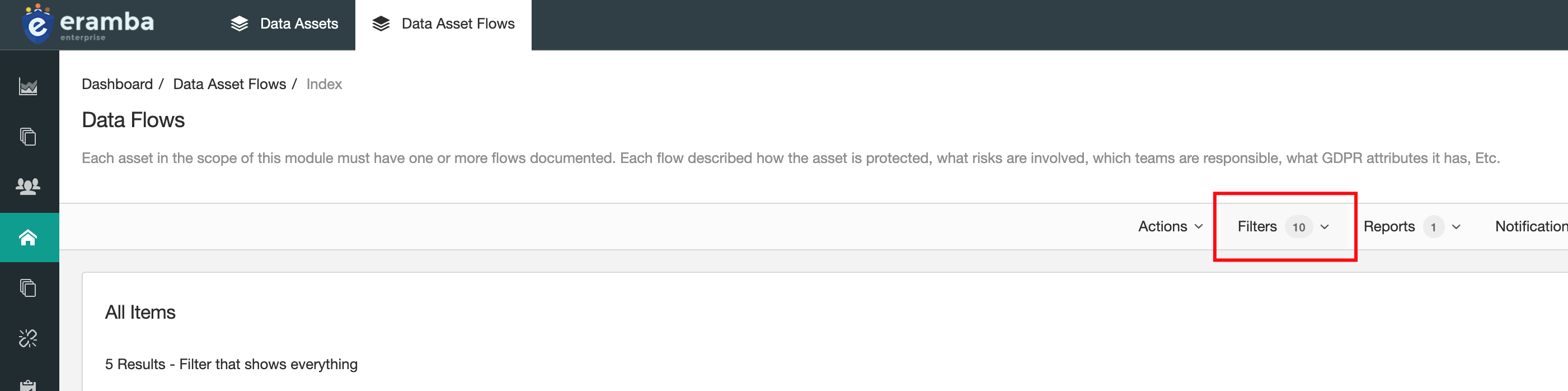
The following filters are typically useful in this module:
- Data Assets
- Incomplete Analysis.
- Assets used in GDPR that have flows with Controls Issues
- Data Assets Flows
- Flows with Controls that miss testing
- Flows with Policies that miss testing.
- Flows that have no Controls or Policies.
Sending Filters as Regular Notifications
You can send default filters (or any filter that you create and save) over email in regular intervals. For example, you could send the filter “Policies with Reviews Due in the Next 14 Days” every week to your email in either CSV or PDF format.
To do this:
- Go to the tab where the filter that you want to send is saved.
- Click on “Notifications,” “Reports,” and then “New.”
- Select “Send Scheduled Filter.”
- Write a name for this notification.
- Select the saved filter that you want to send over email.
- Choose CSV or PDF.
- If you toggle “Skip Empty Results,” no email will be sent if there are no results. Otherwise, an empty CSV or PDF will run.
- Set how often you want the email to be sent. For example, 1 means every second day.
- On the Recipient tab, select under Users the recipients for this notification.
- Under the Email Body tab, adjust the body and subject to something that works for you.
- Save.
Note: Visualizations do not apply to filter report notifications.
Typical Reports
Before continuing, review the Graphical Reports and Report Notifications documentation.
Reports are dashboard templates used to explain eramba in a graphical way. While most modules ship with default dashboards you can still build your own dashboards using graphical, charts, filters, tables widgets. For more information review the Report Course in our learning platform.
Default Reports
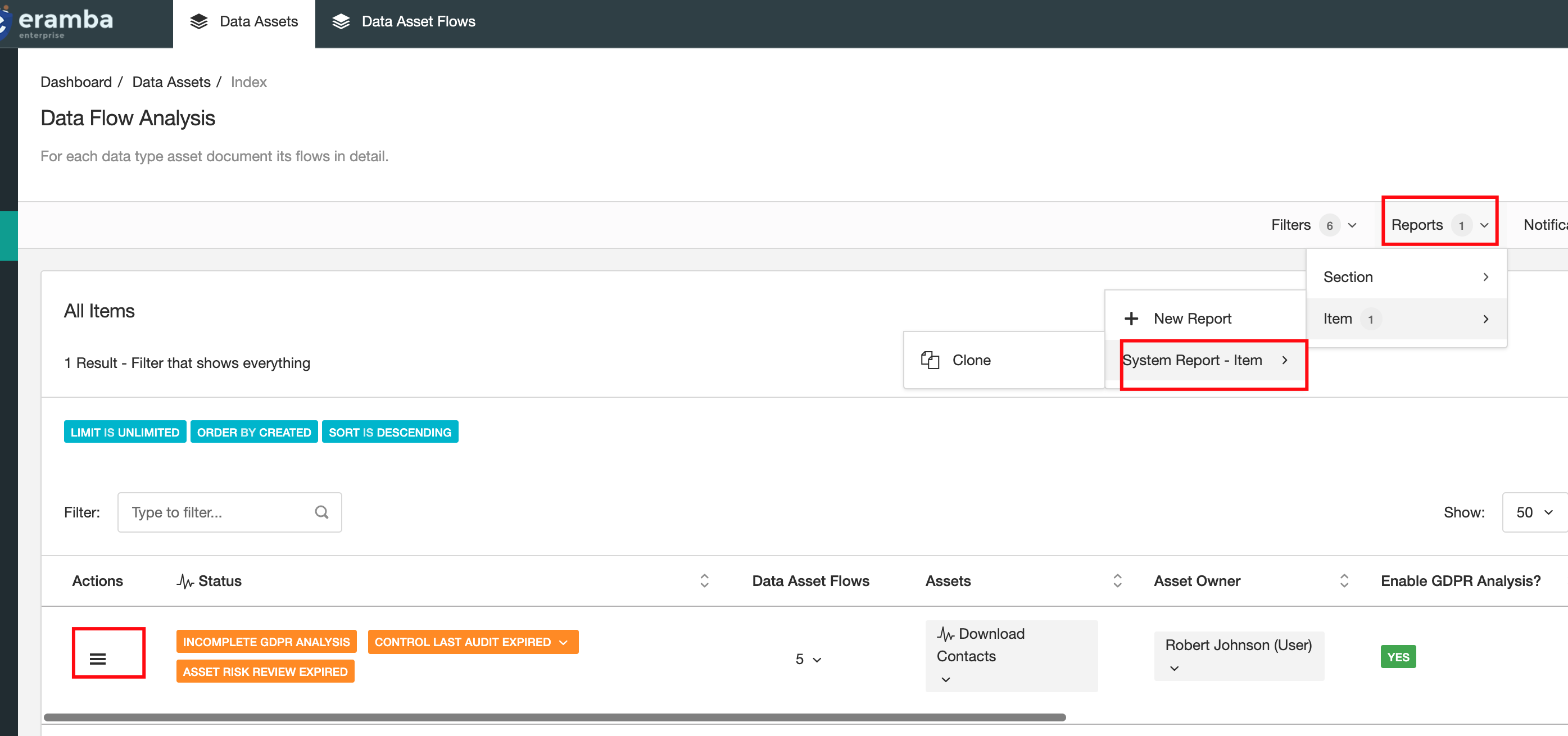
Eramba ships with one default report types (Item) under the Data Flow tab. While there aren't default reports on the Data Asset Flows tab, you can always create your own.
You can access these reports from the top menu bar under “Reports,” and then click on “Item” or “Section.”
Send Reports as Regular Notifications
You can send reports over email in regular intervals. This functionality only applies to “Section” reports.
To do this:
- Go to the tab where the report that you want to send is saved.
- Click on Notifications, Reports, and then New.
- Select “Send Scheduled Report.”
- Write a name for this notification.
- Select the saved report that you want to end over email.
- Set how often you want the email to be sent. For example, 1 means every second day.
- On the Recipient tab, select under Users the recipients for this notification.
- Under the Email Body tab, adjust the body and subject to something that works for you.
- Save.
Note: Visualizations do not apply to report notifications.
Typical Dynamic Statuses
Before continuing, review the Dynamic Status and Notifications documentation.
Dynamic statuses are a powerful functionality that allows you to apply labels based on your Data Asset Flows conditions. You will find this functionality on the menu bar under “Status,” grouped in two categories: System and User Defined.
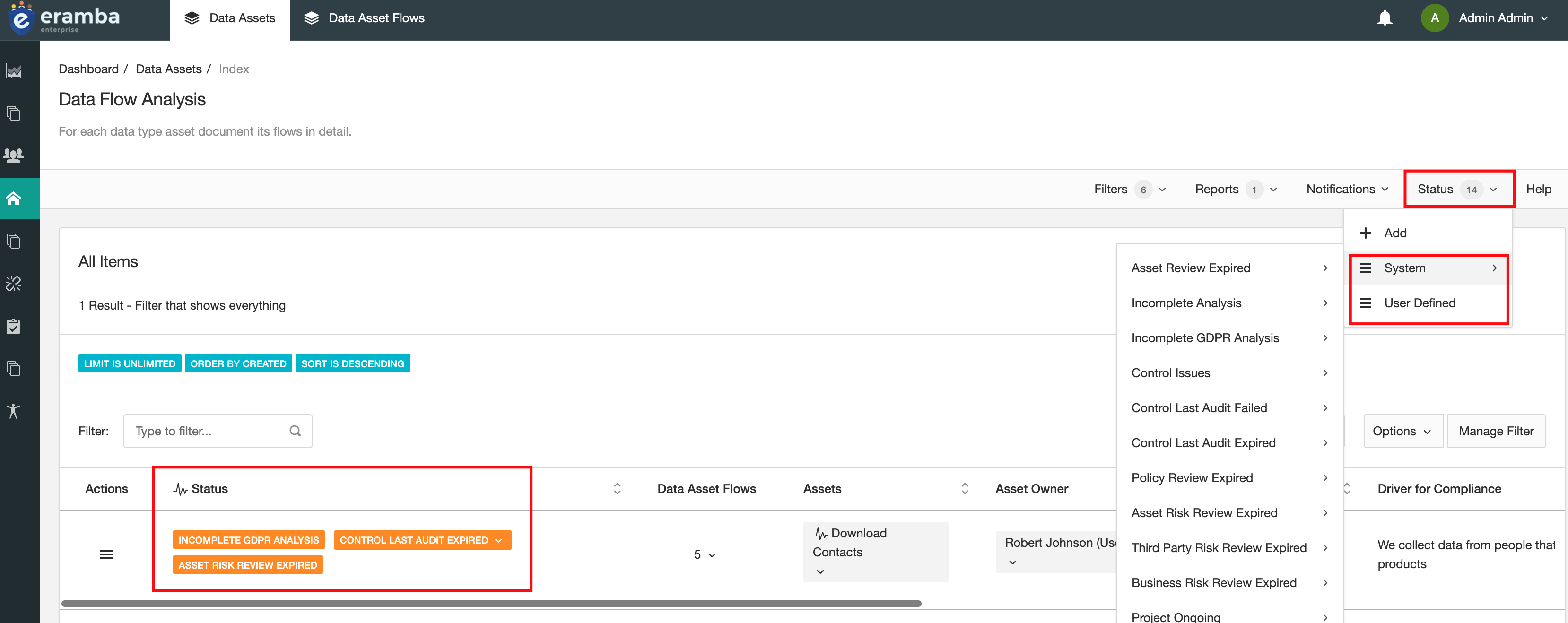
Remember that statuses apply to all tabs, so you will find them on both the Data Assets and Data Assets Flow tabs. Please review the Dynamic Status course to understand in depth how this functionality works.
System and Custom Statuses
There are many default statuses configured on both tabs, the reason behind this is that your data flows are linked to many other modules (Risks, Controls, Policies, Etc) and therefore all their statuses will be inherited in your data flows. If a flow is mitigated by a control, but the control is not tested then you need to know (or the data owner of that asset).
Trigger Notification with Statuses
When a status condition matches or no longer matches, a notification can be sent. This is very useful, as statuses are typically used to trigger specific situations. To create a notification:
- Go to the tab where the filter that you want to send is saved.
- Click on Notifications, Warning, and then New.
- Select “Dynamic Status Change.”
- Write a name for this notification.
- Select the saved Dynamic Status that you want to send over email.
- Select when you want the email to trigger, when the Dynamic Status matches (On) or not (Off).
- On the Recipient tab, select under Users the recipients for this notification.
- Adjust your email body and subject.
- Save.
Operational Steps Summary
As part of the Asset Review process you should review the flows related to them under the Data Flows module. At the Asset Identification module you can create Dynamic Statuses that will inherit the Data Flow status. On the Data Flow module you can use notifications, filters and dynamic statuses to alarm the Data Asset "Owner" when a flow is affected by a Control or Policy not reviewed or tested in time.
Video Guides
Problem vs. Solution Principle
Still have questions?
Write to support@eramba.org or ask the community on the forum.