Quick Introduction
Course Introduction
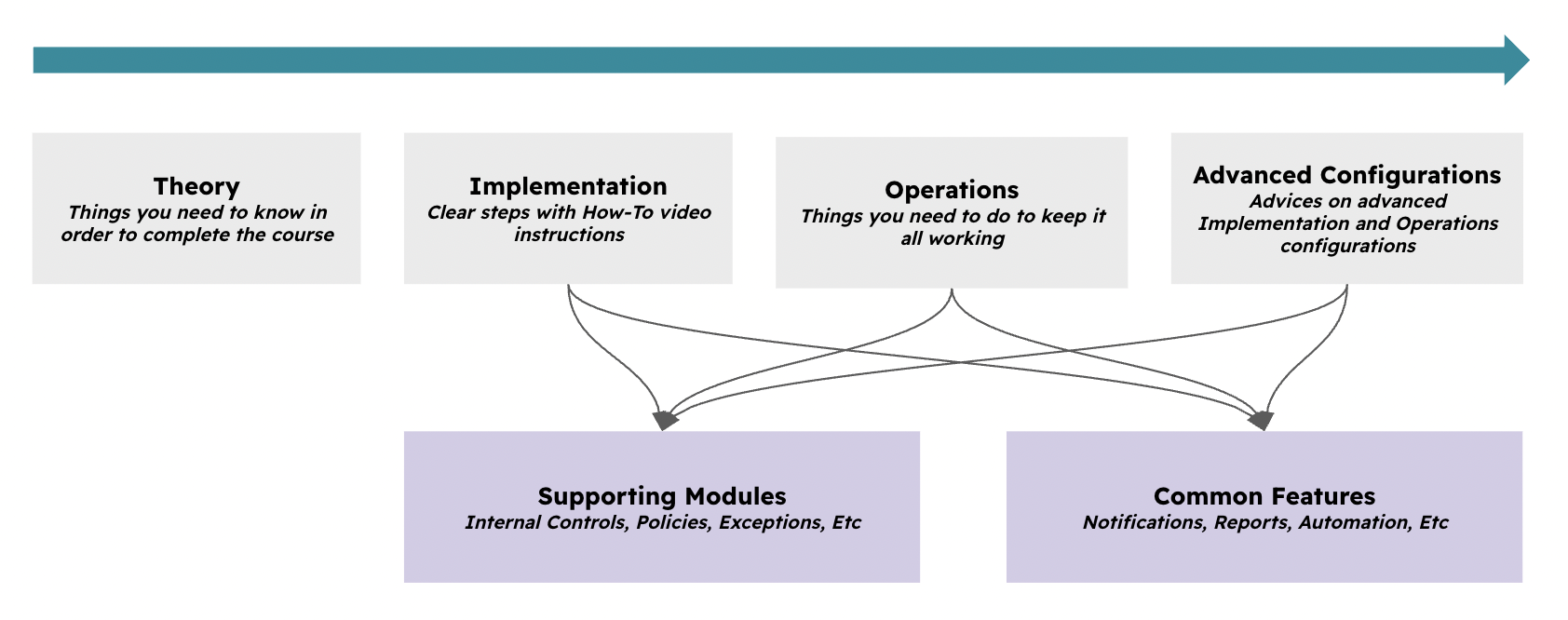
The course is structured around Theory, Implementation, Operations, and optional Advanced Configurations. You cannot skip these steps; otherwise, you will not succeed with a successful implementation and later operation of the use case.
At times, this guide will require you to understand how other modules (Supporting Modules) and features (Common Features) work. Follow the instructions carefully.
Typical Scenarios
This use case allows you to work with the following common situations:
-
Handle any type of Compliance requirements - Cybersecurity (ISO 27001, NIST, Etc), Financial (SOX, FCA, SOC1/2-T1/2, Etc), Quality (ISO 9001, Etc), Etc.
-
Any number of compliance requirements, there is no limit to how many you upload to eramba
-
Being able to explain to auditors how exactly you are compliant to these requirements (through the use of Internal Controls, Policies, Exceptions and Projects)
-
Use of reports that clearly demonstrate how compliant you have been over time.
-
Being able to produce template documentation such as Statements of Applicability (SOA)
Framework Guides
Some people would like to see content from us such as “How to be compliant with SOC 2,” “ISO 27001,” or “SOX.” Or even worse, “How Eramba makes me compliant with PCI, NIST, or whatever.” Unfortunately is not possible.
GRC tools do not make an organisation compliant; the same applies to project management or accounting tools. These tools will not make your project a success or your business financially successful. They facilitate and professionalise the work, helping you achieve higher standards of quality.
You can review the following articles for popular compliance frameworks. They are brief and useful for understanding them:
- That is the case of ISO 27001—and 27002—for which we have practical advisory if you need help.
- Digital Operational Resilience Act (DORA)
- Network & Information System (NIS2 Article 21)
Supported Versions
Compliance Management runs on Community and Enteprise versions.
Workshops
If you are an enterprise customer, you can purchase 8-hour implementation workshops delivered by a GRC professionals. Contact support@eramba.org for more information.
Theory
Module Relationships
The Compliance Management use case requires the use of multiple “related modules” in eramba. 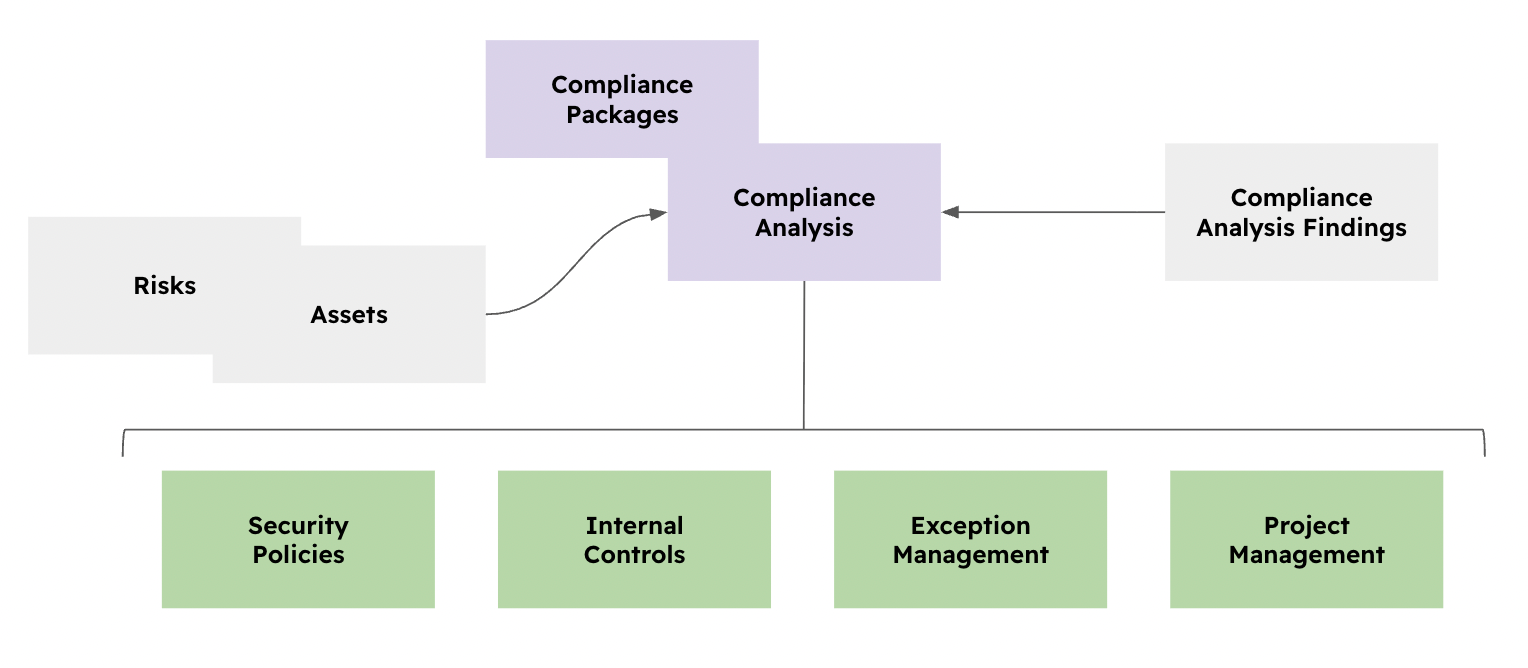
-
The Compliance Management / Compliance Packages module serves as the central library for actual compliance requirements (such as NIST, SOC, or SOX).
-
The Compliance Management / Compliance Analysis module is where you will analyse compliance requirements and associate them with “Solutions” (the green modules below).
-
The green modules, Security Policies, Internal Controls, Exception Management and Projects are what we call “Solutions”. These modules will help explain to stakeholders (collegues, customers, regulators, auditors, etc) how you actually deal with each compliance requirement.
All these modules will be empty when installing eramba. Your job is to populate them using your organization’s policies, controls, projects, etc. The objective is to import quality data (what your company really does, not templates) into eramba.
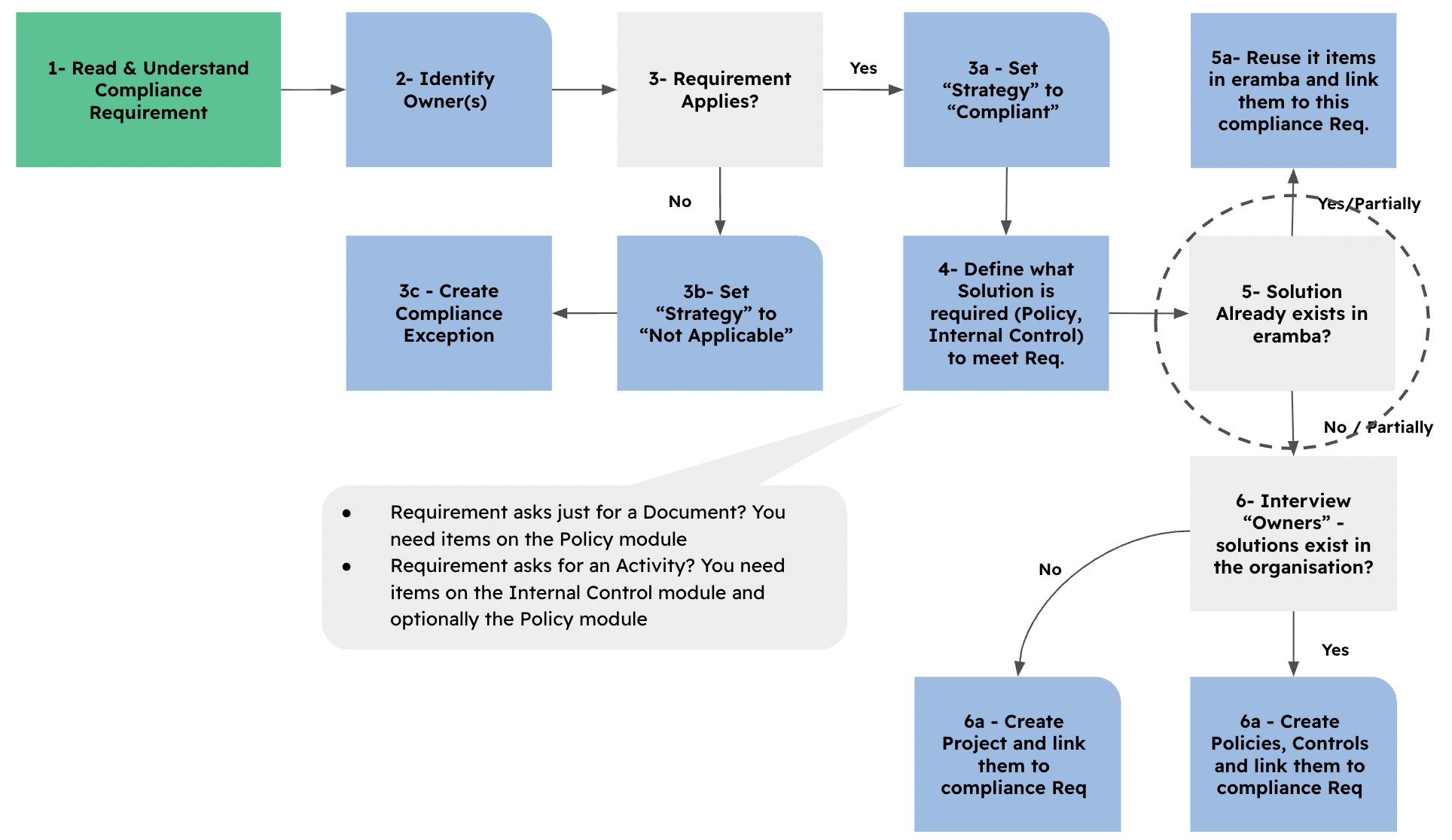
Once you import a Compliance Package (ISO, PCI, Etc), the process by which you identify "Solutions" is very simple:
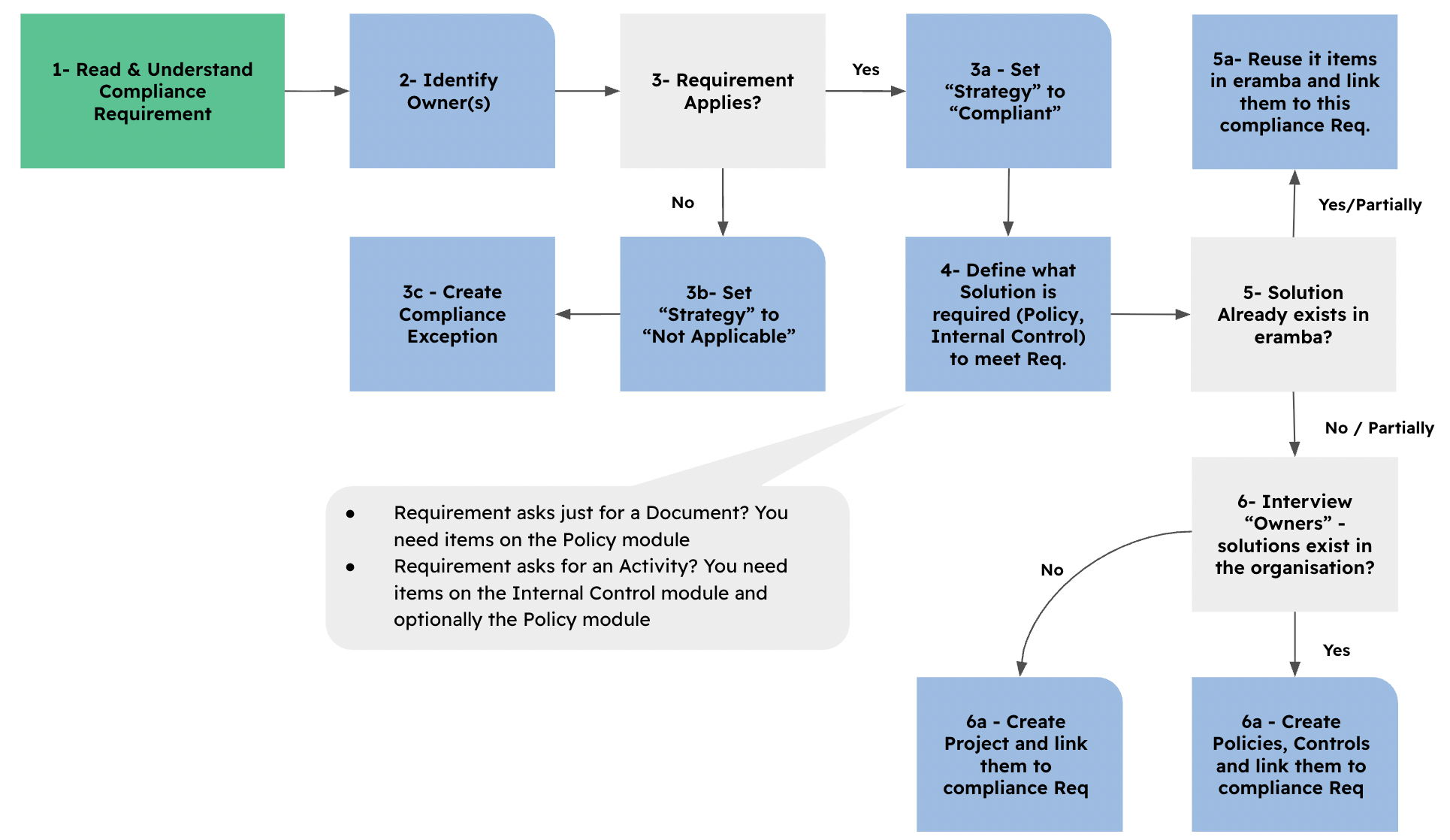
The diagram is explained with the following steps:
-
Read and understand the compliance requirement.
-
Identify the owner or owners.
-
Decide whether the requirement applies.
-
If it does not apply, set the “Strategy” to “Not Applicable” and create a “Compliance Exception” linked to the requirement.
-
If it does apply, set the “Strategy” to “Compliant.”
-
-
Define what solution is required: a Policy, an Internal Control, or both.
-
Do these (in part or full) solutions, Internal Controls and/or Policies, already exist in eramba?
-
Reuse them and link them to the compliance requirement.
-
-
Discuss with the “Owners” from step 2 whether the solutions already exist in the organisation. If they do not, create a “Project” and link it to the compliance requirement.
-
Create new items and link them to the compliance requirements.
-
Let’s use an example so you can better understand this process, imagine you need to be compliant with ISO 27002 requirement 8.1 “User Endpoint Management”.
-
Read and understand the compliance requirement.
-
Read the ISO 27002 requirement about User Endpoint Management. This requirement is about how the company manages endpoint devices, such as laptops and desktops.
-
-
Identify the owner or owners.
-
The "IT" Group
-
-
Decide whether the requirement applies.
-
The company uses endpoint devices, we mark it as "Compliant"
-
-
Define what solution is required: a Policy, an Internal Control, or both.
- Internal Controls: Endpoint Encryption, Strong Authentication, Anti-Malware Software.
- Policies: Endpoint Security Policy, Endpoint Build Process, Endpoint Inventory
-
Do these solutions, Internal Controls and/or Policies, already exist in eramba?
-
Reuse them and link them to the compliance requirement.
-
Create new items and link them to the compliance requirements.
-
-
Discuss with the “Owners” from step 2 whether the solutions already exist in the organisation. If they do not or part of the solution does not, create a “Project” and link it to the compliance requirement.
-
They exist, but they also are working on a projet "Project: Implement endpoint protection for Linux"
-
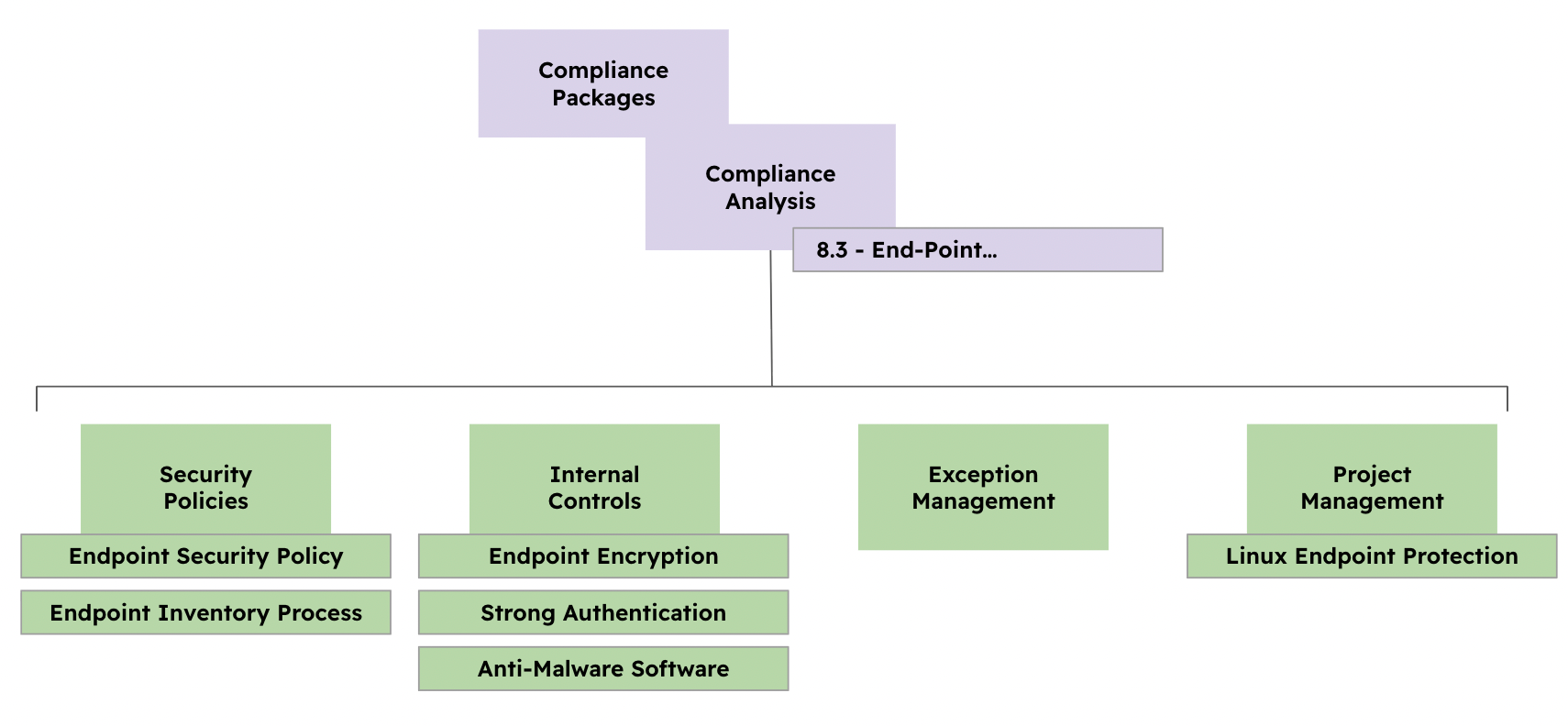
Effective compliance management aims to accurately reflect reality. Therefore, it is crucial to implement genuine, existing "solutions." Populating the system with non-existent items is unproductive, as these entries will be disregarded by auditors and anyone relatively serious.
You can use an LLM Prompt to run this process over MCP
Problems & Solutions
Solutions created in earlier steps can be reused in other use cases. This means the same solution form the previous chapter can be used for your risk register (Risk Management) and data flows (Data Privacy)
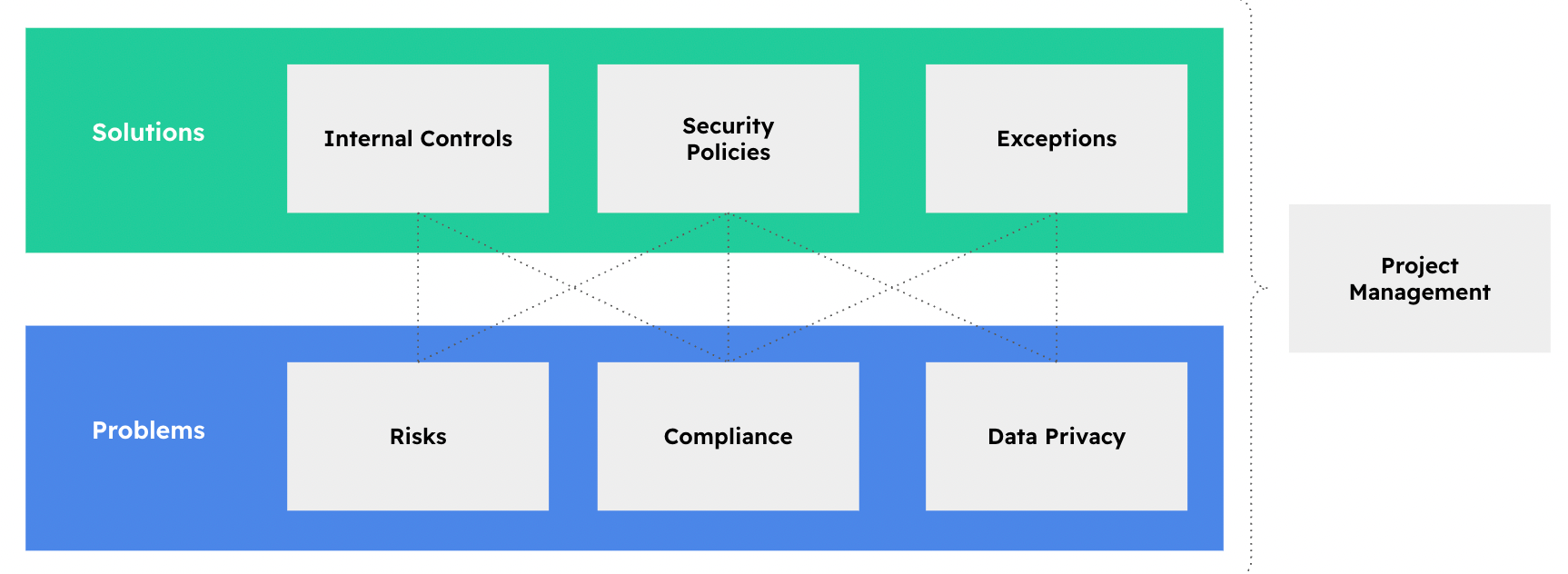
An internal control such as Endpoint Encryption (from the previous example) can solve more than one Compliance requirement:
- It can help mitigate the following Risk: Laptops are lost or Stolen
- It can help mitigate the following Data Flow: Employees store health data on laptops
This means that, in this example, one solution addresses three problems.
A single solution is usually connected to several problems. In most cases, one solution is linked to around 5 to 15 problems. For example, if your organisation has 500 problems, including 300 compliance requirements, 100 risks, and 100 data flows, you probably do not need 500 solutions. You will likely need around 60 to 100 solutions because the goal is to reuse solutions wherever possible.
Mappings
As shown in the previous example, using Leverage or Mappings is a natural part of how eramba works. On the 5th step we clearly ask ourselves if we can re-use solutions to other problems:
Compliance Requirements are never identical. Because of that, trying to “map” one requirement to another (not to mention more than two) is not realistic. Any attempted mapping will generally fall into one of the following scenarios:
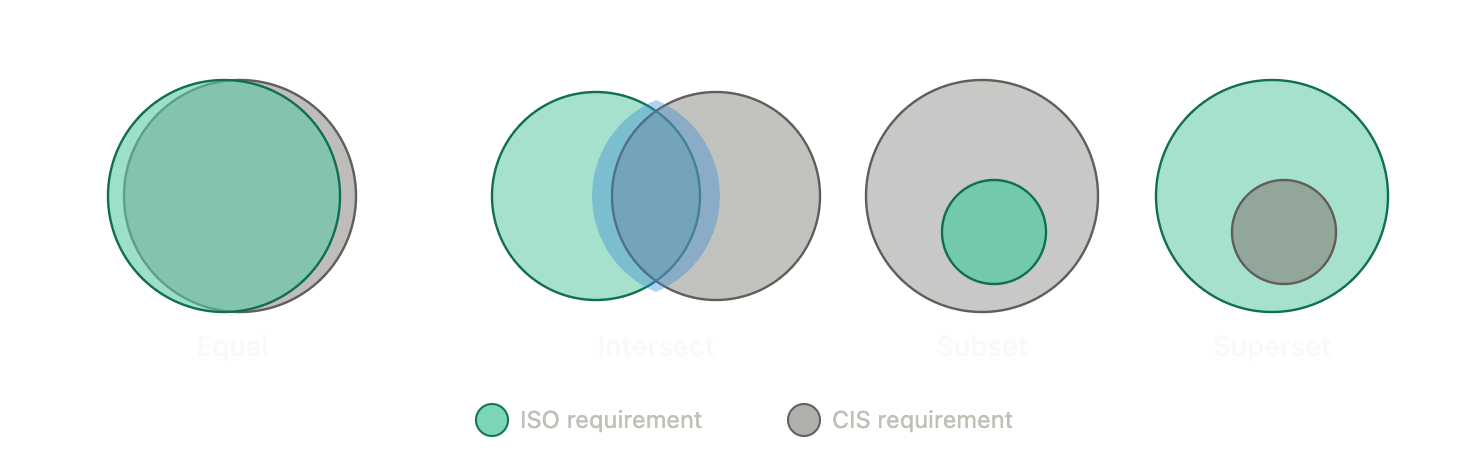
Imagine that “Green” is an ISO requirement and “Gray” is a CIS requirement.
- When they are equal, things are simple: the same solutions apply to both.
- When some of their requirements intersect, some parts will be the same, but you will still need to fill the gap between them.
- With subset and superset relationships, one requirement is completly contained inside the other
In eramba those scenarios would look as shown on the diagram below:
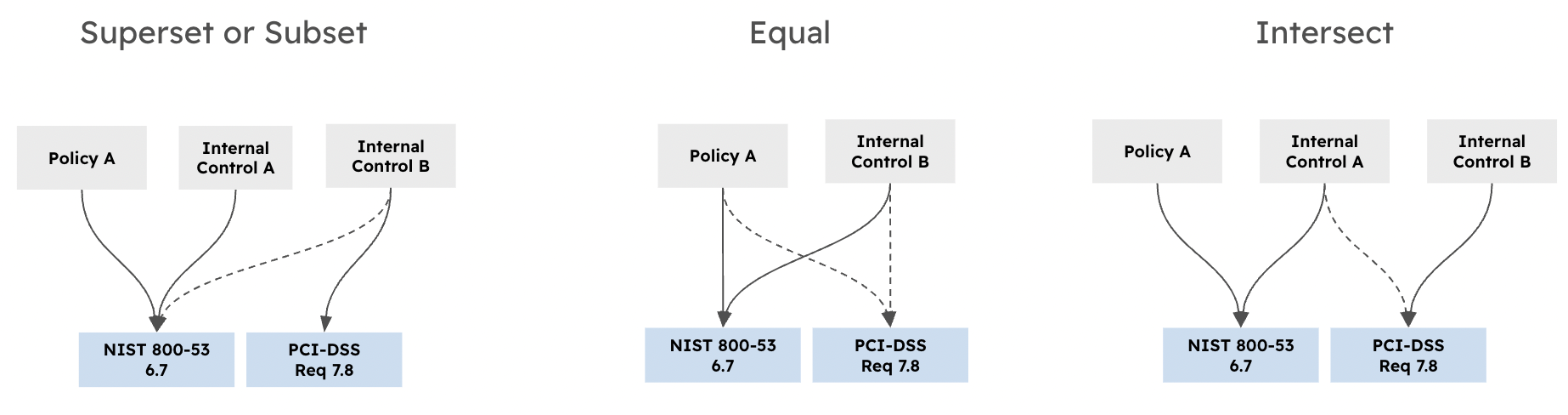
The dotted line means that a solution is leveraged from another problem. The thicker line means that this control or policy is used to fill a gap. There are many possible scenarios, but you do not need to worry about them. If you follow our compliance process, mappings will become natural.
We explain why mappings in between Packages are not possible in real life in this forum post
Operational Tasks (Status)
Before continuing, review the following common feature documentation: Dynamic Status
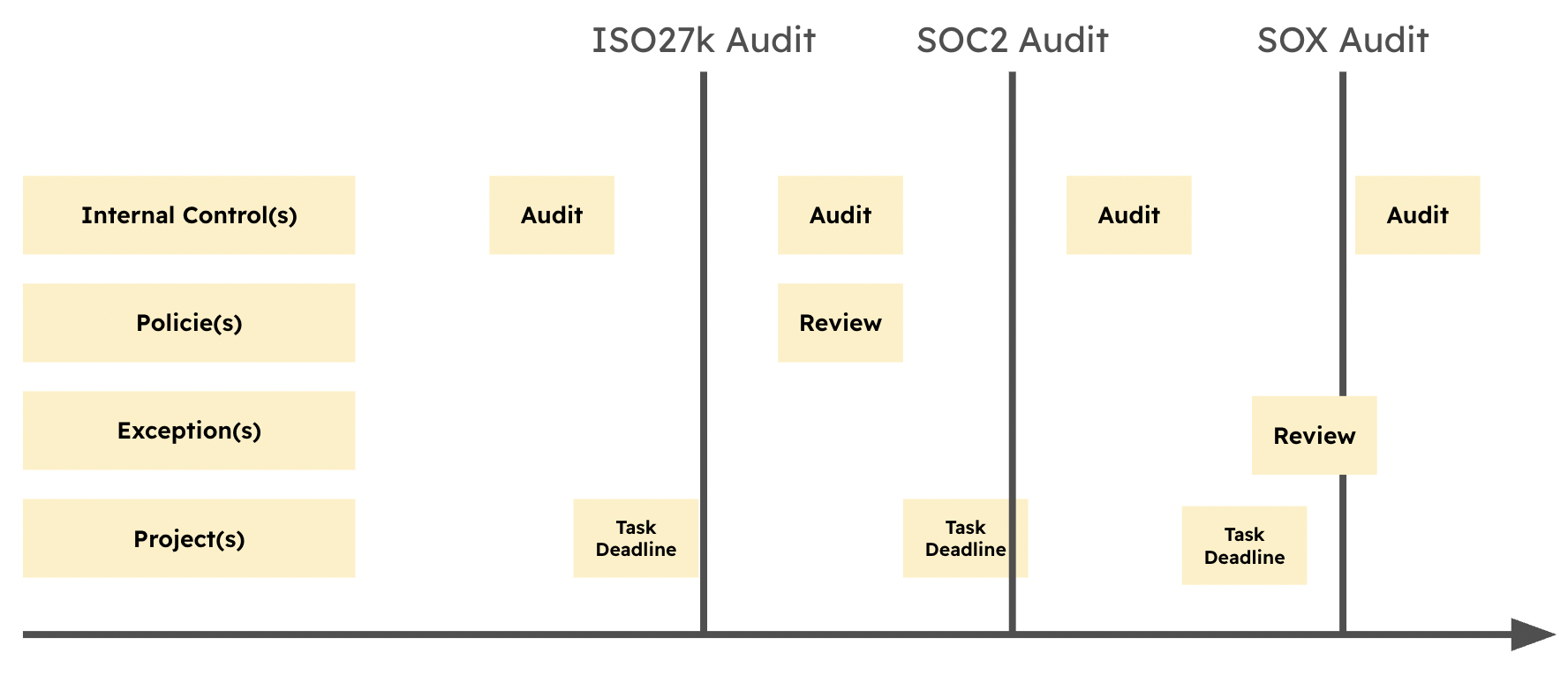
Compliance management in eramba includes regular operational tasks that keep information updated, accurate, and useful.
The evidence produced by these tasks is essential for auditors. For this reason, it is important not to miss these tasks and to complete them properly.
When these tasks are completed throughout the year, compliance reports remain up to date and you get a clearer view of how compliant you are with each compliance package.
The following tasks must be performed regularly:
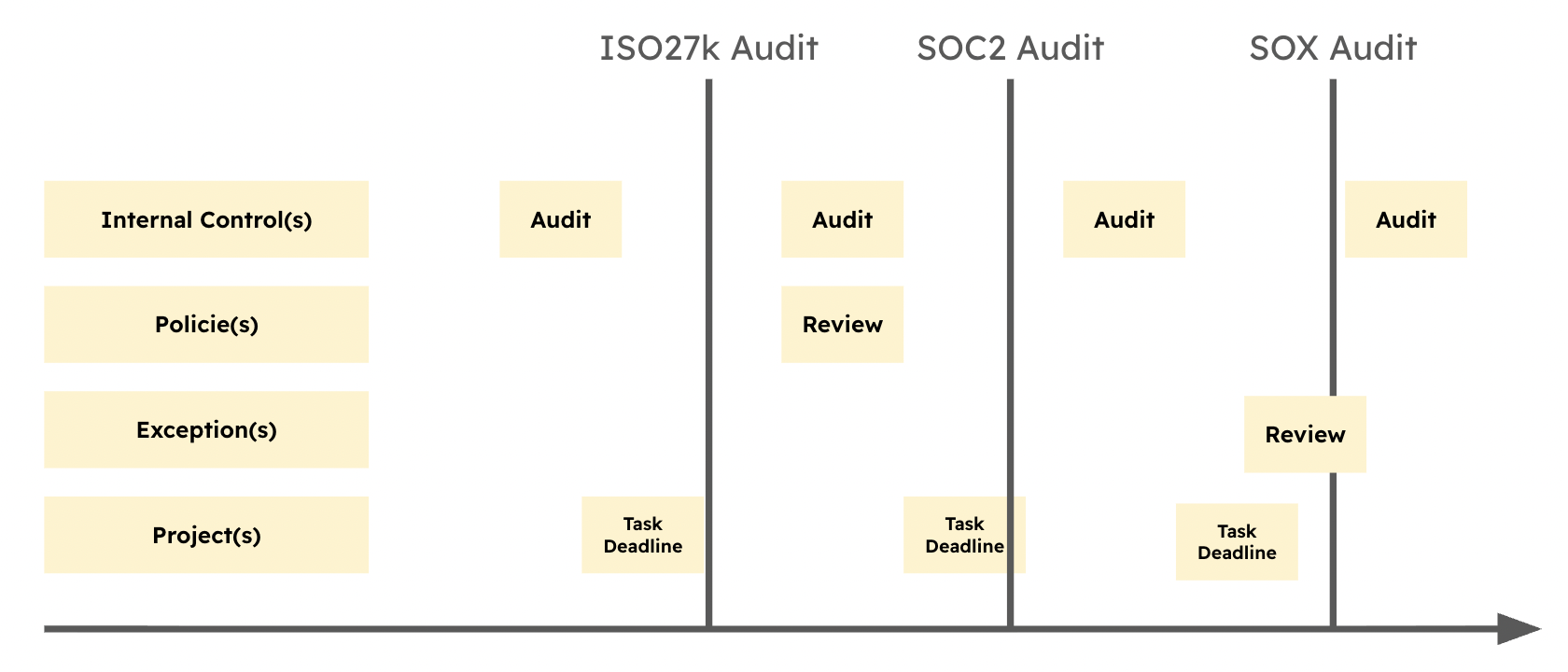
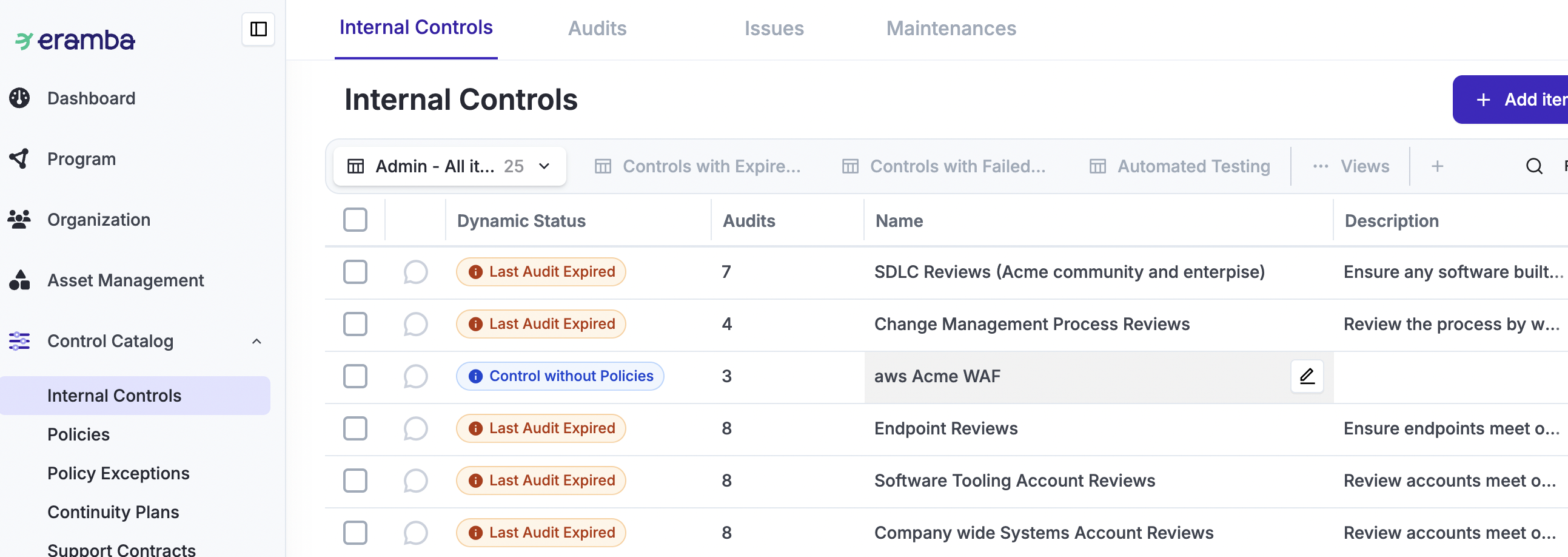
As shown in the screenshot below, each of these modules includes a Dynamic Status column. This column automatically warns you when task deadlines are approaching, when deadlines are missed, when a task has failed, and when other important status changes occur. Use this column to quickly understand which compliance tasks need attention and which ones are already on track.
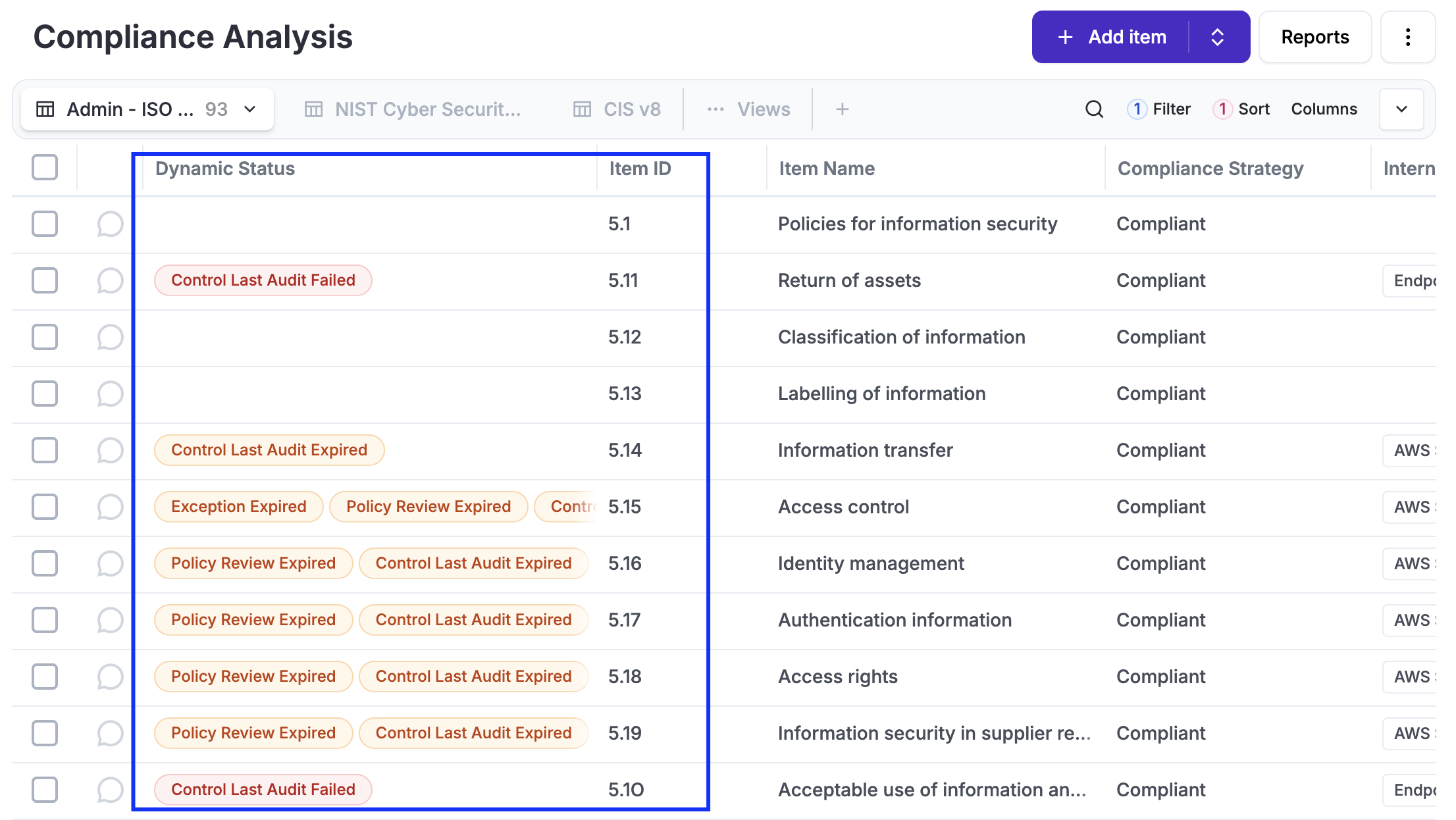
These items are linked to Compliance Requirements. As shown in the screenshot below, the Dynamic Status of these items is inherited by the related Compliance Requirements. This helps you quickly see when your compliance status is affected.
Statuses is what helps you answer the question, "Are we compliant with ISO or SOC or whatever?" - the way Statuses can tell you that is based on how often and the result of these operational tasks (audits, reviews, etc).
Compliance Packages
We call “Compliance Packages” things that were written by someone that your company must comply with for one reason or another. Typical examples:
-
ISO 27001, PCI-DSS, SOC, etc.
-
Some framework invented by a customer of your organisation that you must comply with in order to work with them.
-
Some local or global regulation.
-
Contractual obligations, which many times include clauses such as “you must be compliant, otherwise…”.
Because all these things come in different forms, shapes, languages, etc in eramba we have an open format to store them, a plain CSV file with a specfic format (explained below under "Custom" packages.
The following table includes the full list of Packages ready to download and import as CSV files into Eramba. This list is updated regularly, and we accept community collaborations. Please submit them to support@eramba.org for our review.
These packages are available in both Community and Enterprise editions.
- Explore Compliance Management features and pricing
- Download the free Community edition
- Compare Eramba plans
|
Package |
Publisher |
Version |
Notes |
| Secure Control Framework | SCF | 2025.3 |
https://www.securecontrolsframework.com/ Thanks to Tamás Földesi |
|
SCF |
2022.2 |
https://www.securecontrolsframework.com/ Thanks to Derek Price |
|
|
PCI Council |
3.1 |
||
|
PCI Council |
3.2 |
||
|
PCI Council |
3.2.1 |
||
|
PCI Council |
4 |
||
| PCI DSS V4.0.1 | PCI Council | 4.0.1 | https://www.pcisecuritystandards.org/ |
|
PCI Council |
2 |
||
|
PCI Council |
2 |
||
|
CYBERSECURITY REQUIREMENTS FOR FINANCIAL SERVICES COMPANIES (NEW YORK STATE 500 of Title 23) |
March 1st, 2017 - 500 of Title 23 |
||
|
201 CMR 17.00 |
https://malegislature.gov/laws/generallaws/parti/titlexv/chapter93h |
||
| ISO 22301 | ISO | 2019 | You need to provide evidence you purchased the standard to get a copy. |
|
ISO |
2015 |
You need to provide evidence you purchased the standard to get a copy. |
|
| ISO 14001 | ISO | 2015 | You need to provide evidence you purchased the standard to get a copy. |
|
ISO |
2013 |
You need to provide evidence you purchased the standard to get a copy. |
|
| ISO 27001 | ISO | 2022 | You need to provide evidence you purchased the standard to get a copy. |
|
ISO |
2013 |
You need to provide evidence you purchased the standard to get a copy. |
|
|
ISO |
2022 |
You need to provide evidence you purchased the standard to get a copy. |
|
|
ISO |
2019 |
You need to provide evidence you purchased the standard to get a copy. |
|
| ISO 37001 | ISO | 2025 | You need to provide evidence you purchased the standard to get a copy. |
| ISO 42001 | ISO | 2023 | You need to provide evidence you purchased the standard to get a copy. |
| ISO 45001 | ISO | 2018 | You need to provide evidence you purchased the standard to get a copy. |
|
CIS |
8.1 |
https://www.cisecurity.org/controls/ |
|
|
CIS |
8 |
https://www.cisecurity.org/controls/ |
|
|
CIS |
7.1 |
https://www.cisecurity.org/controls/ |
|
|
SANS |
3 |
||
| NIST |
2.0 |
NIST https://csrc.nist.gov/publications/detail/sp/800-171/rev-2/final |
|
| NIST SP 800-171 r3 | NIST | 3.0 | NIST https://csrc.nist.gov/pubs/sp/800/171/r3/final |
|
NIST |
2021 |
https://csrc.nist.gov/publications/detail/sp/800-172/final Thanks to Derek Price |
|
|
NIST |
Revision 4 |
||
|
NIST |
Revision 5 |
||
|
NIST |
1.0 |
||
|
NIST |
1.1 |
||
| NIST CyberSecurity Framework v2 | NIST | 2 | https://www.nist.gov/cyberframework |
|
NIST |
1.0 |
||
| NIST AI Risk Management Framework | NIST | 1.0 | https://www.nist.gov/itl/ai-risk-management-framework |
| Jan 2013 | https://www.hhs.gov/hipaa/for-professionals/security/index.html | ||
|
8 |
|||
|
9.3.1 |
|||
|
CSA |
3.0.1 |
https://cloudsecurityalliance.org/research/working-groups/cloud-controls-matrix/ |
|
|
https://cloudsecurityalliance.org/blog/2019/03/01/introducing-caiq-lite/ Thanks to Mick Otoole |
|||
| SOC2 Report (Confidentiality, Security and Availability Principles) | 2022 | ||
|
1.0 |
https://www.swift.com/myswift/customer-security-programme-csp |
||
| SWIFT CSF | 2024 | Thanks to Sonia Azeem | |
| Cyber Essentials - UK - Willow Version | v3.2 (Willow) |
https://www.cyberessentials.ncsc.gov.uk/ Thanks to Felipe Bueno |
|
| Cyber Essentials UK- Danzell Version | v3.3 (Danzell) |
https://www.cyberessentials.ncsc.gov.uk/ Thanks to Felipe Bueno |
|
| Cyber Essentials v14 | https://www.cyberessentials.ncsc.gov.uk/ | ||
|
European Union |
|||
|
Thanks to Roshan Fernandes |
|||
| Australian NSW Cyber Security Policy V6.0 | 2023-2024 | Thanks to Roshan Fernandes | |
| Thanks to Roshan Fernandes | |||
| Australian Signals Directorate Essential Eight | Australian Signals Directorate | 2023 v1 | Thanks to Hamid Osmani |
|
1.0 |
Office of the Under Secretary of Defence for Acquisition & Sustainment |
||
|
Publicly Available Specification 1296: 2018 |
2018 |
You need to provide evidence you purchased the standard to get a copy. Thanks to David Davis |
|
|
Proof of Age Standards Scheme: Requirements for Identity and Age Verification - PASS-1: 2020 |
2020 |
Thanks to David Davis |
|
|
TDIF - Trusted Digital Identity - 04 - Functional Requirements |
v1.3 |
Thanks to David Davis |
|
|
v3.1 |
Ref: https://www.ncsc.gov.uk/collection/caf , Ref: https://discussions.eramba.org/t/compliance-ncsc-cyber-assessment-framework-v3-1/2115 |
||
|
2022 |
https://www.qatar2022.qa/sites/default/files/Qatar2022Framework.pdf |
||
|
v2.0 |
https://www.cmmc-compliance.com/ Thanks to Derek Price |
||
|
4 |
Thanks to Derek Price |
||
| AESCSF-SP1 |
Thanks to Bret Watson |
||
| AESCSF-SP2 |
Thanks to Bret Watson |
||
| AESCSF-SP3 |
Thanks to Bret Watson |
||
|
|
v1 |
https://www.sama.gov.sa/ |
|
| v1 | https://www.sama.gov.sa/ | ||
| v1 | https://www.sama.gov.sa/ | ||
| EU Digital Operational Resilience Act (DORA) | European Union | https://www.eiopa.europa.eu/digital-operational-resilience-act-dora_en Thanks to Mark Fuchten |
|
| UK Government - National Security Cyber Centre (NCSC) | Thanks to Martin Freeman | ||
| Cloud Security Alliance (CSA) Cloud Controls Matrix (CCM) | v4.0.6 | Thanks to Martin Freeman | |
| Prudential Standard CPS 230 Operational Risk Management | DRAFT | Thanks to Martin Freeman | |
| NIS2 Directive | European Union | 2 | https://digital-strategy.ec.europa.eu/en/faqs/directive-measures-high-common-level-cybersecurity-across-union-nis2-directive-faqs |
| NIS2 - Chapter IV | European Union | 2 - Only Chapter IV |
https://digital-strategy.ec.europa.eu/en/faqs/directive-measures-high-common-level-cybersecurity-across-union-nis2-directive-faqs Thanks to Felipe Bueno |
| NIS2 - Article 21 | European Union | 2 - Only Article 21 | https://digital-strategy.ec.europa.eu/en/faqs/directive-measures-high-common-level-cybersecurity-across-union-nis2-directive-faqs |
| TISAX | Trusted Information Security Assessment Exchange | 6.0.2 | https://portal.enx.com/ |
| PKI Maturity Model | PKI Consortium | v1 | https://pkic.org/pkimm/model/ |
| Cloud Computing Compliance Control Catalog (C5) | BSI | C5:2020 | Thanks to Tobias Gurtzick |
| Esquema Nacional de Seguridad (ENS) | CCN | https://gobernanza.ccn-cert.cni.es/ens-navegable Thanks to vidaktobyl |
If you want to upload your own compliance packages, you need to create a CSV file and ensure it is formatted in such a way that Eramba can understand the contents. We organise compliance packages (CSV files) into “chapters” and “items”:
Chapters are made of three fields:
- ID
- name
- description
Items are made of four fields:
- ID
- name
- description
- Questions
The following example shows the column entries for PCI-DSS requirement 2:
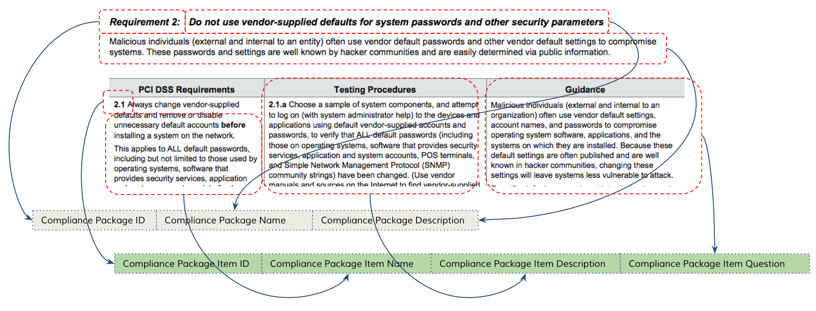
In the image above, you see the chapter row (composed of three fields) and the item row (composed of four fields). The PCI requirement is translated into a CSV-formatted file with the chapter and item all in one straight row.
To successfully create a CSV file, follow these guidelines:
-
Make sure there are entries in all 7 columns.
-
There should be no empty cells. If you do not know what to put, simply write “N/A”.
-
If you are using Microsoft Excel, you need to save the spreadsheet as “Windows CSV” (not DOS CSV)
Implementation
Access Management
Before continuing, review the following common feature documentation: Access Management.
It is critical to get this right before implementing the Compliance Management use case, as correcting it later can be complex and time-consuming. The following steps must be completed:
-
Log in to Eramba for the first time and set the Admin password and email. This account is not going to be used so we recommend not using your email.
-
Create a Group for your GRC department (name it according to your department) (How-To) (Theory)
-
Create User Account for the GRC team (How-To) (Theory). Do not create user accounts for anyone else (IT, Human Resources, Finance, Etc)
-
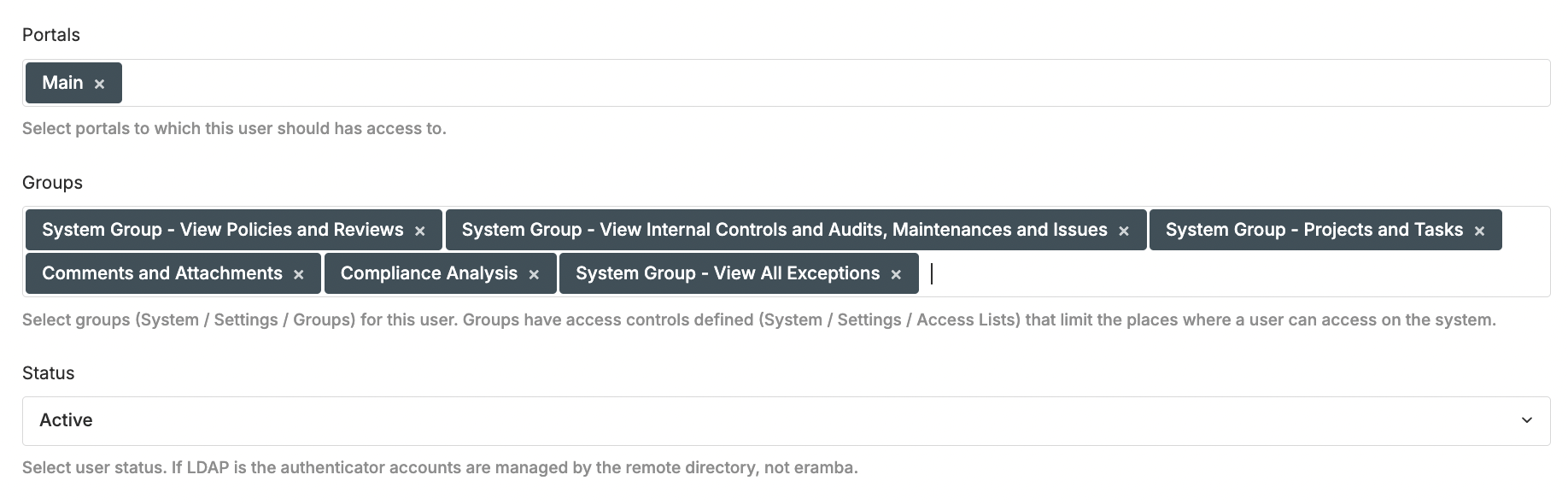
Create a "Dummy" User Account (How-To) that will be used to test permissions (Theory). Assign the following groups: View Projects, View Internal Controls, View Compliance Analysis, View Policies, View Exceptions, Comments & Attachments. Assign the "Main" "Portal" only.
-
Log out as Admin, from now on always login with your personal account
-
Create one Group for every Department in the scope of your Compliance program (How-To) (Theory)
-
Optional: Set up SAML, Google OAuth, or LDAP Connectors (How-To & Theory)
Packages
Before continuing, review the following guide from this course: Compliance Packages
In this phase we will creating (optionally) and uploading packages:
-
Identify the package you need from our list of templates and import it (How-To) (Theory).
-
Alternatively, create your own package and import it (How-To) (Theory).
Note: make sure you do not start with more than one package at a time
Compliance Analysis
Before continuing, review the following guide from this course: identify Solutions (Internal Controls, etc) for each compliance requirment
The steps to complete this stage are:
-
For every item on the compliance package you imported, follow our Compliance Analysis process (Theory & How-to) to identify what solution you need to create or re-use mappings (Theory)
-
You need to complete the Compliance Requirement Strategy, Owner (How-To)
-
You may need to create one or more Internal Controls without audits (How-To) (Theory) or re-use an existing one.
-
You may need to create one or more Policies (How-To) or re-use an existing one.
-
You may need to create one or more Projects (How-To) and Exceptions (How-To) or re-use an existing one.
-
Link the solutions above (How-To) to Compliance Requirements
-
Optional: You can use the "Efficacy" field to track down the extent to which you are compliant. This might help you later on to identify compliance gaps.
-
Basic Section Report
Before continuing, review the following common feature documentation: Reporting
As you complete the Analysis phase (which will take you some time) is a good idea to visualise a simple System Item Report that is pre-built for you to see progress:
-
Click on the checkbox of any item in Compliance Management / Compliance Analysis.
-
Click on Report / Section Report / System Report Template and load it.
-
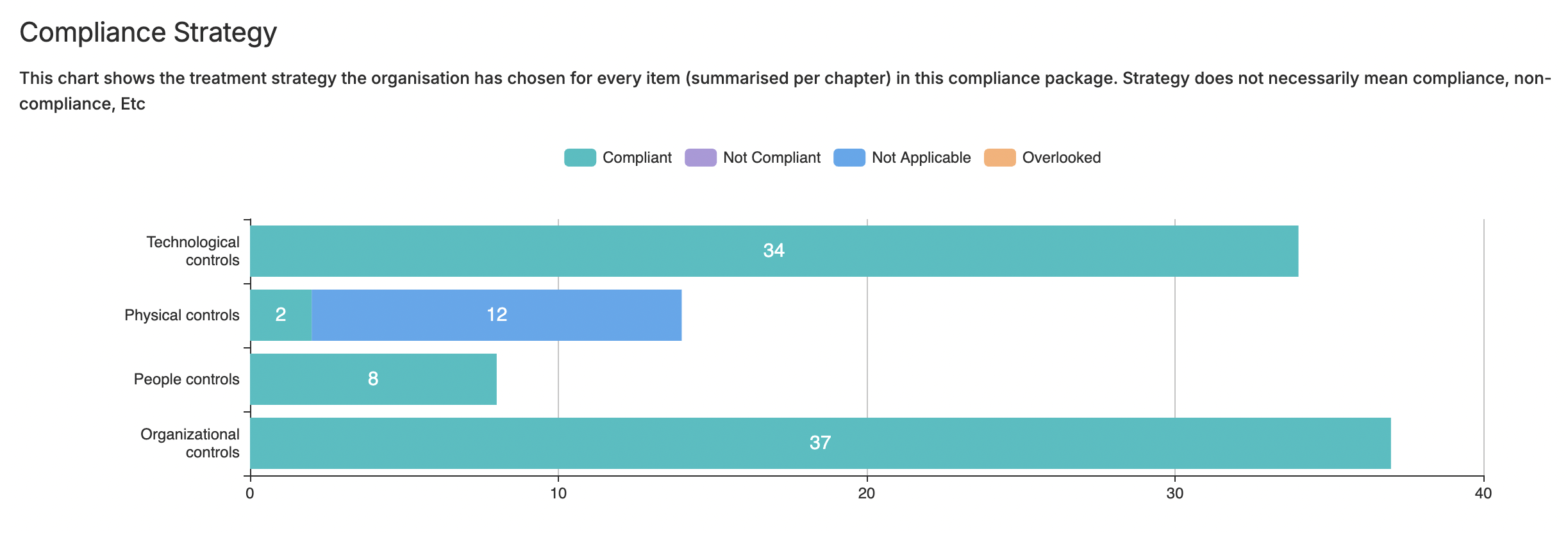
There are multiple charts that will display the progress of your implementation, in particular “Compliance Strategy.” If you followed our analysis, you would have only switched the strategy to “Compliant” for those items where you identified solutions, leaving all others incomplete. This will highlight how much work remains.
Basic Module Configurations
Before continuing, review the following common feature documentation: User Interface and Customisations
For every module in scope (Compliance Analysis, Internal Controls, Policies, Etc) that you have used perform the following tasks:
-
Adjust the module form fields using customisations (How-To) (Theory)
-
Create your default view (How-To) (Theory) and adjust columns (How-To) (Theory)
Internal Control Audits
Before continuing, review the following supporting modules documentation: Internal Controls and in particular Audits
-
Define audits / maintenance settings for every Internal Control you wish to test
Setup Weekly Reports
Before continuing, review the following common feature documentation: Notifications.
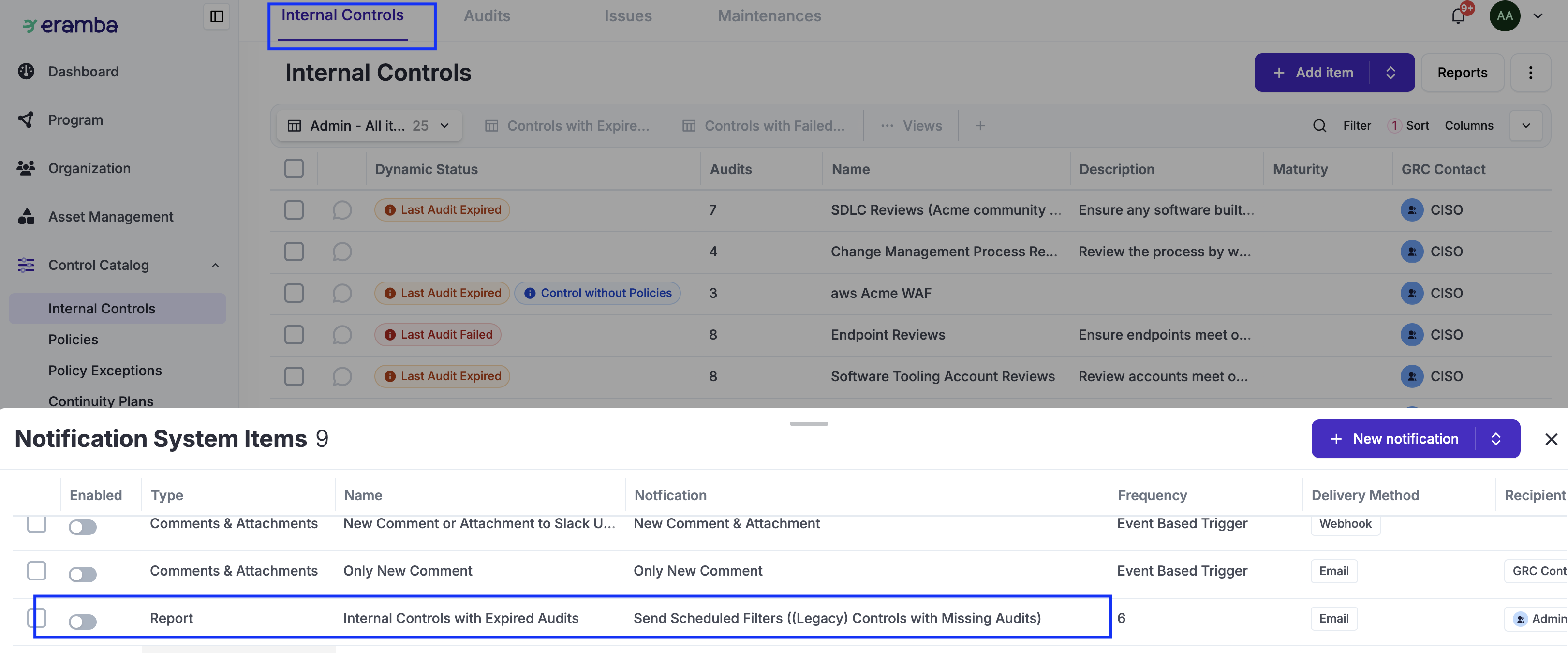
Now that you have created Policies, Projects, Exceptions & Internal Controls and these items have "deadlines" is a good idea to enable weekly View reports:
-
Edit template report notifications adjusting Recipient, Frequency, Etc and enable them
-
Create custom Report notifications with your own defined Views
Setup Warning Notifications
Before continuing, review the following common feature documentation: Notifications.
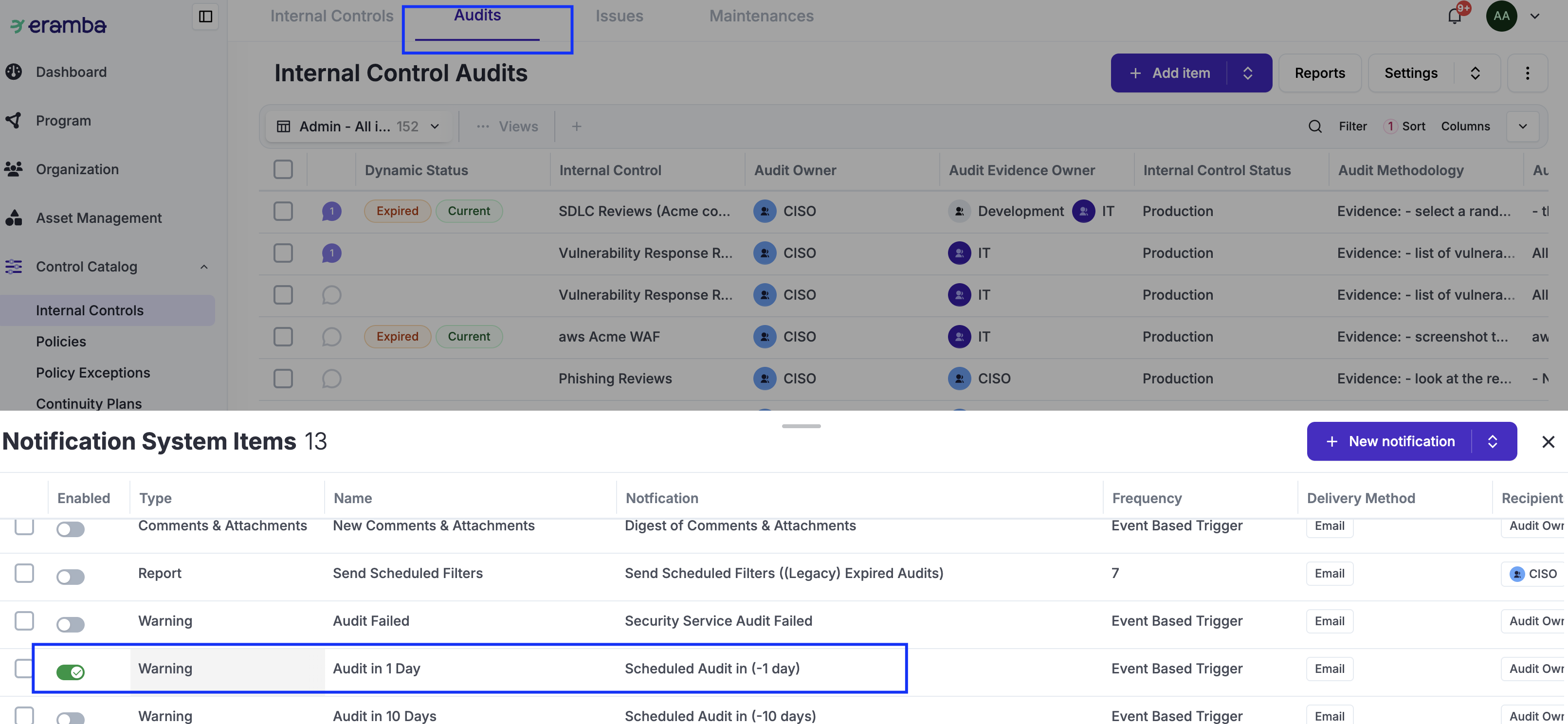
For each one were items were created (Policies, Internal Control / Audits, Exceptions and Projects):
-
Define what type of feedback you want to setup: Online or Offline (Theory)
-
Edit Template Warning and Comments & Attachments and adjust them accordingly (How-To)
-
Test Notifications (How-To) and "Others" Permissions (How-To)
Roll-Out of Accounts
Before continuing, review the following common feature documentation: Access Management.
Is time to grant access to the "Others" to provide you fedback:
-
Using the "Dummy" account previously created, define the permissions required for each department and test them to make sure they work correctly (How-To) (Theory)
-
Create accounts for "Others" making sure their access is correct (How-To)
Operations
Rather than a one time implementation step, this is a set of regular tasks that must be perfomed every year:
How-To Guides
Import Compliance Package
Create Custom Package
Update Compliance Analysis Item
Advanced Configurations
eramba includes common features that are available across many modules. These features let you customise how the software works for your organisation. They are especially useful for automations, reporting, data modelling, and notifications. In this section, we provide suggestions for each of these common features. These are examples of what you could implement to make compliance management easier, more automated, and better aligned with the way your organisation works.
Customisation
Before continuing, review the following common feature documentation: Customisation Common Feature.
The most common examples for the Compliance modules (see the Internal Control, Policy, Assets, etc. guides for examples applicable to those modules that are involved with Compliance) are listed below:
-
Compliance Management / Compliance Analysis: A common custom field typically used as the module is implemented is “Fulfillment,” which aims to explain how well the requirement is addressed based on the “Solutions” available in your organisation.
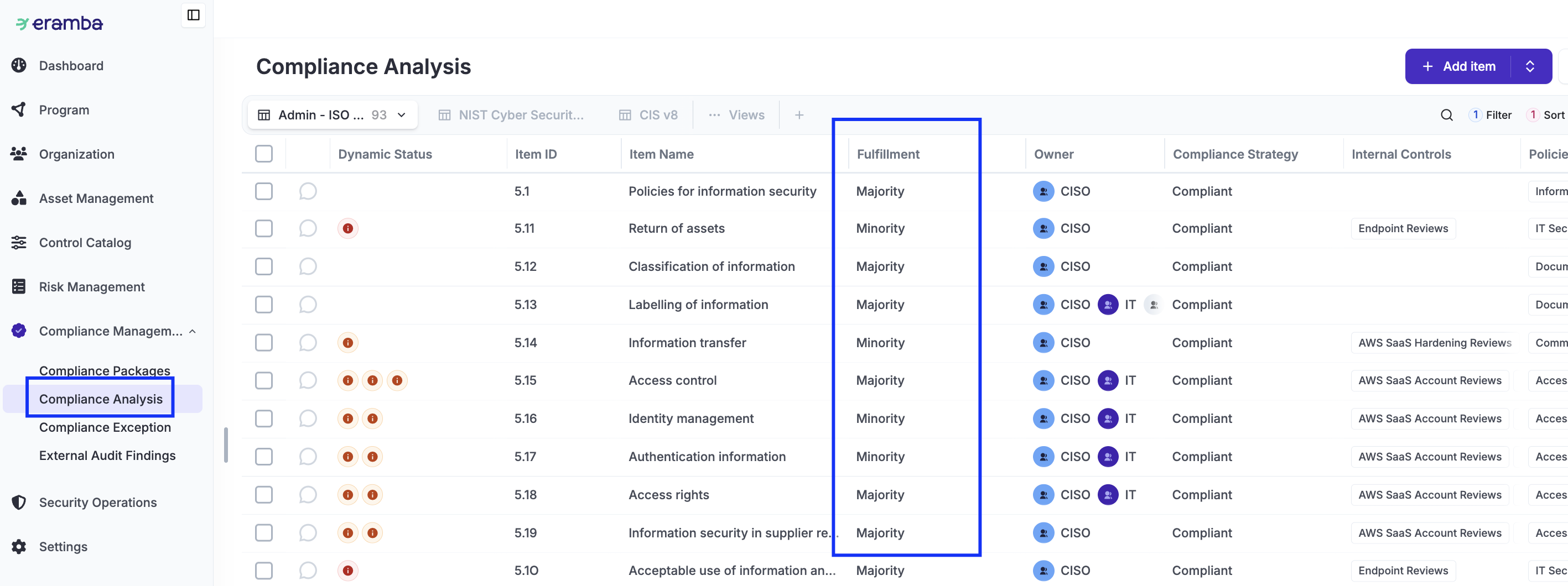
There is a tendency to focus on custom fields that describe the “maturity” of the mitigation. This is typically not needed in Eramba, as the associated solutions (Internal Controls, Policies, etc.) already have those attributes, and they will be inherited by the Compliance Analysis module. This is explained on these modules guides.
Dynamic Status
There are many possibilities when it comes to Dynamic Stauses, in particular using them in combination with Custom Fields, Notifications, Reports and Automations. It essential to understand the Dynamic Status common feature before making configuration decisions.
The most common examples for the Compliance modules (see the Internal Control, Policy, Assets, etc. guides for examples applicable to those modules that are involved with Risks) are listed below:
-
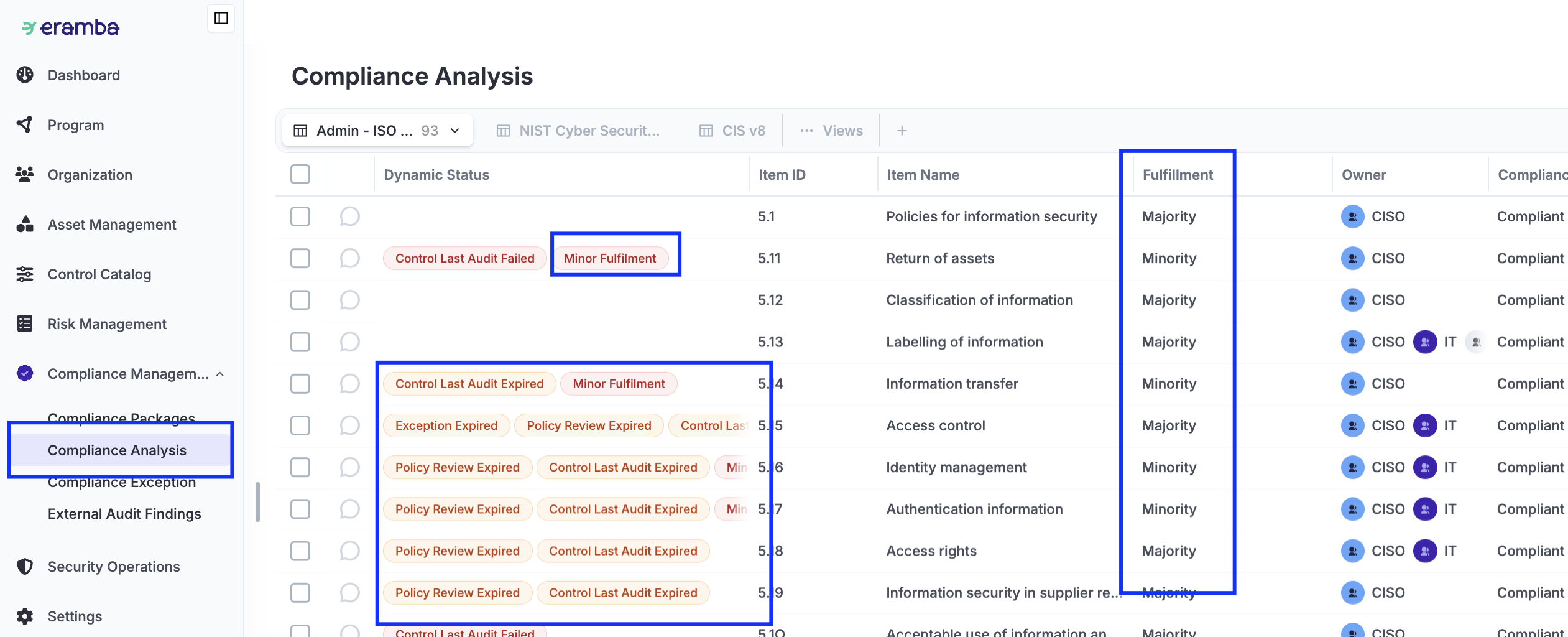
Compliance Management / Compliance Analysis: A common Dynamic Status is derived from the custom field suggested above. Another very common Dynamic Status is to inherit from the Policy, Internal Controls, etc. modules their maturity (this requires a custom field on those modules and custom Dynamic Statuses) and their status regarding audits and reviews.
Views
Views are essential as is the main interface with data in eramba, you will most likely adjust them to suit your needs. It essential to understand the User Interface guide before making configuration decisions.
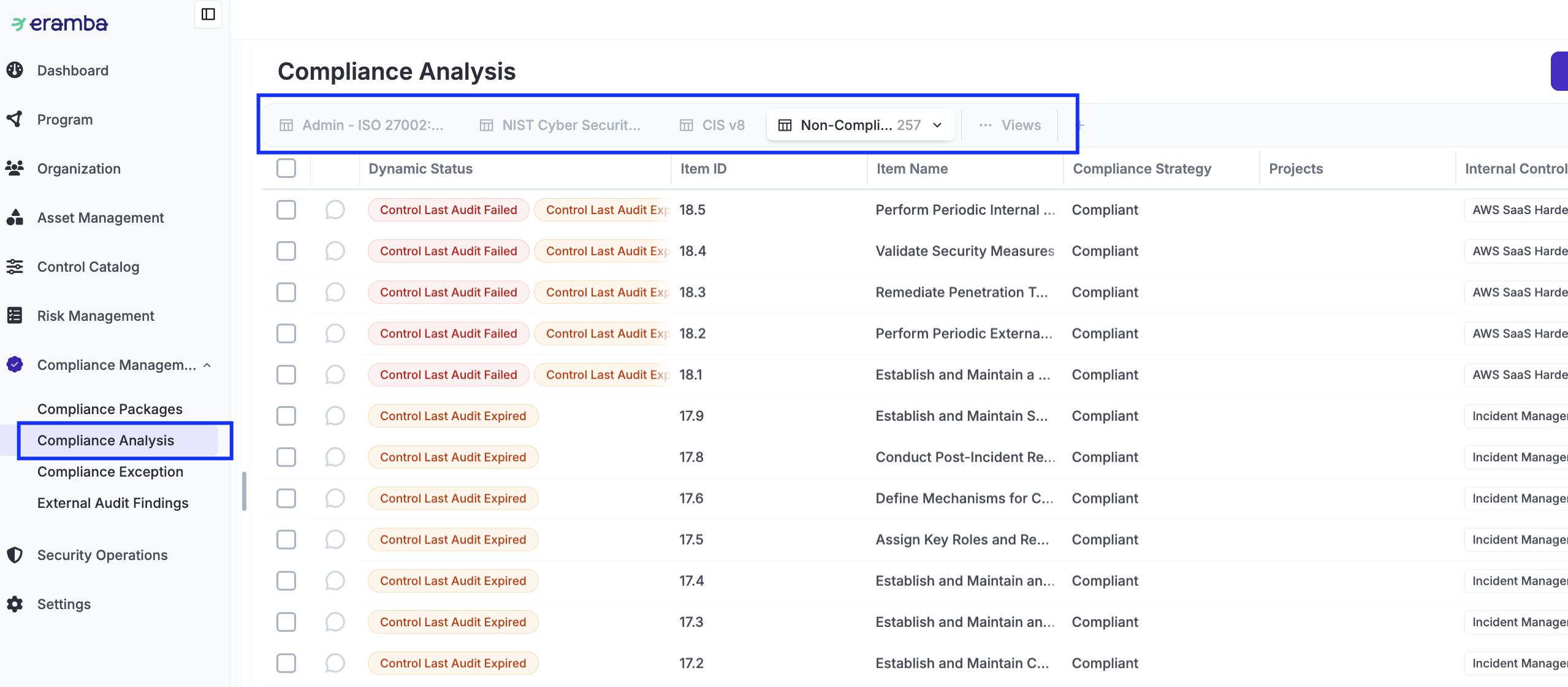
System views will be automatically created as soon as you upload a compliance package. You would still need to adjust the columns to your own liking. You typically can also create views that list "Compliance Requirements" for which there are issues (Audit Failed, Expired, etc).
Notifications
There are many possibilities when it comes to notifications. It essential to understand the notification common feature before making configuration decisions.
The most common examples for the Compliance modules (see the Internal Control, Policy, Assets, etc. guides for examples applicable to those modules that are involved with Risks) are listed below:
-
Compliance Management / Compliance Analysis:
-
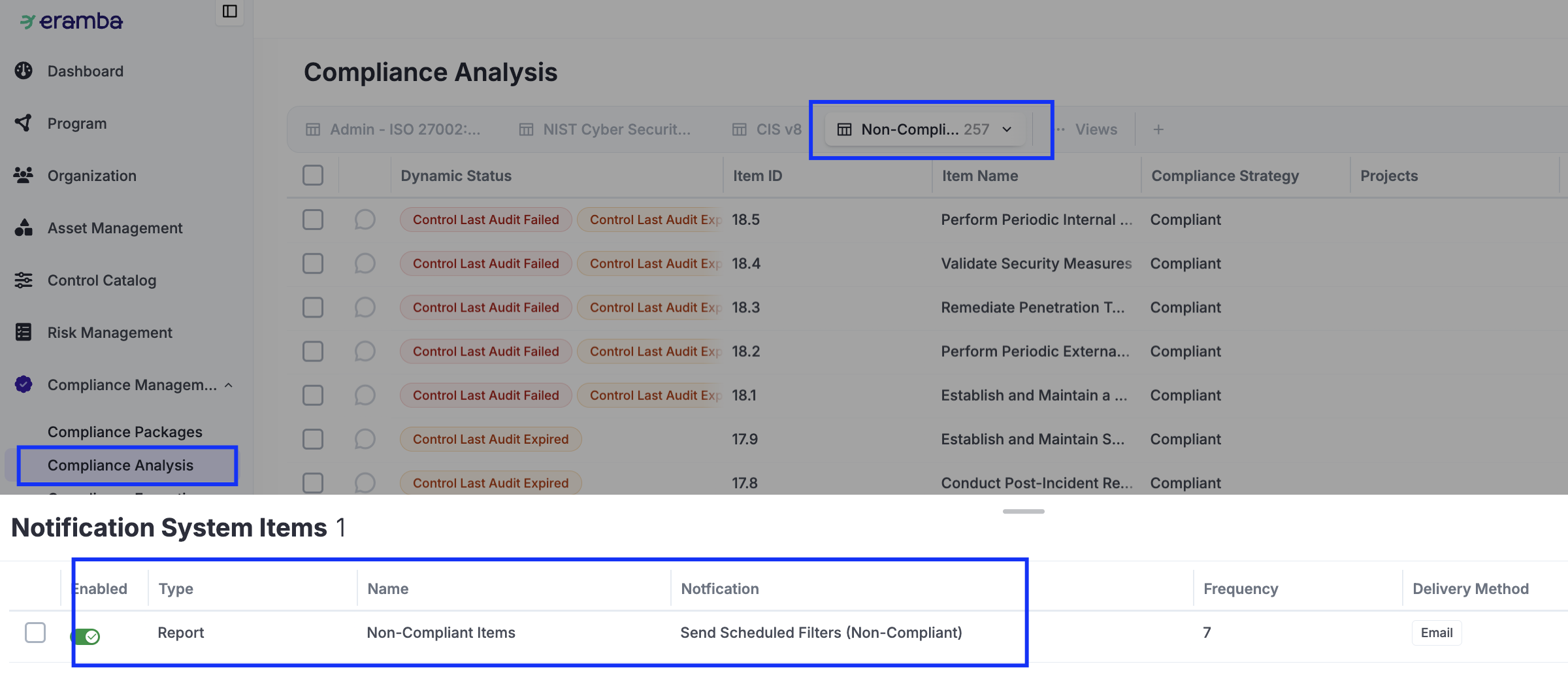
Report: We typically send a weekly report with the view mentioned in the previous chapter with “Non-Compliant” issues. This can also include an over-time chart showing the trajectory of this report.
-
Another typical report is one sent to each “Department” with their associated compliance requirements so they can see how compliant they are.
-
Automations
There are many possibilities when it comes to automations. It essential to understand the Automation common feature before making configuration decisions.
The posibilities with automations in the context of compliance are very wide:
- Automate testing of Internal Controls
- Regularly review if your Policies meet compliance requirements using an LLM
- Generate regular reports (Tasks on LLMs)
- Etc